# Action Network for XR
XRUK's mailing system containing separate 'email lists' for Nations & Regions, Local Groups, Campaigns, Volunteers, Talks and Training, all connected in one big 'network'.
This book contains guidance for how to become an admin of a list, to send emails, how to sign up potential rebels to your list and more complex tasks too.
# Start Here
Overview, training, admin access and contact details
# Overview
#### What is Action Network?
It is the tool that XRUK uses for sending emails out to the movement.
It is funded centrally and available to all local groups, and organises groups by Region/Nation. People can join either at the 'top' (i.e. at the XRUK level) by signing up on the [website](https://joinxr.uk) - or at the 'bottom' by searching for their Local Group of the [LGmap](https://joinxr.uk/local).
#### How Local Groups fit in to XR's Action Network
You may be familiar with other email lists such at Mailchimp - so to point out the main difference with Action Network (and it may sound obvious!) is that it is a NETWORK!
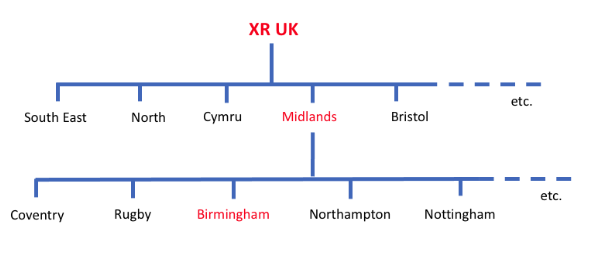
Here is a little smapshot to explain...
[](https://rebeltoolkit.extinctionrebellion.uk/uploads/images/gallery/2022-10/image-1666545826985.png)
For example : if someone joins the Birmingham email list, they automatically get subscribed 'UP' the network (to Midlands and UK lists). The benefit of this is that as more and more Local Groups use Action Network to recruit, then all these new subscribers end up on the XRUK list too - allowing for communication to the whole movement within the UK with a single email.
Also in this example this person will be on the 'Midlands' list which allows regional level organising too.
#### Campaign and Community Groups
Not shown on the diagram above are groups such as 'Deep Water', 'Digital Rebellion' or 'XR Walkers' - these also have separate emails list that sit just below the UK list and therefore also feed in to the total numbers of subscribers on the UK list. These lists are not utilised as much as they could be, so if you are in a community group and would like support to use your Action Network list, please [get in touch](https://rebeltoolkit.extinctionrebellion.uk/link/634#bkmrk-page-title).
#### There is a huge opportunity to grow the UK list
If 200 sub-groups (either Local Groups, Campaigns or Community groups) each recruited 25 new subscribers a month - that would be an additional 5000 people on the UK list **per month**.
# Why use Action Network?
Why would a group choose to use XR's Action Network account, rather than alternatives such as Mailchimp?
#### Benefits
- It's a network - when signing up for a local group email list, people are also subscribed to their region/nation and to the XRUK email list. They will therefore be informed of campaigns and activities locally, regionally and nationally. [More detail of the structure of all the lists here](https://rebeltoolkit.extinctionrebellion.uk/link/649#bkmrk-page-title).
- **Mobilisation** - This means new Local Group sign ups add to the total on the UK list. This is critical for both mobilisation for big actions (e.g. The Big One), for awareness of ongoing campaigns and for training.
- **Fundraising** - The full XRUK email list is very important for [fundraising](https://rebeltoolkit.extinctionrebellion.uk/link/1007#bkmrk-page-title), the more we grow our list the more potential donors we have!
- **Security** - all admins have their own account, so you don't have to share passwords. If someone leaves the movement, their admin access can be removed without having to change shared passwords.
- You can have multiple Admins for your email list.
- Support and training is available.
- Action Network is **GDPR compliant** and anyone receiving an email can unsubscribe at any time.
#### Growing the list
As well as your own outreach work to get subscribers locally, being part of this network helps you pick up more subscribers because you lists is promoted via:
- 'Join Group' buttons on the [Local Group map on the UK website](https://extinctionrebellion.uk/act-now/local-groups/).
- Also these lists are connected from the [Global website map](https://rebellion.global/groups/gb-united-kingdom/#groups)
- If someone joins the UK list they get a [welcome email](https://rebeltoolkit.extinctionrebellion.uk/link/1503#bkmrk-xruk-email-welcome) encouraging them to sign up to their Local Group
- The [UK Rebel Ringers team](https://rebeltoolkit.extinctionrebellion.uk/link/1503#bkmrk-xruk-rebel-ringers) call all new UK subscribers and try to link the with a local group via these lists.
#### Barriers/Issues
- In common with other mailing list systems, the data is stored on servers that we do not control, and that could be accessed by law enforcement authorities. For this reason, you should never store "spicy" information - such as data showing intention to take part in or to organise arrestable actions.
- To become an Admin takes [a bit of training](https://rebeltoolkit.extinctionrebellion.uk/books/action-network-for-xr/page/training-request), which can be a barrier to some Local Groups without someone with the time and skills (or determination!) to learn. But we have a very friendly training team who are happy to teach in 1-1 sessions and go at the pace that suits each individual.
#### Migrating to Action Network
If you currently use a list of emails in your 'contacts' or another mailing system like Mailchimp and want to migrate to using Action Network, there is support available to do this in a GDPR compliant way.
# Training Request
##### Request training for yourself (or a small group) [using this form](https://actionnetwork.org/forms/an-training-request/)
We provide:
- A quick overview session (10mins plus questions), suitable for Nation/Region or Local Group meetings to introduce people to Action Network as a essential tool for mobilisation and communication.
- Help with migration of data from your current system to Action Network.
- Focused 1hr basic training for your Local Group.
- Tailored help with any issue: forms, events, reports etc
# Before Training Starts...
If you have requested the **Focused 1hr basic training for your Local Group please read the following information.** Don't worry if you don't understand it all, just come as prepared as you can.
If your group is already using Action Network, some of the following may already have been done.
#### Who are your admins?
Confirm the email address of those people requiring ‘Admin’ access to Action Network. You must use a personal email address and not a shared email account for this.
All admins will need to have signed the
[XR Volunteer Agreement](https://actionnetwork.org/forms/xr-data-protection-agreement-2), **with the email addresses they will use as admins.**
#### Contact email for your group
You **must** also have a group contact email address. Action Network software **sends** emails, but you still need an official address for people to reply to.
If you are part of a Local Group, this email should be listed on the [Local Group Map](https://map.extinctionrebellion.uk/). If the email (or other info) isn't correct, or your group isn't listed then contact [map@extinctionrebellion.uk](mailto:map@extinctionrebellion.uk).
If you have lost access to your group email or would like a new one setting up in the style xxxx@extinctionrebellion.uk you can find about how to [apply for a extinctionrebellion.uk email on this page](https://rebeltoolkit.extinctionrebellion.uk/link/1063)
Note: please don't set up proton.me addresses ([details of why](https://rebeltoolkit.extinctionrebellion.uk/link/968#bkmrk-page-title)). Protonmail.com addresses are fine.
#### Your Existing Mailing List
If you have an existing list of emails addresses - then we need to transfer that into Action Network, preferably before training. [Let us know](https://rebeltoolkit.extinctionrebellion.uk/link/634#bkmrk-page-title) if you want to do this and we'll support you through this process.
#### Have something ready to send
When we meet you online for your training session we will want to take you through the entire process of writing and sending an email to your group. If would be beneficial to have some words already written regarding an upcoming event or action, that you are happy to be sent out during the training.
If you have an event coming up, that's ideal, if not then you could find pictures from previous actions or outline more general future plans.
#### Your local group welcome message
It is advised to have an email that gets sent automatically when someone new joins your list. We will set up a simple message for you before the training. You will be able to view and edit this during the training.
#### Is anybody out there?
For geographically based groups, we may be able to identify supporters who have signed up via the XRUK website with a postcode near you, but not yet joined your Local Group.
If you can, prepare a list of the first part of the postcode that provides the catchment for your Local Group (e.g. NG1-NG10). Here are two tools that might help with this task: [Doogal postcode finder](https://www.doogal.co.uk/MultiplePostcodes) or [this Google maps based tool](https://www.google.com/maps/d/viewer?mid=1_yZ8LNwwjFuMMKHlThA4khMQDARD-DYl&z=6)
#### You're all set
You should now be ready to book in the training session, which is about an hour and by the end of it you will have created and sent out a mailing to your group.
# Contact the Action Network Data Team
#### Get in touch
- [Action Network Data Team Reception channel](https://organise.earth/uk/channels/datareception) on Mattermost
- or email
[datateam@extinctionrebellion.uk](mailto:datateam@extinctionrebellion.uk)
- or request some time with us via our [Training Request Form](https://actionnetwork.org/forms/an-training-request/)
Make sure you let us know what local group or email list your query is refering to.
This team sits within the [Digital Team](https://rebeltoolkit.extinctionrebellion.uk/link/1006#bkmrk-page-title) and looks after XR's Action Network both in the UK and globally.
# Update your details or unsubscribe
#### Requesting changes to your XR Action Network email list subscriptions
**Unsubscribe**
Search for the last email you recieved - there will always be various ways to unsubscribe, you might have a pop up message at the top, you will always have a very small link at the very bottom and in the case of XRUK emails there will be an extra link near the bottom that says 'View or unsubscribe from your XR email lists'.
You may be subscribed to multiple lists, e.g. local group, regional, UK, global and you'll have to unsubscribe seperately from all these.
**Updating your personal details**
For all updates (except email address itself), you can
use this form. Make sure you use the same email address that you are recieving emails from XR.
**Subscribing to a new Local Group list**
Search for a local group using the [Local Group map](https://map.extinctionrebellion.uk).
**Updating your email address**
To update your email address, but keep all your current subscriptions, contact .
#### Removing your data from other XR systems
[More information here](https://rebeltoolkit.extinctionrebellion.uk/link/606#bkmrk-unsubscribing-and-da) regarding full data deletion requests and information about removing yourself from the XRUK 'Hub'.
# Admin access to email lists
#### Introduction
Anyone wanting to be an admin of any Action Network list must adhere to current policies (as maintained, monitored and implemented by the Action Network Data Team):
**1 - Sign the [XR UK VOLUNTEER AGREEMENT](https://actionnetwork.org/forms/xr-data-protection-agreement-2?source=direct_link&)**
It doesn't matter if you don't remember if you've done this and sign it twice. More information on the volunteer agreement is [HERE](https://rebeltoolkit.extinctionrebellion.uk/link/798#bkmrk-page-title)
**2 - XR Admins List**
You will be automatically subscribed the the 'XR Admins' email list where you will be kept up to date with any important info and updates relevant to your role as admin.
**3 - Sign in regularly**
You must have signed in and out of your account at least once in the last 12 months to retain your admin permissions. You will be emailed after 11 months inactivity to warn you of this. You will have your admin permissions removed after 12 months inactivity (6 months inactivity for XR UK group admins) and you will be notified by email once this has been done.
**4 - What email address to use**
The email address that you will use to log in to Action Network must be a personal one (not a generic Local Group email address) and you shouldn't share your password with anyone else. You can have more than one person as Admin on an email list and everyone should have their own individual log in.
#### Applying to be admin for a Local, Regional/National email list
Admins at these levels (e.g. region, county, town, university) are managed locally, usually by asking your LG coordinator, regional coodinator, or 'Gardener'.
You can be an admin on more than one XR email list. (e.g. 2 different LG lists, or a campaign list)
If you don't know who to ask in your area contact the [Action Network Data Team](https://rebeltoolkit.extinctionrebellion.uk/link/634#bkmrk-page-title).
#### How to add another admin to your list
If you are already an admin yourself and want to grant access to someone new, go to [this page here](https://rebeltoolkit.extinctionrebellion.uk/books/action-network-for-xr/page/giving-someone-admin-access) for instructions
**Applying to be Admin on the XRUK list or XR Global newsletter**
The Action Network Data Team manages applications from people who need to have admin access to the larger lists the full UK and Global newsletter lists. To request this please contact the Data Team by email [datateam@extinctionrebellion.uk](mailto:datateam@extinctionrebellion.uk)
# Adding Subscribers
# How do subscribers join the email list?
#### XRUK List
Pointing people to the UK website [extinctionrebellion.uk](https://extinctionrebellion.uk) is the very simplest way to get someone on to Action Network. The 'Join Us' form is near the top.
#### Local Groups
[](https://map.extinctionrebellion.uk/)
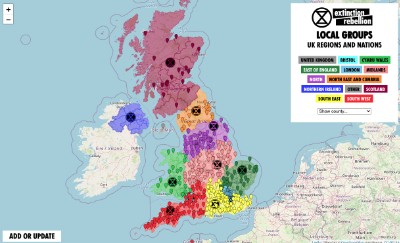
This [Local Group Map](https://map.extinctionrebellion.uk/) is a list of all known XR groups in the UK. Most have Action Network email lists. When you click on the map pin and then click 'JOIN GROUP' you will be taken to a form allowing you to be subscribed to that particular Local Group. (If they don't have a list, then the subscription defaults to the Nation/Region list).
Local Groups can now have a dedicated shortlink in the style of _joinxr.uk/localgroupname_ - see the [Local Group Sign ups page](https://rebeltoolkit.extinctionrebellion.uk/books/action-network-for-xr/page/local-group-sign-ups) for more information.
All subscriptions cascade 'up' the geographical list structure i.e. if you sign up to Birmingham, you will also be signed up to the Midlands and UK lists.
The map can be viewed at [extinctionrebellion.uk/act-now/local-groups](https://extinctionrebellion.uk/act-now/local-groups/) on the XRUK website, and also can be accessed directly at [map.extinctionrebellion.uk](https://map.extinctionrebellion.uk/)
Request updates to the Local Group map by clicking the **Add or Update** button on the bottom left of the map
# Local Group Sign-ups
**Action Network is the software system used for the XR UK’s email list.**
As the name suggests it really is a ‘network’. If you use Action Network and sign someone up to your Local Group, they will [automatically be signed up](https://rebeltoolkit.extinctionrebellion.uk/books/action-network-for-xr/page/overview) to regional and UK lists. This means Local Groups can have a huge impact on the total numbers on the UK email list. The more Local Groups that use Action Network, the stronger XR becomes as a whole.
#### For Outreach Volunteers
**There should be a tailored link for every local group in the style joinxr.uk/xxxxx**
e.g. joinxr.uk/cardiff, joinxr.uk/edinburgh
If it's working it will lead you to a **pale blue form**.
If your link isn't set up yet [get in touch](https://rebeltoolkit.extinctionrebellion.uk/link/634#bkmrk-page-title)
**Remember your short link wherever you are**
Anyone can enter this shortlink in to their browser on a phone, tablet or computer to find the sign up form for you group.
**Paper Sign-Ups and QR Codes**
In this folder - you can find GDPR compliant paper sign up forms and QR codes that point to your local group. Also templates for printing simple posters.
#### For Local Group Organisers
[This map](https://map.extinctionrebellion.uk/) shows all the known Local Groups within XR UK. Most of these have an Action Network email list (although not all groups are using their list!). You can update this map if you have any info to add or change by emailing [map@extinctionrebellion.uk](mailto:map@extinctionrebellion.uk).
If you need help accessing or using your own Local Group email list, and you have a rebel willing to take on that role you can request an [Action Network training session](https://actionnetwork.org/forms/an-training-request/?clear_id=true).
You may already have an email list that isn’t on Action Network, but using the XR UK network is really important for mass mobilisation, so get in touch!
**Bonus opportunity:** XR UK mailing list currently with 180,000+ people signed up, some of these people have given us their postcodes, but haven’t found their way to a local group yet! By requesting training on Action Network, you can also request a search of postcodes in your area to find these ‘floating rebels’.
# UK List Sign-ups
For big rebellions (e.g. in London) there are many opportunities for outreach and the usual ask is for people to join the UK email list.
The best link to use is the XRUK website homepage [extinctionrebellion.uk](https://extinctionrebellion.uk).
[Flyers are available to order](https://rebeltoolkit.extinctionrebellion.uk/link/818#bkmrk-page-title) that point to XRUK website.
Also you can find GDPR compliant paper forms and a poster to put on the back of clipboards that points to the UK website [in this folder](https://joinxr.uk/QRcodes).
At big events/actions clipboards will be delivered to Outreach hubs and collected at the end of the day so that the data can be entered. It is very important to write the information VERY neatly and clearly as someone else will have to read your handwriting. This is preferable to the public writing their own information as names/emails are very likely to be written in haste and therefore illegible.
# Can I move my existing email list to Action Network?
##### Your Existing Mailing List
If you have been using mailing list management software, like MailChimp or have a list of addresses stored on Gmail, you won't want to lose contact with those people.
The only email addresses that we'll be able to move across immediately to Action Network are people who have also signed up to the XRUK list. [Contact the Action Network Data Team](https://rebeltoolkit.extinctionrebellion.uk/link/634#bkmrk-page-title) so we can transfer this data in a GDPR compliant way.
Once this first step is done, the easiest way to continue this process is to send out an email to everyone who wasn't transferred to encourage them to join the AN list e.g.
> We are moving to a new email system and will no longer be sending out news and announcements from this system/address. To opt into this new mailing system just visit http://joinxr.uk/_your_LGname_here_* and enter your details.
*If this hasn't been set up for your group yet, [read more about this tailored short link](https://rebeltoolkit.extinctionrebellion.uk/link/702#bkmrk-there-should-be-a-ta).
# Writing and Sending Emails on Action Network
Technical, style, content and accessibility advice. Plus automatic welcome emails.
# Introduction to writing emails
Start here for a quick overview
If you don't have access to your email list yet [click here](https://rebeltoolkit.extinctionrebellion.uk/books/action-network-for-xr/page/becoming-an-xr-admin)
This chapter contains guidance on technical aspects of sending emails, advice on content, style, common errors and positive adjustments you can make to increase accessibility of what you send.
There are two ways to create an email on Action Network **'Drag and Drop'** or **'Visual/HTML'**.
The Action Network training team support the use of 'Drag and Drop' for various reasons, but mostly because it provides layout control and features such as buttons, without you needing any html skills. The [training](https://rebeltoolkit.extinctionrebellion.uk/link/650#bkmrk-page-title) that you can request is based on this method.
##### You can set your default email writing method to drag and drop style by following the instructions below.
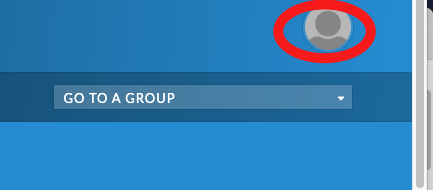
1. Click on your profile icon in the top right
[](https://rebeltoolkit.extinctionrebellion.uk/uploads/images/gallery/2022-11/email-style-default-1.png)
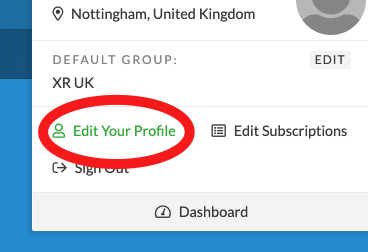
2. Edit your profile
[](https://rebeltoolkit.extinctionrebellion.uk/uploads/images/gallery/2022-11/email-style-default-2.png)
3. Scroll to the bottom of the page and switch the toggle to 'drag and drop' and then 'save changes'
[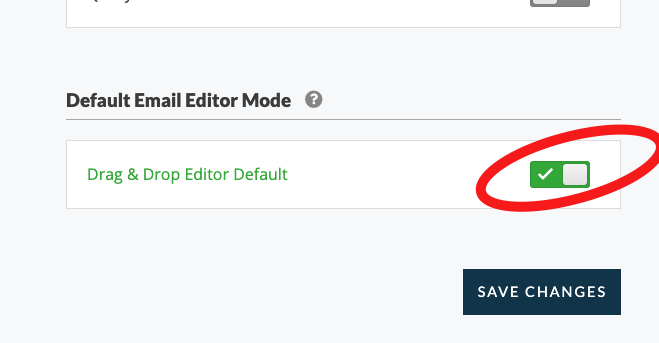](https://rebeltoolkit.extinctionrebellion.uk/uploads/images/gallery/2022-11/email-style-default-3.png)
# Validate your reply-to email address
This is quick and easy thing to do and is very important because:
- **to ensure more of your emails/newsletters reach your subscriber's inboxes** (instead of junk/spam).
- **so you can recieve replies** to your messages
[Follow the AN guidance here](https://help.actionnetwork.org/hc/en-us/articles/36999589334036-Verifying-your-reply-to-email) or read the steps below.
You will still technically be able to send out emails, but it is **strongly advised that you do validate your reply-to email**.
1. Go to your 'group' and click on settings on the middle dark blue menu bar.
2. Click 'Email Settings' (if you can't see this option you may need additional 'permissions' - please [contact the Action Network Data Team'](https://rebeltoolkit.extinctionrebellion.uk/link/634#bkmrk-page-title)).
3. Click '+ ADD NEW EMAIL ADDRESS'.
4. Type in the email address you usually use as the 'reply-to' when you send emails. This should be your Local Group (or team's) contact email. One that you have access to, so you are able to recieve any questions people have when they reply to the Action Network emails you send out.
5. Log in to your inbox you'll have received and email from Action Network to validate your email address (it might take a minute or two to arrive).
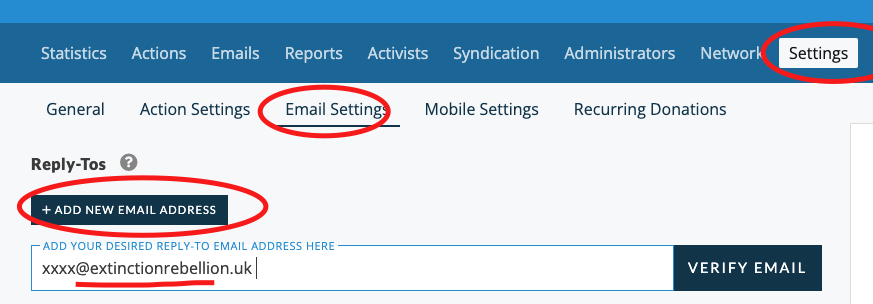
---
Note: only click on emails asking you to urgently validate and email address if you've just done the steps above. Beware of [unsolicited 'phishing' requests](https://rebeltoolkit.extinctionrebellion.uk/link/1841#bkmrk-page-title) or a similar type.
Bonus info: if you are using protonmail, gmail or similar for your reply-to address and you are an XRUK circle/team, Nation, Region or Local Group, you can [apply for an xxxx@extinctionrebellion.uk email address here](https://rebeltoolkit.extinctionrebellion.uk/books/other-online-tech-tools/chapter/applying-for-and-using-extinctionrebellionuk-email-accounts).
If you don't see the 'Settings' tab on the dark blue menu bar, then your admin account doesn't have the Settings permission. If you feel like you should have this ability then contact the [Action Network Data Team](https://rebeltoolkit.extinctionrebellion.uk/link/634#bkmrk-page-title).
# Write and send an email
#### Start a new email
Go to the right hand side menu and pick 'Email'
[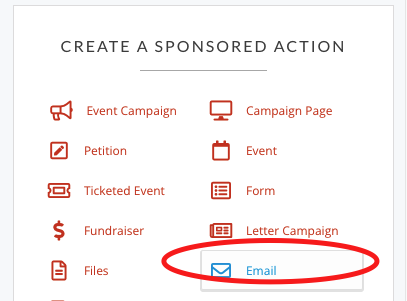](https://rebeltoolkit.extinctionrebellion.uk/uploads/images/gallery/2022-02/Email.png)
#### Next steps
[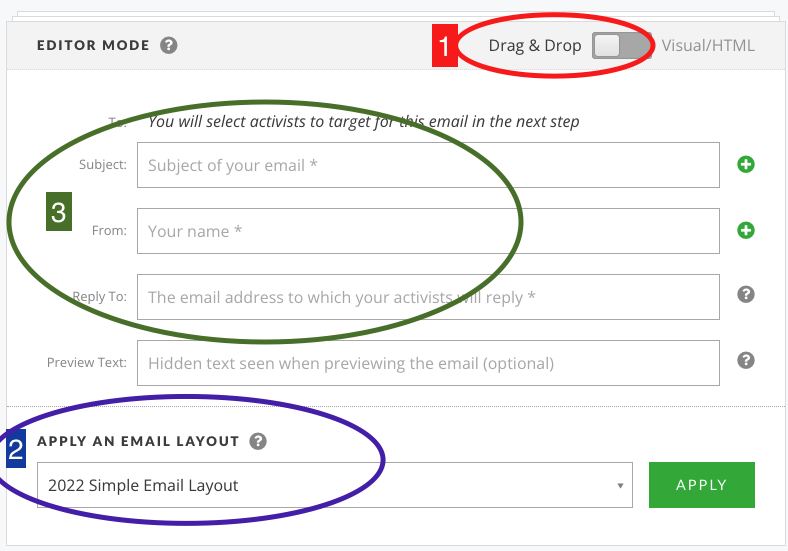](https://rebeltoolkit.extinctionrebellion.uk/uploads/images/gallery/2022-02/image-1645383275551.png)
1: Skip to step 2 if you've already changed your [default settings](https://rebeltoolkit.extinctionrebellion.uk/link/496#bkmrk-you-can-set-your-def)
2: You should see the default XR template layout here (2022 Simple Email Layout) - if not [contact the Action Network Team](https://rebeltoolkit.extinctionrebellion.uk/books/action-network-for-xr/page/contact-the-action-network-data-team).
3: Complete the following...
[**Subject**](https://rebeltoolkit.extinctionrebellion.uk/books/action-network-for-xr/page/tips-for-writing-effective-content) - a simple 5ish word title which makes the subject of the email clear and appealing,
**From** - your group name e.g. XR Sheffield
**Reply To** - your public contact email for people to reply and ask questions.
3b: Also you should complete the [**Preview text**](https://rebeltoolkit.extinctionrebellion.uk/books/action-network-for-xr/page/tips-for-writing-effective-content) with some extra words of encouragement. This can be about 10 words long and it will show up on some people's phones _before_ they open the email. So think of it as some extra bit of information to tempt them in to opening it.
4: Then write your email. The safest way is to type straight in to here. If you copy and paste from a Word or Google doc, the formatting can also copy over which creates problems. Either copy from a plain text editor or paste without formatting. [Help on how to do this](https://rebeltoolkit.extinctionrebellion.uk/link/1276#bkmrk-page-title)
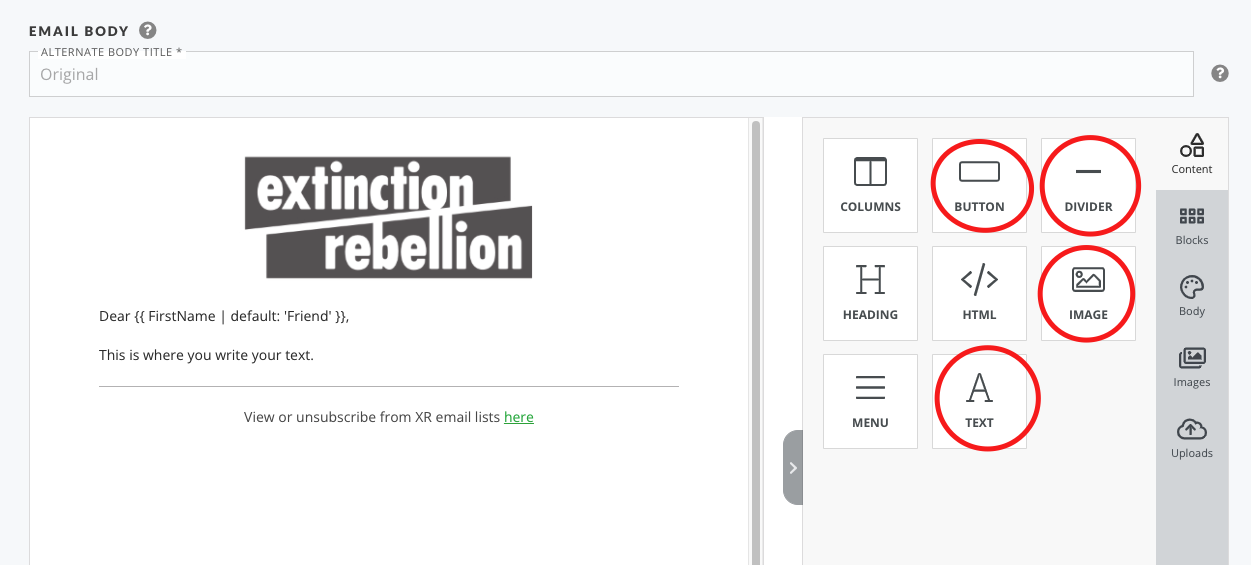
5: Adding extra content boxes. The most common things to add would be the items circled in the following image. You drag them over to your email layout and use them as you wish.
[](https://rebeltoolkit.extinctionrebellion.uk/uploads/images/gallery/2022-02/image-1645383477200.png)
6: You may now want to add a photograph or graphic either at the top or within your email - [details of how to add images here](https://rebeltoolkit.extinctionrebellion.uk/books/action-network-for-xr/page/inserting-images-into-your-action-network-e-mail). This also contains **very important guidance** on accesibility and resizing of images.
#### Target and Send your email
[](https://rebeltoolkit.extinctionrebellion.uk/uploads/images/gallery/2022-02/image-1645383924462.png)
Before sending the email out to your list, you can send yourself a test email. It is always good to proofread your email on a phone as well as on a computer to see what it looks like.
When you are happy with your email - click 'SAVE AND TARGET YOUR EMAIL'
You can now see the targeting page.
You can just skip this and click SAVE, PREVIEW and SEND.
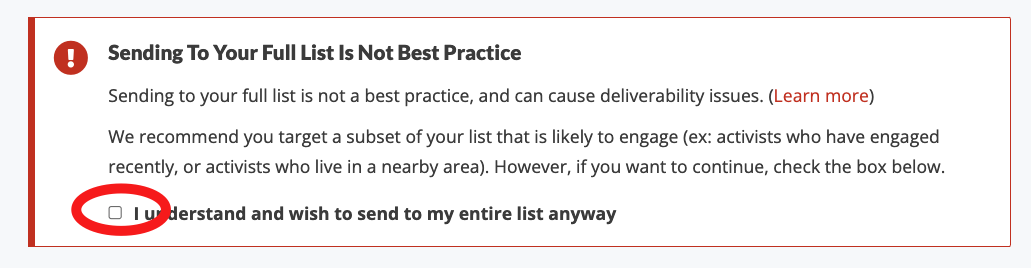
**A warning appears advising you NOT to send to your whole list.** With a small list (under 5000) it's probably still ok to send to all, but if you want to know more about targeting there is [information about the warning message here](https://rebeltoolkit.extinctionrebellion.uk/link/1339#bkmrk-page-title)
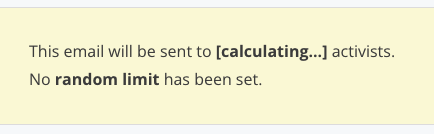
The next page shows a preview of your email. Scroll down to the bottom and you will see Action Network calculating how many 'activists' to send to.
[](https://rebeltoolkit.extinctionrebellion.uk/uploads/images/gallery/2022-02/image-1645385022019.png)
When it's finished you'll see how many activists you are about to send the email to.
You can now either schedule (you have to minus 5hrs, due to this being set up for EST time zone e.g. if you want to send at 9am, then schedule for 4am EST) or if you want to send immediately, use the red button.
[](https://rebeltoolkit.extinctionrebellion.uk/uploads/images/gallery/2022-02/image-1645385115248.png)
# Targeting an email
#### Warning Message when targeting
There is a new warning message on Action Network (as of 2024) that looks like this:
[](https://rebeltoolkit.extinctionrebellion.uk/uploads/images/gallery/2024-01/warning-message.png)
With smaller lists (less than 5000 subscribers) it's probably still ok to send to everyone on your list - just tick the box and proceed. But if you are getting low open rates (less than 40%) for any sized list, then perhaps read on for advice....
#### How to target the more active subscribers
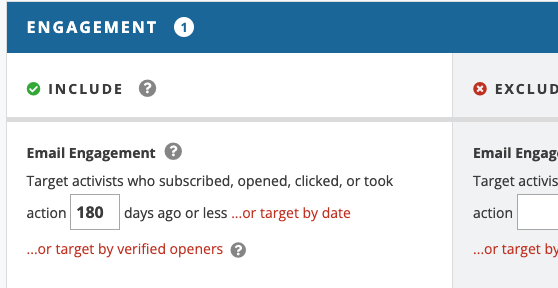
To do this in a quick and simple way you can target using this option:
[](https://rebeltoolkit.extinctionrebellion.uk/uploads/images/gallery/2024-11/screenshot-2024-11-19-at-09-54-17.png)
This will then only send an email to someone who has newly subscribed, opened, clicked or taken and 'action' (that means filling in a form or event) in the last 180 days (this is the time period that Action Network recommends).
The will probably reduce the number of people you email to about 70-80% of your full list. If you do this regularly, it is supposed to help make sure emails go to inboxes and not spam.
Your list looks more 'engaged' when a higher percentage of people open the emails.
An email coming from an engaged and active list is more likely to end up in somones inbox than in spam.
**It would then be good practice to email EVERYONE a couple of times a year, to try to 'wake up' those inactive people.**
There are many other options in targeting emails, and you'll see the ? sign next to each item to explain what it is. There are too many options to explain here, so if you need help - contact the [Action Network Data Team](https://rebeltoolkit.extinctionrebellion.uk/link/634#bkmrk-page-title)
#### Targeting on people registered to an event...
(...this is the same for other 'actions' such as **forms** and **surveys**)
Just note for using 'actions' during targeting - be aware that for each 'action' there are three options and you should choose the first one (otherwise you might miss some of the people registered).
[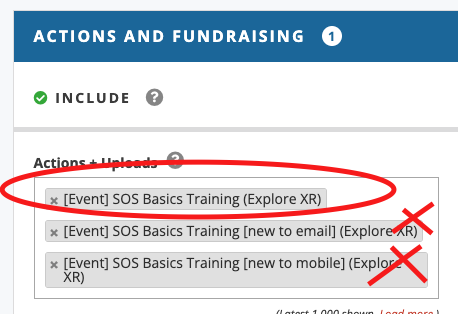](https://rebeltoolkit.extinctionrebellion.uk/uploads/images/gallery/2024-11/action-targets.png)
If you want to exlude people who have taken an 'action' just do the same but in the EXCLUDE column instead.
# Tips for writing effective content
How to improve open rates and increase involvement from people subscribed to your list.
#### Subject lines
Write engaging subject lines to catch people's attention. This could be by that implying someone's participation is valuable and needed; pitching your event as new and exciting; or tailoring an email to be as local as it can be. e.g.
- Help make our January action a success
- Join us for a meal next Wednesday
- New Heading for Extinction talk - book now
- XR Nottingham on the local news
#### Preview text
This is added in the header of your email and is shown to some of your readers. It provides space for about 10-15 more words that could help tempt someone to open the email. e.g.
- Join us next Tuesday for free cake and conversation in the Cafe on the Green
- Hear all the latest science in this engaging new talk
#### Email body
Sometimes you want to cover a lot of information in an email because there is a lot happening and giving choice to your readers will help them find the thing that interests them.
BUT... if you have something important that you really want as many people as possible to do, whether this is signing up to a zoom, or attending a meeting or action, then a **single focused email** is far more effective. These are suggestions to help create a focused email:
- Using 150-200 words max
- Only have one link in your email - if you have more, make sure the most important one is first and preferably comes early enough in your email that the person can see it on their phone before scrolling.
#### More resources
- [How to Write a Marketing Email: 10 Tips for Writing Compelling Email Copy](https://blog.hubspot.com/blog/tabid/6307/bid/32606/the-9-must-have-components-of-compelling-email-copy.aspx)
# Deliverability - making sure your email doesn't look like spam
Reading and acting on the advice below will reduce the number of emails getting caught by spam filters and hopefully deliver more emails to your subscribers inboxes.
#### Alt tags on Images
Use 'alt' tags on images. Just click the image after you've added it into an email and write a description for the 'alt/title' e.g. _Rebel holding pink banner reading Act Now_. This is good practice for accessibility for people with visual impairments who use screen readers, but could also help with deliverability.
#### Image sizes
Don't use images over 600px wide. You can change the size after you've added it to the email.
Guidance on [adding images is here](https://rebeltoolkit.extinctionrebellion.uk/link/706#bkmrk-page-title).
#### Short Links
Don't use short links (e.g. don't use bitly.com/xxx or tinyurl.com/xxx or even XR's own short link generator [xrb.link](https://xrb.link/) - it's fine to use these on telegram or social media- but not in emails. This doesn't mean you have to have a long link url on show - just hide it as a hyperlink.
The reason for this seems to be that people that send spam email often hide links behind shortlinks and so they make your make email look suspicious.
#### Private data embeded in links
VERY IMPORTANT - don't use links that you've copied out of other emails. Links from Action Network emails contain tracking links and people's personal Action Network ID's etc. You will get an error message if you do this of **"You appear to have a link with an Action Network ID attached"** - read [details of this error message](https://rebeltoolkit.extinctionrebellion.uk/link/614#bkmrk-page-title).
#### Reply-to email address
You will need to 'validate' your reply-to email address. This is quick to do and [the instruction are here](https://rebeltoolkit.extinctionrebellion.uk/link/1844#bkmrk-page-title).
You can use any email address as your reply-to e.g a gmail or protonmail address. Usually this would be your Local Group's (or campaign/community group) public contact email. But more of your subscribers are likely to get your newsletters/emails in their inboxes if you use a 'trusted domain' like extinctionrebellion.uk. This should make it less likely that your mailouts will be stopped by spam filters or diverted to 'junk' folders.
You can apply for your own email address in the format **_GroupName_@extinctionrebellion.uk** - [guidance on how to request one of these email address is here](https://rebeltoolkit.extinctionrebellion.uk/books/other-online-tech-tools/chapter/applying-for-and-using-extinctionrebellionuk-email-accounts).
It is now very important for groups with list sizes over 5000 to use one of these address or another 'trusted domain'. If you have your own domain e.g. XR Nottingham have xrnottingham.org and use 'support@xrnottingham.org', but if you do this you should [set up the DMARC, DKIM records](https://rebeltoolkit.extinctionrebellion.uk/books/action-network-for-xr/page/installing-dkim-spf-and-dmarc-records).
#### Warning message when targeting emails
This warning is documented on the [Targeting and email](https://rebeltoolkit.extinctionrebellion.uk/link/1339#bkmrk-page-title) page.
#### Engagement
Extra guidance can be read in the [AN Deliverability Checklist](https://help.actionnetwork.org/hc/en-us/articles/18929552061204-Deliverability-Checklist) and the full [Deliverability Training (15min) video](https://www.youtube.com/watch?v=D3yMoIAWApk). If you watch these and feel out of your depth, then reach out to the [Action Network Data Team](https://rebeltoolkit.extinctionrebellion.uk/books/action-network-for-xr/page/contact-the-action-network-data-team) for support.
# Formatting, readability and accessibility
Writing clear, readable emails for everyone and with focus on readers with visual impairments, dyslexia etc.
#### Text and Style guide
Use sans serif fonts (such as Arial and Calibri). Once you have chosen a font it's best to stick to it; don't mix fonts in an e-mail.
Avoid using italics, capitals, underlines, or colour for emphasis. Instead, use **bold** text for emphasis.
Font size should be at least 14 point or equivalent.
Use simple language that is clear and easy to understand. Use shorter sentences and avoid using abbreviations and jargon.
[Some more general guidance](https://rebeltoolkit.extinctionrebellion.uk/link/766#bkmrk-page-title) on text, style, colour and layout.
#### Images
Include alternative (alt) text to describe images, tables, and graphics for people using screen readers. Just click the image after you've imported it into an email and write a description for the 'alt/title' e.g. _Rebel holding pink banner reading Act Now_.
#### Links
Ensure any hyperlinks are descriptive. For example, "Video about 100 Days" rather than "Click here".
#### Paste without formatting!
Particularly when using the drag and drop email editor, there can be significant problems copying text from a program such as Word or Google Docs into Action Network. Luckily, there is an easy fix!
**Windows users**
When pasting, use the shorcut __Ctrl+Shift+V__ instead of __Ctrl+V__. This pastes just the simple text, rather than the text plus formatting.
You can also see this option on the context menu you get when right-clicking.
[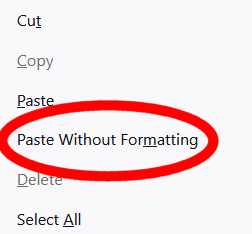](https://rebeltoolkit.extinctionrebellion.uk/uploads/images/gallery/2023-05/Screenshot-2023-05-24-141754.png)
**Mac users**
Try __Cmd+Option+Shift+V__
# Optimal layout tips for phones
Sending test emails to yourself and reading them on your phone, is the best way to experience how a large proportion of your readership will be viewing your email.
#### Things to consider
- Emails look WAY longer on a phone, especially if people have smaller phone screens, or the font sizes set to larger sizes.
- Make your main CTA (your call to action) high up in your email, ideally the first link in your email - so people aren't scrolling to get to the button or main link you want them to click on.
Here is an example of what an email looked like when viewing on a phone - all the information is visible as soon as you open the email. This is done by keeping the word count low and the top image height small.
[](https://rebeltoolkit.extinctionrebellion.uk/uploads/images/gallery/2022-02/TrainingV2.jpg)
# Inserting images into your Action Network e-mail
Including images can really help with reader engagement, but there are couple of things to keep in mind. First is that images need to be relevant and mean something, and secondly they must resized to suit emails.
If you are someone that uses photo/graphics software, just make sure your exported .png or .jpg is 600px wide. But don't worry if this isn't your thing - you can change the size after you've added the image.
#### Drag and Drop interface
For those using the 'html' interface [skip to here](https://rebeltoolkit.extinctionrebellion.uk/link/706#bkmrk-html-email-interface)
1. Add a image content block to your email.
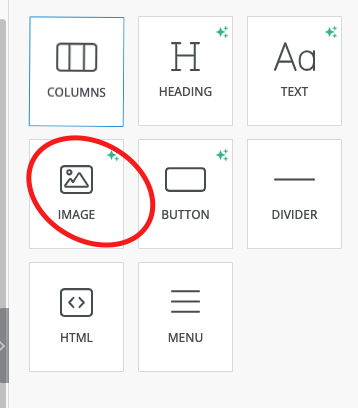
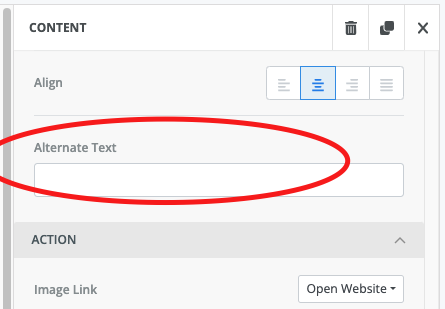
2. Add alt text - something descriptive like 'rebel holding banner reading climate emergency' in the alt text - this is for accessibility reasons and also reduces the chance of your email being caught in spam filters.
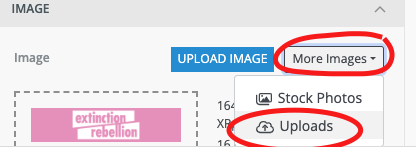
3. Click _Upload Image_ or just drag an image across from your desktop.
4. To help reduce the overall size of your email you can now reduce the image size.
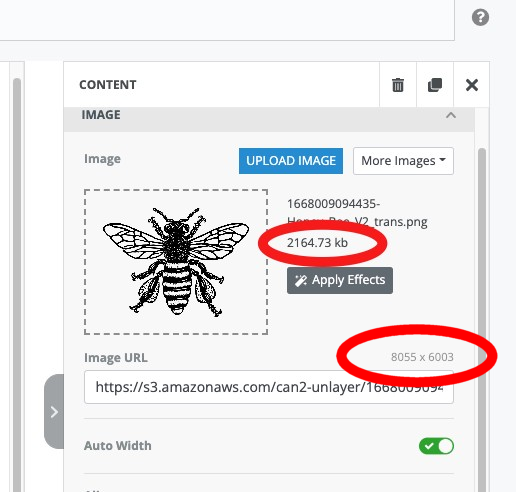
The file size of this image is 2164 kb which is unnecessarily big.
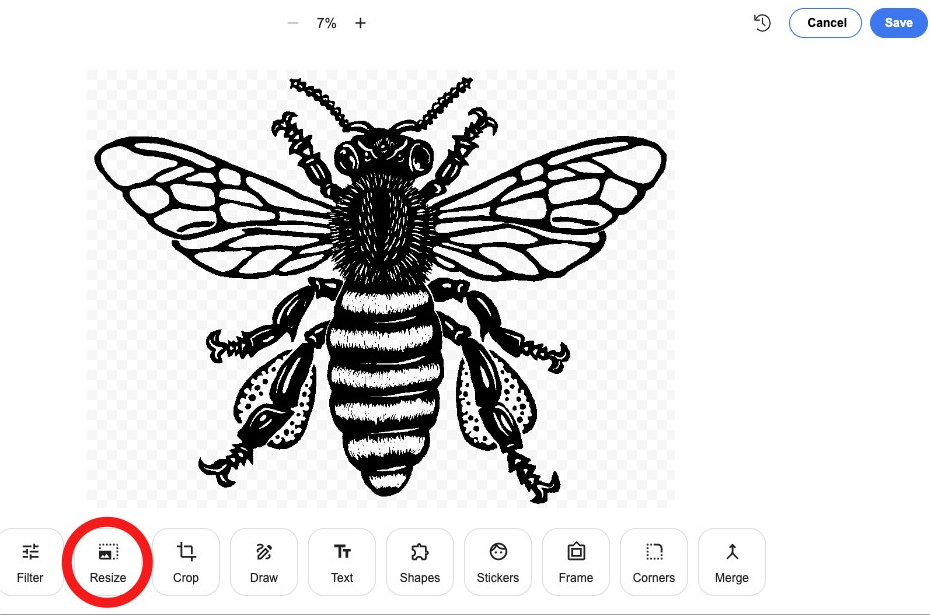
By resizing to 600 pixels wide, the image will be much smaller but still be large enough for your email.
Use the **Apply Effects** button.
5. Click on the resize button and set the **width** to 600
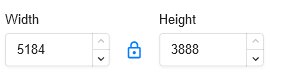
6. Click **Apply** top right of this screen, then **Save**.
Now you can see that the size of the image is much reduced (down from 2164 kb to 150 kb)
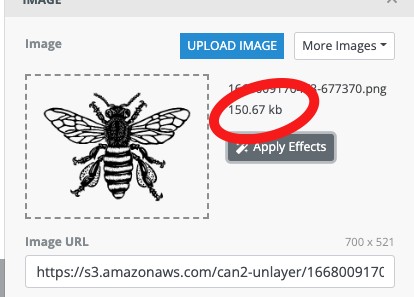
Note : your images are available to use again and can be accessed again from More Images/Uploads.
#### HTML email interface
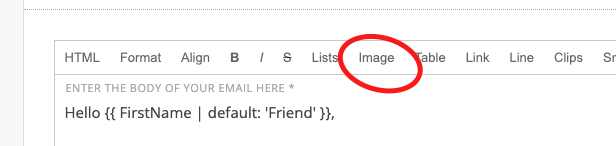
If you want to add images to html email - avoid copy and pasting - this can cause and error that will reduce the number of emails getting to inboxes.
Insert the image using the 'image' option on the toolbox
[](https://rebeltoolkit.extinctionrebellion.uk/uploads/images/gallery/2024-05/image-1715272792508.png)
# Automatic welcome email for your group
So, you’ve got your group up and running and people are signing up via the [LGmap](https://map.extinctionrebellion.uk/) or the [UK website page](https://extinctionrebellion.uk/act-now/local-groups/) or your shortlink (joinxr.uk/localgroupname) or via your own tailor made sign up forms. Nice! Questions? - head to [this page](https://rebeltoolkit.extinctionrebellion.uk/link/702#bkmrk-page-title).
But how will they know when your meetings are and get introduced to your group? A welcome email when they have joined the group is a great way of making first contact, particularly for people who found out about your group through the website.
You can [request help or training for this](https://rebeltoolkit.extinctionrebellion.uk/link/650#bkmrk-page-title) or you can follow the instructions below.
>If you already have a welcome email set up and you just need to view or amend it >> [Skip to step 3](https://rebeltoolkit.extinctionrebellion.uk/link/497#bkmrk-step-3---view-and%2For)
#### Step 1 - Set up a ladder
Before you set up your welcome email - make sure you have [setup your 'reply-to' email addess](https://rebeltoolkit.extinctionrebellion.uk/books/action-network-for-xr/page/validate-your-reply-to-email-address), the one that you want recipients to reach if they click 'reply' when they receive your welcome email. This is usually the same email inbox as you use as the main contact for your local group.
(This is because Action Network only sends emails, it doesn't receive replies).
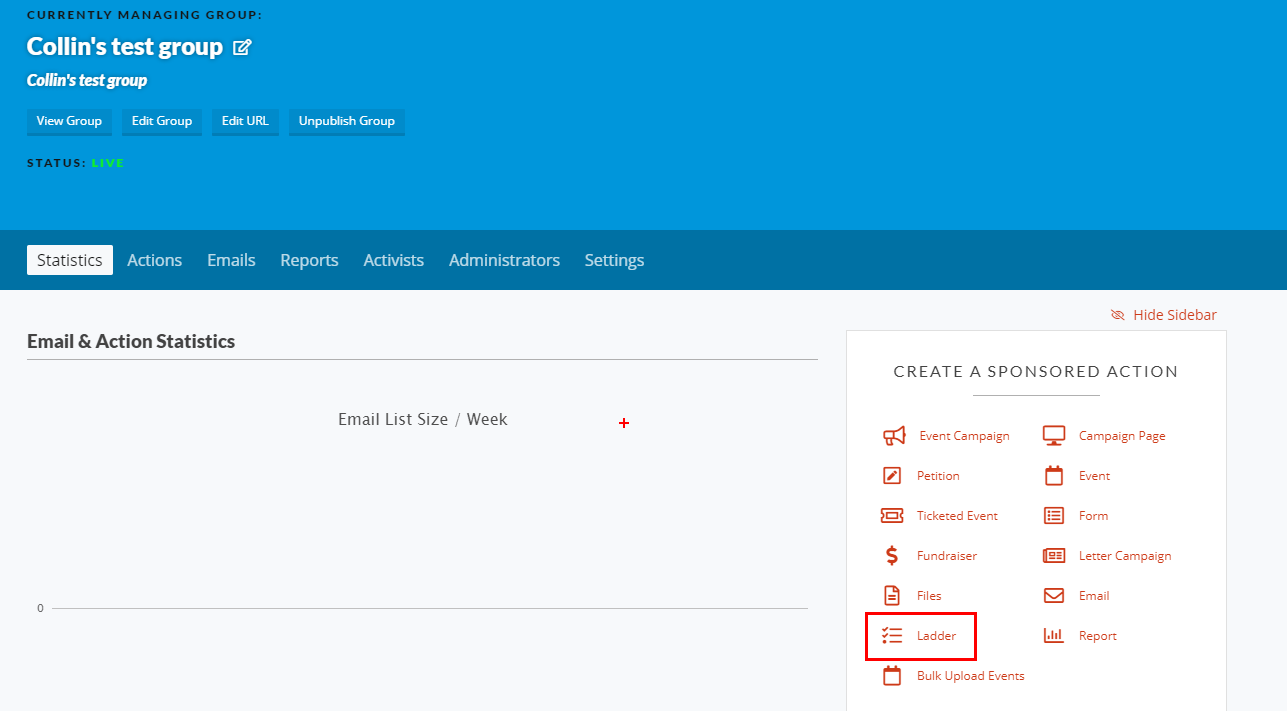
A ladder in Action Network allows you to set things in motion when something happens. For this situation the 'trigger' is that someone is new to your list and the 'action' is to send them an email.
Select **Ladder** in the right hand menu.
[](https://rebeltoolkit.extinctionrebellion.uk/uploads/images/gallery/2021-04/find-ladder.png)
[](https://rebeltoolkit.extinctionrebellion.uk/uploads/images/gallery/2021-12/image-1639648539786.png)
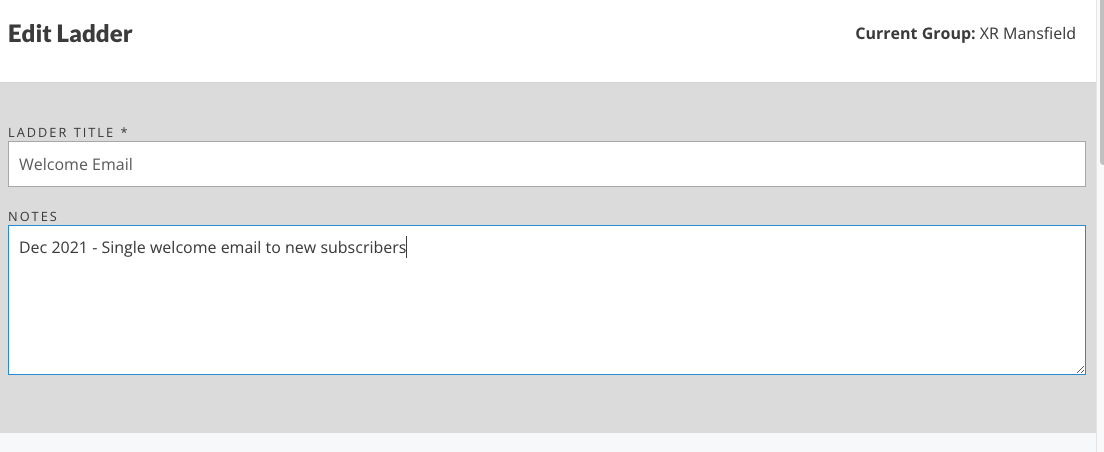
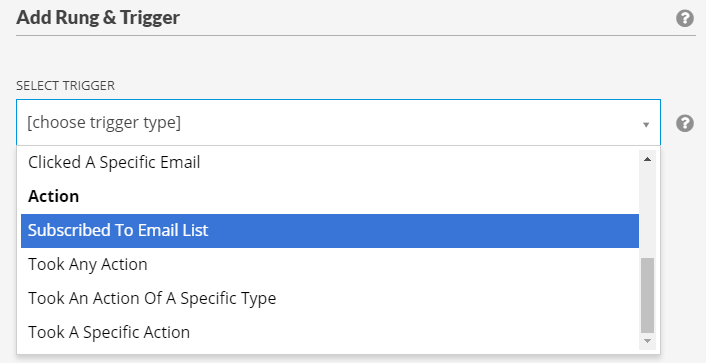
Check that the current group (top right) is correct and enter a title and description. Now click the “ADD NEW RUNG” button. This brings up a new screen to Add a Rung & Trigger. The trigger is what sets the ladder in motion. For a welcome email, it is when an activist first subscribes to your group. Click the dropdown and choose "Subscribed To Email List".
[](https://rebeltoolkit.extinctionrebellion.uk/uploads/images/gallery/2021-04/rung-trigger.png)
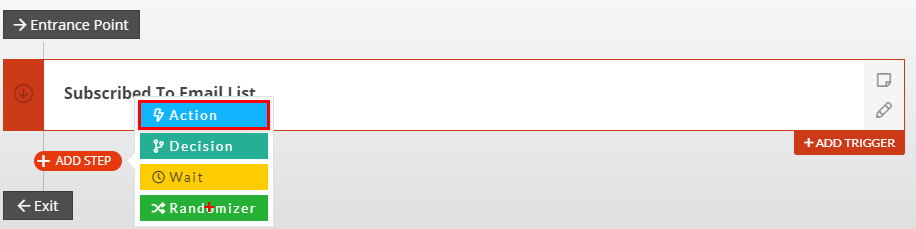
Once you have that option selected, click "Save Rung & Trigger". This takes you back to the Ladder. You now want to add an action. Hover over the red plus and pick Action.
[](https://rebeltoolkit.extinctionrebellion.uk/uploads/images/gallery/2021-04/add-action.png)
Then choose Send An Email.
#### Step 2 - Create your welcome email
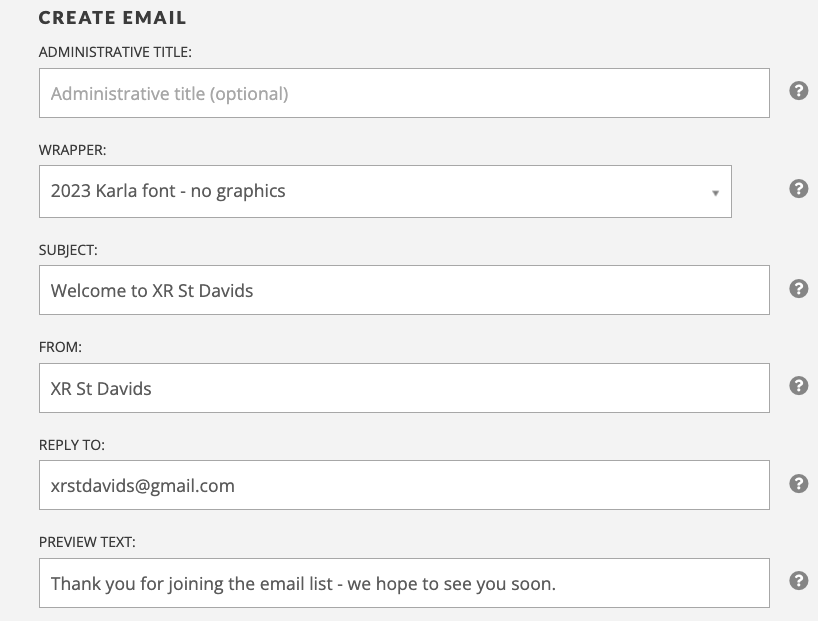
Choose an email wrapper (**2023 Karla font - no graphics** is currently recommended) and set up the other info; Subject, From, Reply-to, Preview Text. [Find a template welcome email here](https://docs.google.com/document/d/1zKi7-fd_nJzawsbi_3jugC1a1J1Ye5MHuHrd9-_Md2Y/edit?usp=sharing) and [advice on good subjects and preview text here.](https://rebeltoolkit.extinctionrebellion.uk/books/action-network-for-xr/page/tips-for-writing-effective-content)
e.g.:
[](https://rebeltoolkit.extinctionrebellion.uk/uploads/images/gallery/2023-11/image-1700938370226.png)
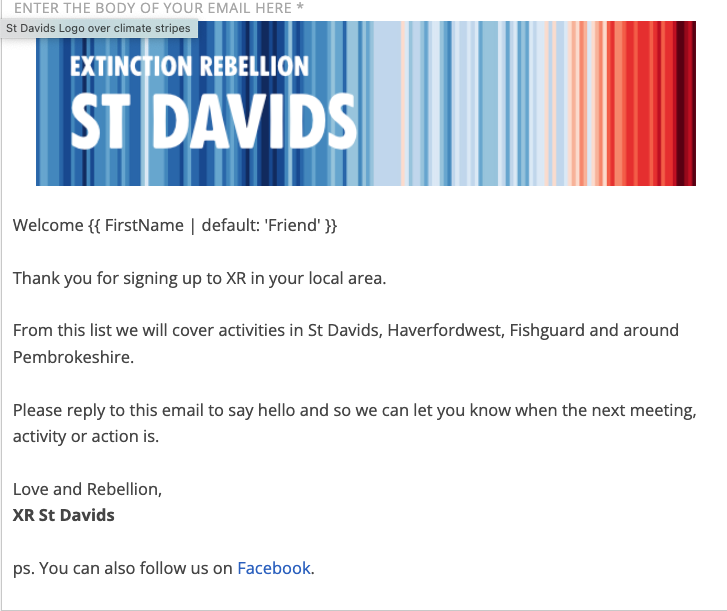
In the email body you can give information about your local group, when and where you meet and how to get involved. Something quite short and simple is fine. e.g.:
[](https://rebeltoolkit.extinctionrebellion.uk/uploads/images/gallery/2023-11/image-1700938540209.png)
P.S. if you like the graphic, then request a tailormade one from [LGsupport@extinctionrebellion.uk](mailto:LGsupport@extinctionrebellion.uk)
##### Then make sure you save the email you've created AND then save the Ladder itself
It can be either left in draft or published immediately.
**Remember** that once you have set this ladder in motion it will keep running until you stop it. So remember to check it occasionally to make sure it's up-to-date.
#### Step 3 - View and/or edit your auto-email
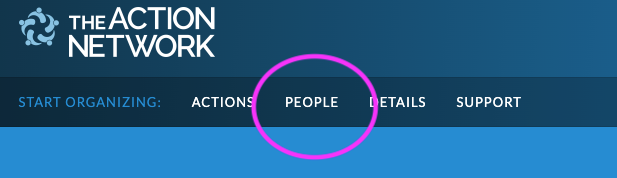
To edit your welcome email, you need to view the ladder. Click on 'People' in the top menu row.
[](https://rebeltoolkit.extinctionrebellion.uk/uploads/images/gallery/2022-08/image-1660942621922.png)
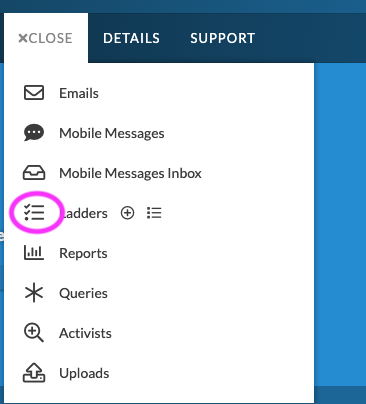
Click on the icon next to the word 'Ladders'
[](https://rebeltoolkit.extinctionrebellion.uk/uploads/images/gallery/2022-08/image-1660942795265.png)
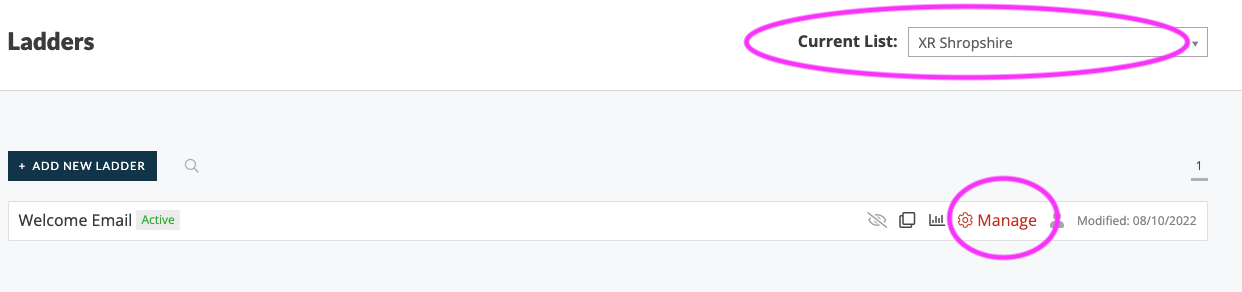
Note: If you are an admin of more than one email list, double check you are looking at the right group (for instance the name of your local group) and then click 'Manage' on the Ladder you want to edit.
[](https://rebeltoolkit.extinctionrebellion.uk/uploads/images/gallery/2022-08/image-1660942997983.png)
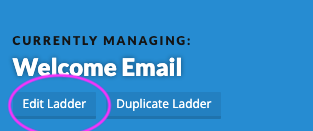
Here you can 'edit' and update your email (as well as viewing some stats). First, click on 'Edit Ladder'.
[](https://rebeltoolkit.extinctionrebellion.uk/uploads/images/gallery/2022-08/image-1660943119730.png)
Scroll down and click the pencil icon for the section you want to edit.
[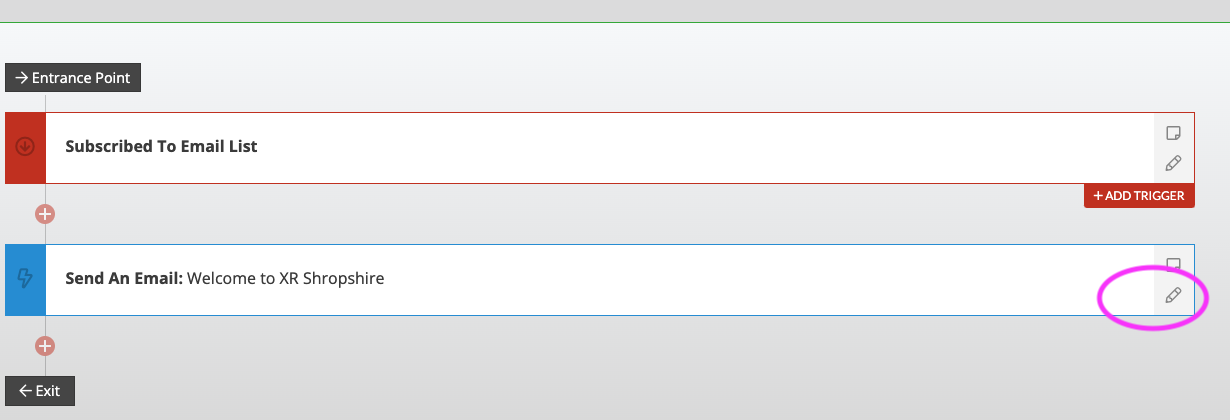](https://rebeltoolkit.extinctionrebellion.uk/uploads/images/gallery/2022-08/image-1660943186369.png)
**Important** : Remember to click 'Save Action' and then also 'Save'!
# Buttons and hyperlinks
**Note:** In Action Network when adding either hyperlinks or buttons, you should always use full original URLs and not 'shortlinks' - an [explainer of why is here](https://rebeltoolkit.extinctionrebellion.uk/link/571#bkmrk-short-links).
#### What are buttons and hyperlinks?
- A **button** is a graphical shape within your email that looks a bit like a button. When it's clicked, it takes the user away from the email to a website, form, event, etc.
- A **hyperlink** means when some words are turned in to a link. For example: [This is a hyperlink to the XRUK website](https://extinctionrebellion.uk/).
#### What text to put on your button or hyperlink
Don't be tempted to use 'Click here' as the text within a hyperlink or button. For hyperlinks, try to highlight words that make sense within the sentence, and for Buttons, try to use individual words that make it clear where the button goes. .
For example-
**Don't use:**
'More information is on the XRUK website - if you'd like to learn more click here'
**Instead, use something like this:**
"If you'd like to learn more go to the XRUK website"
#### Creating hyperlinks in 'drag and drop' mode
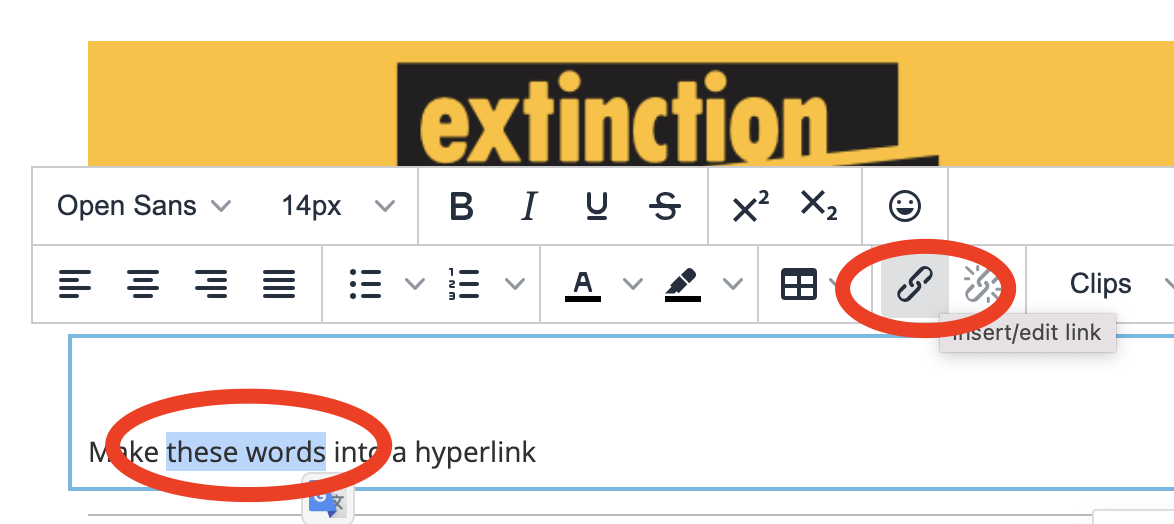
Highlight the text you want to link, click the link icon and add your link URL.
#### Creating hyperlinks in 'Visual/HTML' mode
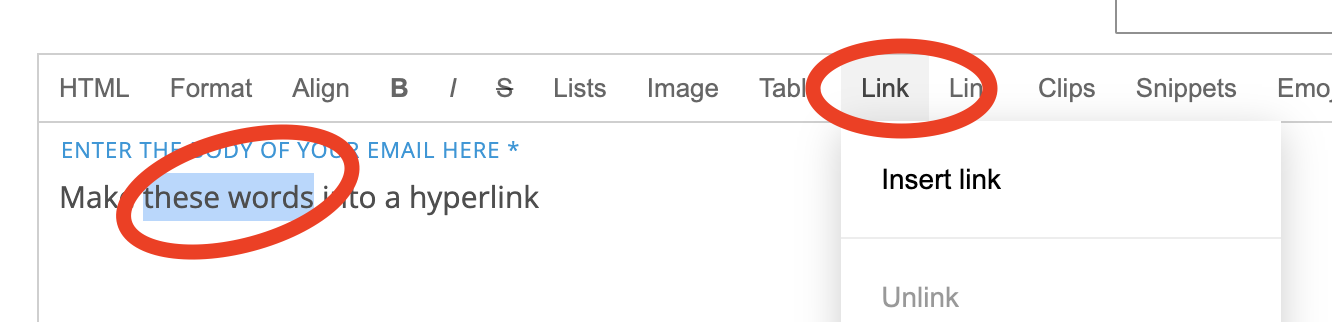
Highlight the text you want to link, click the word 'link' and add your link URL and tick 'open link in new tab'
#### Creating buttons in 'drag and drop' email writing mode
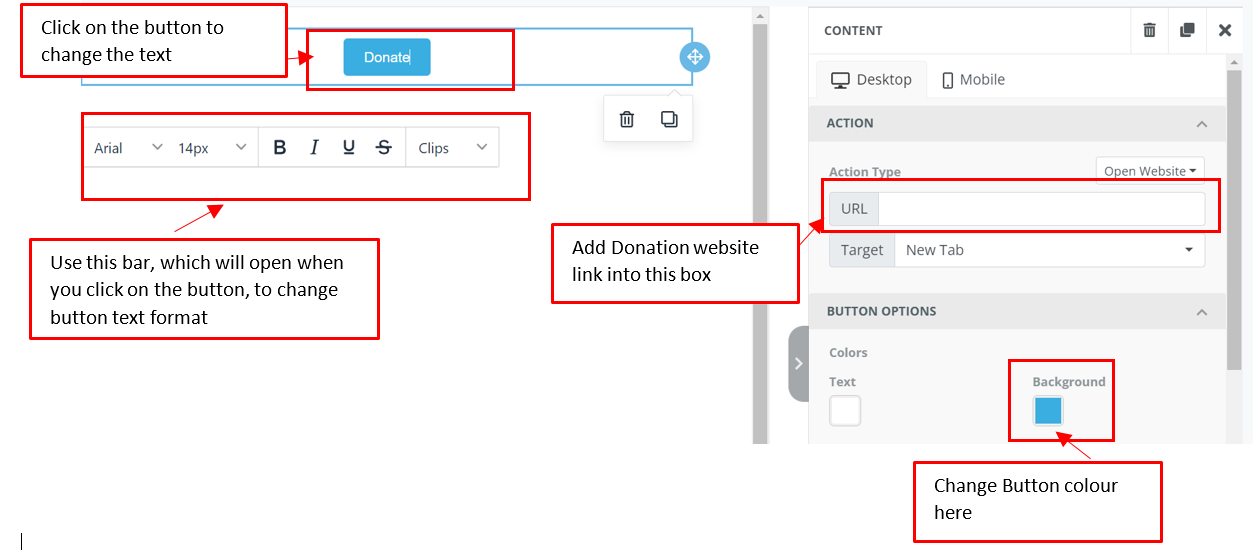
1) Click on the square that states ‘Button’ and drag it into the editing square to the left.
[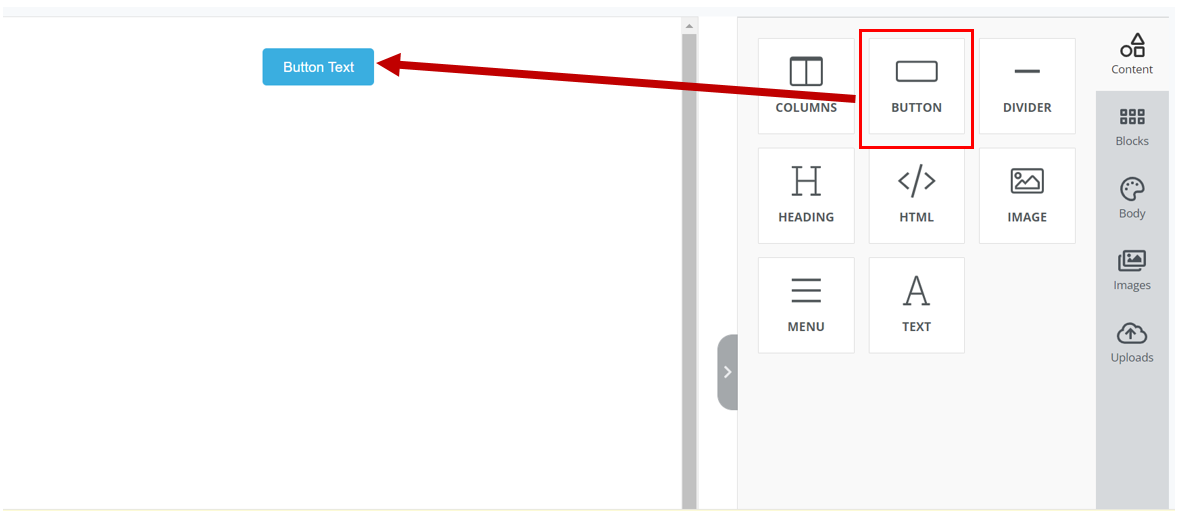](https://rebeltoolkit.extinctionrebellion.uk/uploads/images/gallery/2022-12/1-image.PNG)
2) Click on the Button you have just created in the Editing Window (on the left). This will bring up option in the right window to enable you to change the text in the button, add a URL link, change the colour and form of the button etc.
[](https://rebeltoolkit.extinctionrebellion.uk/uploads/images/gallery/2022-12/2-image.PNG)
#### Creating buttons in 'Visual/HTML' email writing mode
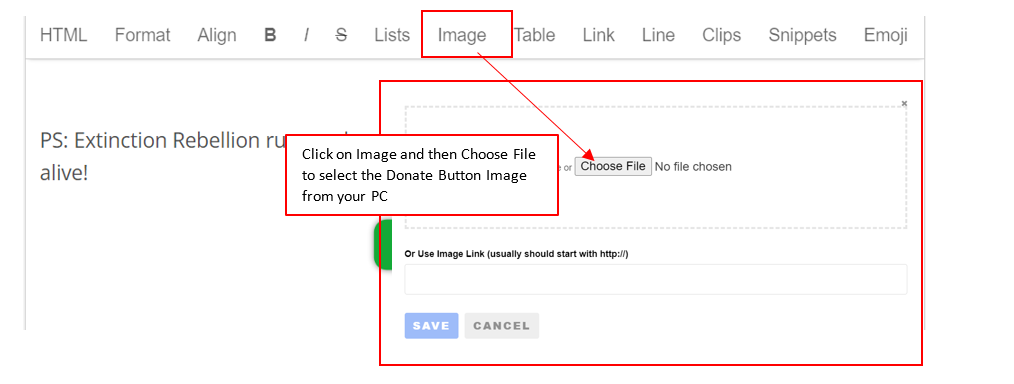
1) First you'll need an image that you want to become the button. Here is an example of a donate button.
2) Add Image to the email as shown below
[](https://rebeltoolkit.extinctionrebellion.uk/uploads/images/gallery/2022-12/3a-image.png)
3) Click on the image you have just added into the email body, and the window shown below will open. Add the link that you want to open when you click the button to the 'Link' field shown below.
[](https://rebeltoolkit.extinctionrebellion.uk/uploads/images/gallery/2024-03/image-1709653113962.jpg)
#### Suppressing tracking data
Action Network adds tracking data to every link in your email. This helps you see how many times those links have been visited and is a valuable resource for judging how effective your email is. However, this tracking can sometimes cause problems for the site you are sending visitors to. This is probably rare, but it happened, for instance, with the following link: https://eventmap.extinctionrebellion.uk/#53.408695,-3.441468/6/week/action//
The tracking data caused the page to display incorrectly. You can suppress the tracking data by adding **?no_rewrite=true** to the URL, so the above link becomes:
https://eventmap.extinctionrebellion.uk/#53.408695,-3.441468/6/week/action//?no_rewrite=true
Doing this will mean that you won't get information about those particular clicks but, in the above case, that was less important than making sure readers saw the website as we wanted them to.
# Reports and Viewing Activist Data
Information on how to access and collect data on rebels in the Action Network system
# Create reports on Action Network
Creating reports in Action Network lets you see what data subscribers have provided, and what actions* they have taken.
*_actions_ is Action Network jargon for interaction with emails, forms or events created in Action Network.
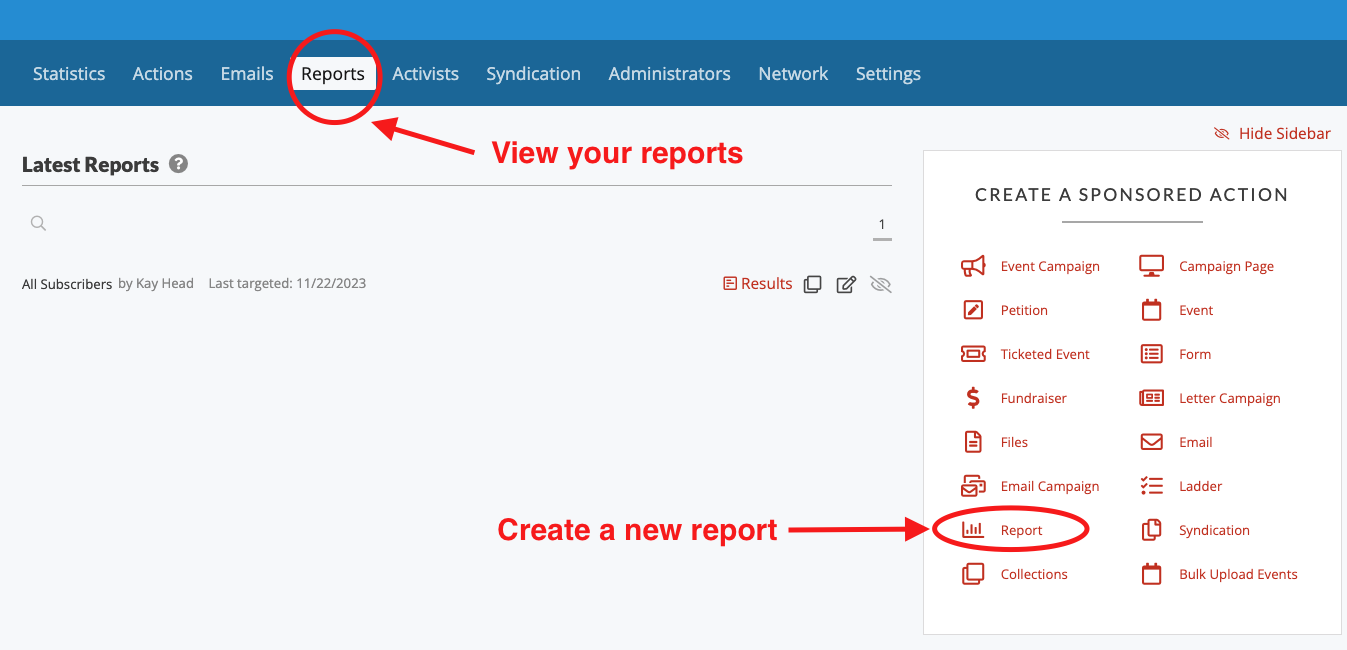
#### To view current reports or create a new one
[](https://rebeltoolkit.extinctionrebellion.uk/uploads/images/gallery/2023-11/image-1700686634519.png)
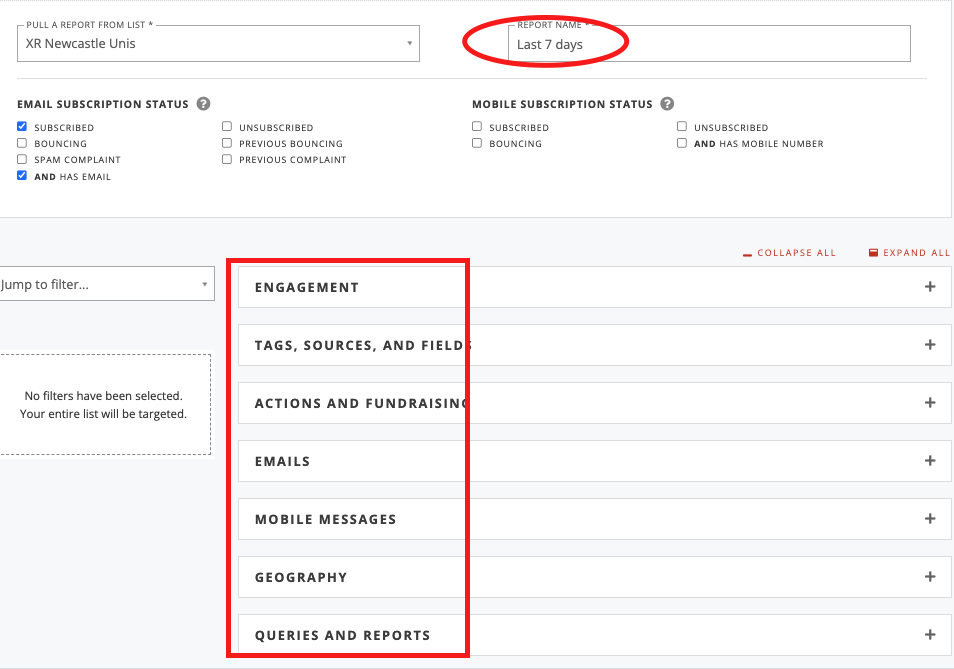
#### Add a title and choose criteria from various categories
[](https://rebeltoolkit.extinctionrebellion.uk/uploads/images/gallery/2023-11/image-1700686726507.png)
#### For example - people who have signed up to your list in the last 7 days
[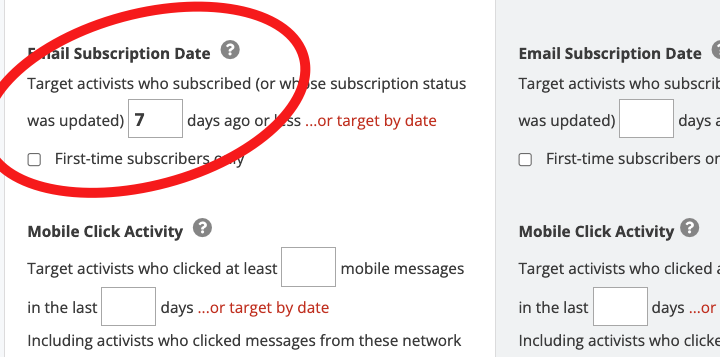](https://rebeltoolkit.extinctionrebellion.uk/uploads/images/gallery/2023-11/image-1701116606973.png)
#### Click 'SAVE AND SELECT DATA'
Blue button on the bottom right of the screen.
#### Choose data to view
There are the core fields of email, name, postcode, phone. But also you can choose to view extra bits of data e.g. the date they subscribed to your list. Also you can rearranged these data field using the 6 little dots to pick up and reorder.
[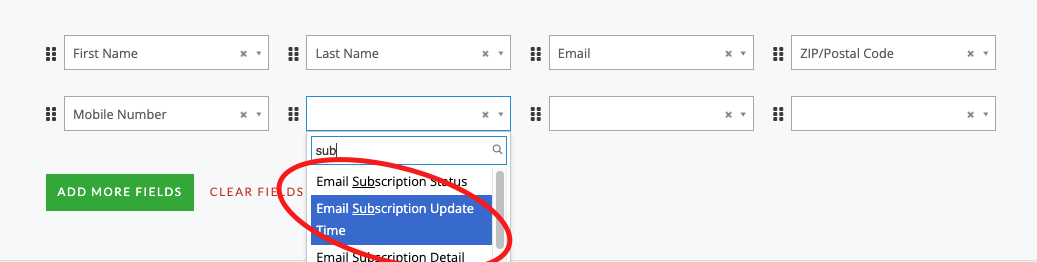](https://rebeltoolkit.extinctionrebellion.uk/uploads/images/gallery/2023-11/image-1700687004606.png)
#### Click 'SAVE AND GET RESULTS'
#### Remember to REFRESH
When you view reports you always need to 'refresh' to get the latest data. This is very important for a report like 'last 7 days'
[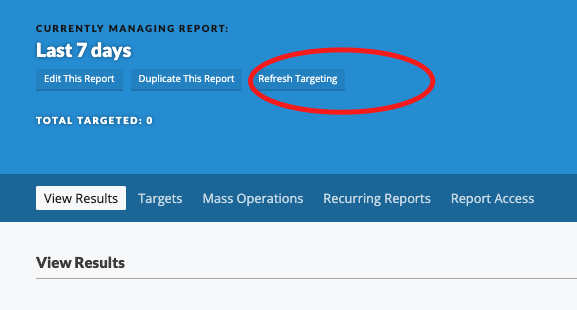](https://rebeltoolkit.extinctionrebellion.uk/uploads/images/gallery/2023-11/image-1700687102426.png)
#### Mass Operation and Recurring Reports
If you need support on these options, then please get in touch with the [Action Network Data Team](https://rebeltoolkit.extinctionrebellion.uk/link/634#bkmrk-page-title)
Note that, once you have created a report you will see a link in red, bottom right; CREATE AN EMAIL BASED ON THIS REPORT.
More 'targeting' advice on [this page about targeting emails](https://rebeltoolkit.extinctionrebellion.uk/link/1339#bkmrk-page-title).
# Monitor your forms or events
**You may want to [learn more about forms and events](https://rebeltoolkit.extinctionrebellion.uk/books/action-network-for-xr/chapter/events-forms-and-surveys)
before reading this page.**
Here are three ways to keep an eye on your sign up forms (or other data collection forms).
1. View the last 100 activists who signed up
2. Get an email every time someone uses your form/event
3. Make a report of all who have signed up on your form/event
#### 1. View the last 100 activists who signed up
Step 1: Go to the 'Actions' tab
[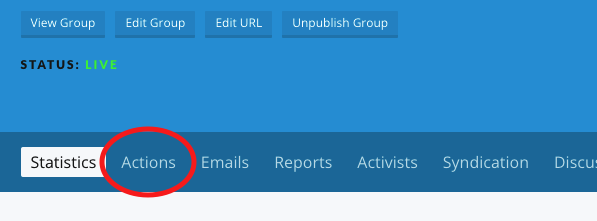](https://rebeltoolkit.extinctionrebellion.uk/uploads/images/gallery/2022-02/actions.png)
Step 2: Choose 'manage' next to your form
[](https://rebeltoolkit.extinctionrebellion.uk/uploads/images/gallery/2022-02/manage.png)
Step 2: Click form answers
[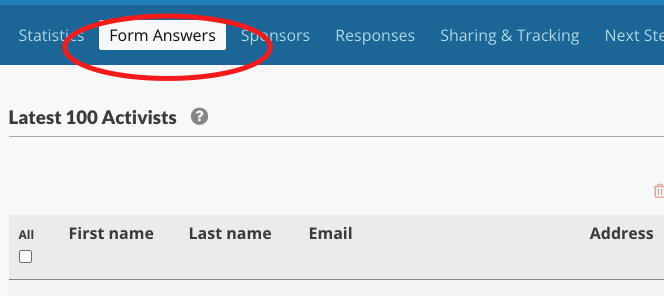](https://rebeltoolkit.extinctionrebellion.uk/uploads/images/gallery/2022-02/form-answers.png)
#### 2. Get an email EVERY time someone uses your form
Follow step 1 and 2 above
[](https://rebeltoolkit.extinctionrebellion.uk/uploads/images/gallery/2022-02/responses.png)
Step 3: Scroll down to the bottom and tick the box 'Send an email notification when someone submits the form', type in your email address, and click 'Save Responses'
[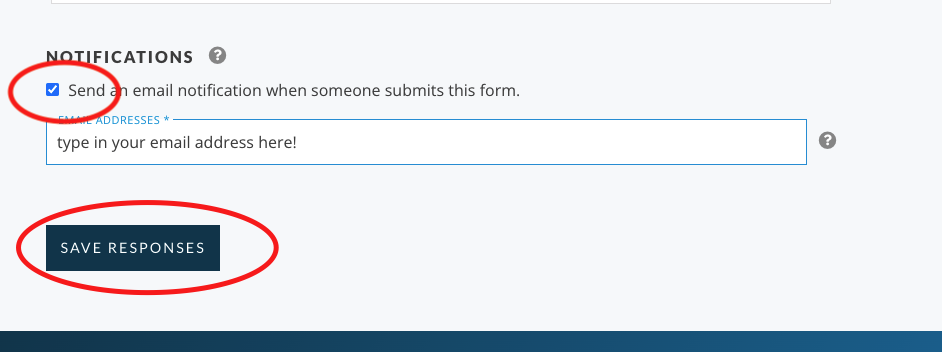](https://rebeltoolkit.extinctionrebellion.uk/uploads/images/gallery/2022-02/notifications.png)
#### 3. Make a report of all who have signed up
Step 1: Click on Report
[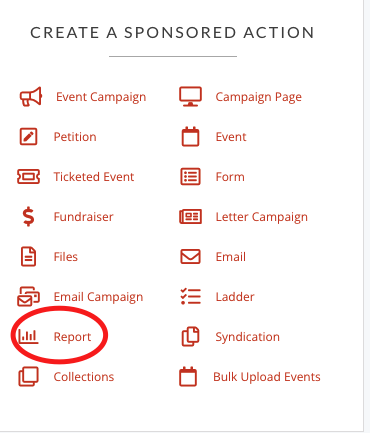](https://rebeltoolkit.extinctionrebellion.uk/uploads/images/gallery/2022-02/report.png)
Step 2: Give it a name
[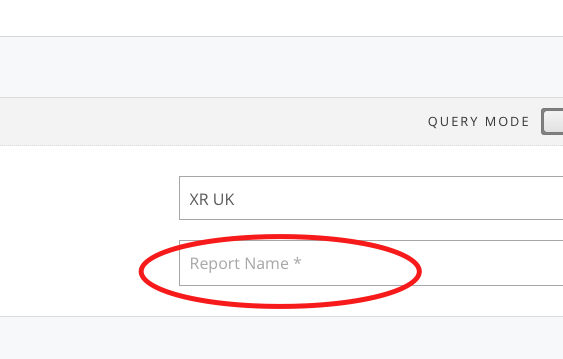](https://rebeltoolkit.extinctionrebellion.uk/uploads/images/gallery/2022-02/reportname.png)
Step 3: On the left hand 'Include' column find your report - just start typing its name into the field labelled 'Actions' and you should find it (ignore the number that just means in this case it's the 1925th form on the system!) - you just need to know what your form is called and search for that.
[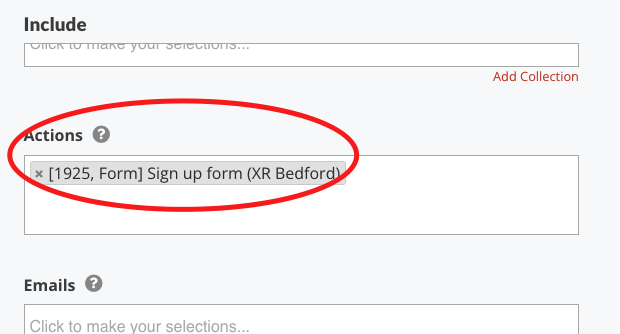](https://rebeltoolkit.extinctionrebellion.uk/uploads/images/gallery/2022-02/find-report.png)
Step 4: Click 'Save and select data' blue button on bottom right.
Step 5: Choose which fields you'd like to see in your report and what order you'd like to see them
Step 6: Click 'Save and get results' button
Remember if you come back to view this report another time - you have to _refresh_ to get the lastest information.
# Monitor new subscribers with a weekly report
This report will pick up all new subscriptions to your email list.
1. Click on 'Report'
[](https://rebeltoolkit.extinctionrebellion.uk/uploads/images/gallery/2022-02/report.png)
2. Give the report a name
[](https://rebeltoolkit.extinctionrebellion.uk/uploads/images/gallery/2022-02/reportname.png)
3. Scroll further down the left hand column and pick (for example) all sign ups in the last 7 days.
[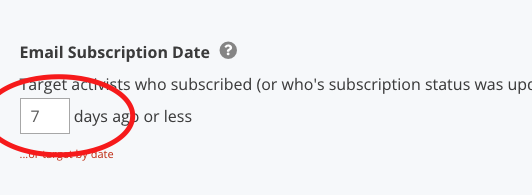](https://rebeltoolkit.extinctionrebellion.uk/uploads/images/gallery/2022-02/last7days.png)
4. Click 'Save and select data' blue button on bottom right.
5. Choose which fields you'd like to see in your report and what order you'd like to see them
7. Click 'Save and get results' button
Note : This may take some time to load!
8. Then set up a recurring report to be run automatically and emailed to you...
[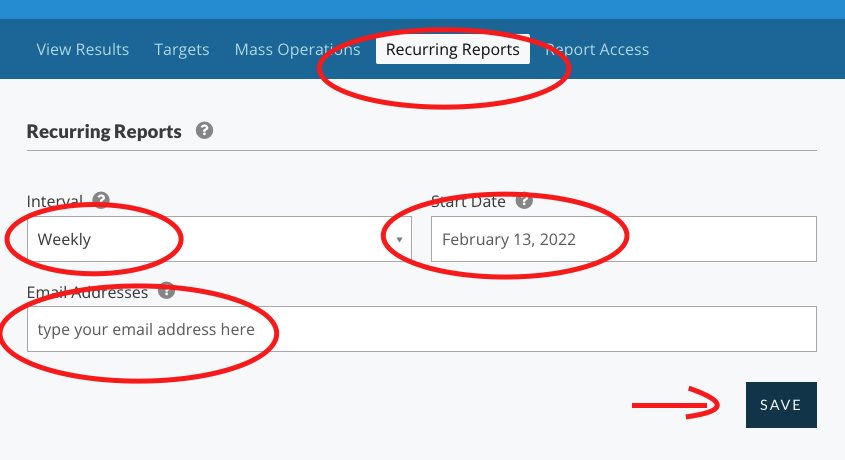](https://rebeltoolkit.extinctionrebellion.uk/uploads/images/gallery/2022-02/report-email.png)
# View Activist Tags
#### View which tags have been added to a email list subscriber
1. On the top menu - click **People** and from the drop-down menu and click on the work **Activists**.
2. Type in the name or email address of the person who you are enquiring about and click **SEARCH**.
3. If this person is on your email list they should now be listed below the search box and you can now click **VIEW RECORD**.
4. Then click on **Tags**.
Only 10 tags are shown at one time, so if the person has more than 10 tags, you need to click on the number 2 (or 3!) to see more of their tags.
#### Example : Has someone signed the volunteer agreement?
The tag you are looking for is:
##### `XR_May2021_Volunteer_Agreement`
**If they don't have this tag, you should ask them to sign the Volunteer Agreement here.**
# Events, Forms and Surveys
These are called 'actions' in Action Network jargon.
# What are event and forms for?
Events and forms are called 'actions' on Action Network.
**Why use them?**
They are a way of getting the subscribers on your list to interact and respond. Instead of sending them away from Action Network (e.g. to read a newspaper article or to sign up to a zoom) you keep them inside Action Network and therefore track responses.
You can use **forms** to do surveys, ask questions or collect more data on interests or skills.
You can use **events** for both in-person events with a physical location or for online talks, meetings, training etc.
If people fill in your form or event, you'll be able to see their response and learn more about the people on your list.
A list of useful [ready-made standard questions](https://rebeltoolkit.extinctionrebellion.uk/link/655#bkmrk-page-title) are available for you to use.
# Creating a form
Forms are for collecting extra information or feedback from your list. E.g
- asking people if they are interested in certain ongoing activities like 'arts', 'action planning', 'social media support'.
- a general shout out for people with any time to spare (giving some options)
- registering their interest in distributing leaflets (you might collect their phone number so you could contact)
#### To start a new form - start here
From the **_Create a sponsored action_** menu on the right hand side, choose **_Form_**
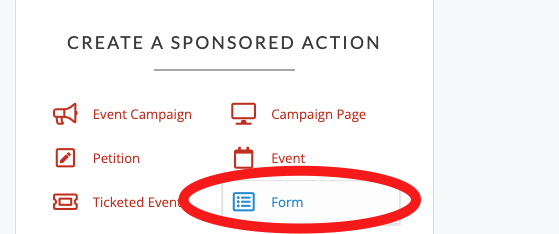
#### To edit a current form - start here
Click on **_Actions_** then either **_Manage_** for a published form OR **_Edit_** for a form still in draft. Follow the same instructions below, but obviously some things may have already been set up.
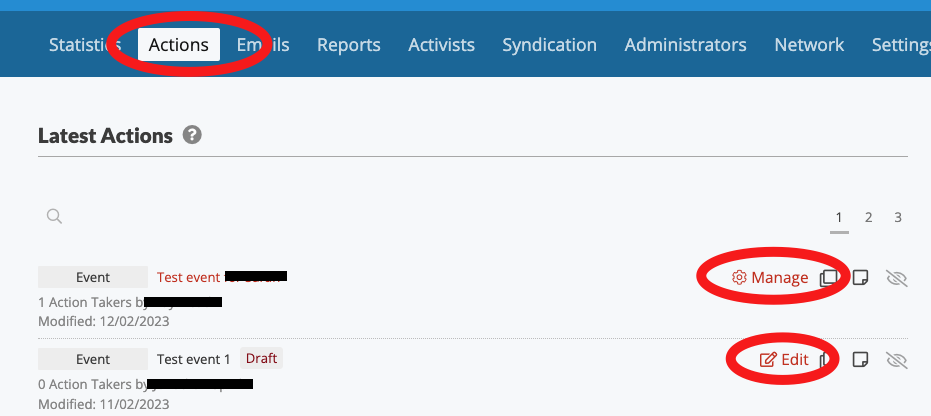
#### 1. Title and description
Give your form a short and clear title (and optionally a more descriptive different title for internal use only) and also a description/instructions written clearly for the person you want to fill in the form.
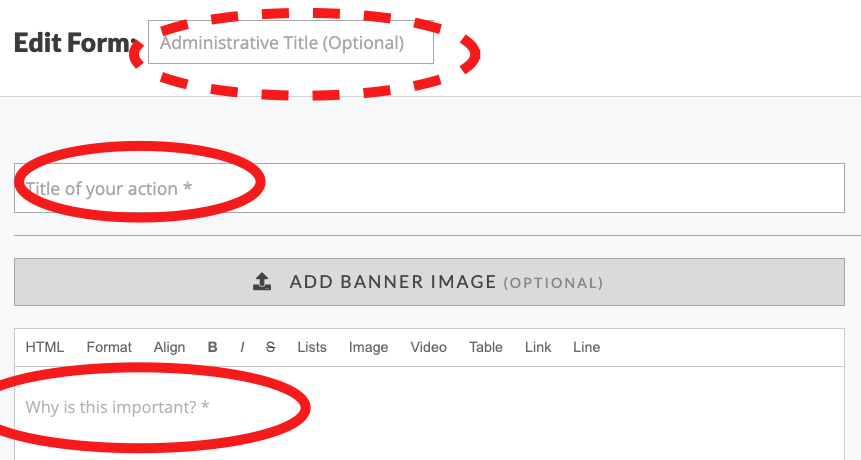
#### 2. More settings
You can let people know how many other people have taken the action of filling out the form by leaving the **_Progress Bar_** on, but usually this is turned off. Then you need a short **_Form Heading_** and at the is you can update the text that appears on the submit button depending on what kind of form this is. This could be e.g. 'Update', 'Submit Info' or 'Register'.
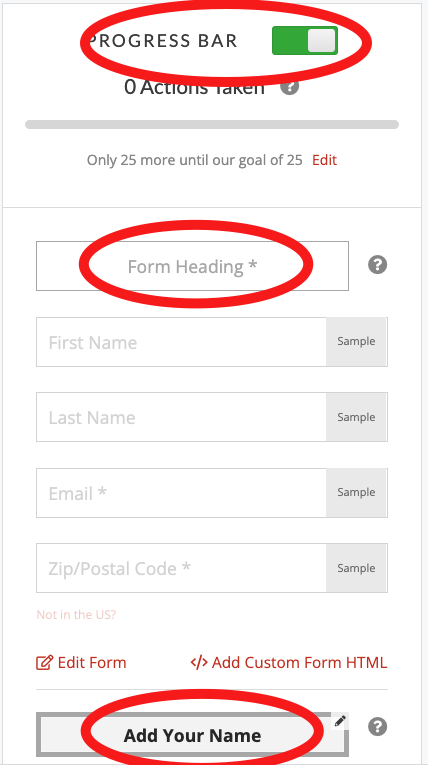
#### 3. Edit Form
Then click **_Edit Form_** (as seen just above), which takes you to a drag and drop type page to add or remove questions from your form.
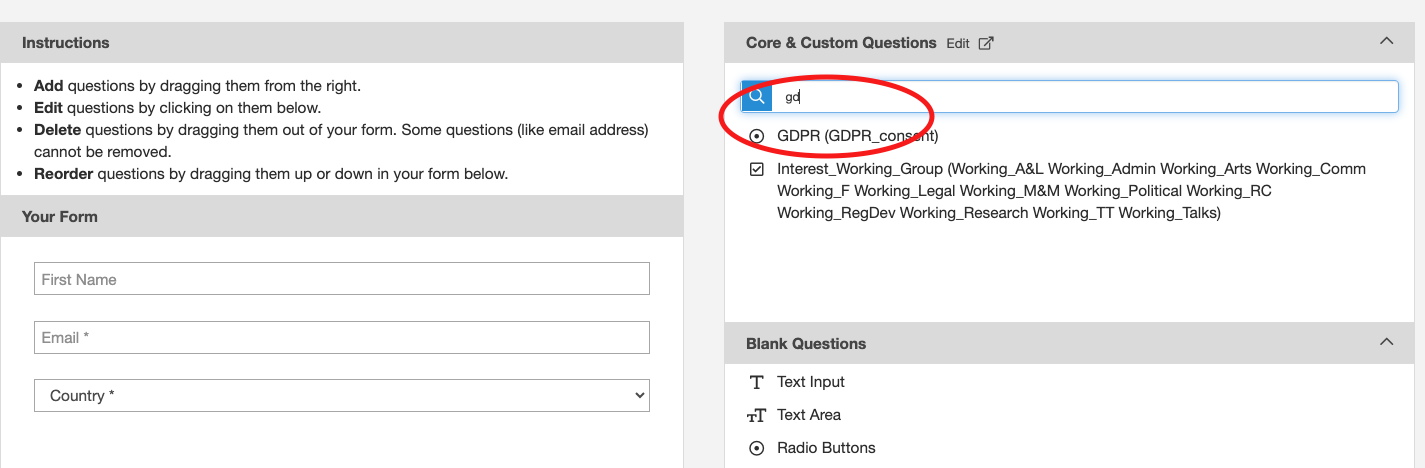
This part is hard to describe in words and images - so you need to just have a go. You can drag and drop any fields you don't want for your event (it's up to you). Just click on them and drag away from the left and let go.
In this example the surname and postcode have been removed and the GDPR field is being picked up and moved in to the form.
[](https://rebeltoolkit.extinctionrebellion.uk/uploads/images/gallery/2023-08/image-1693403673562.png)
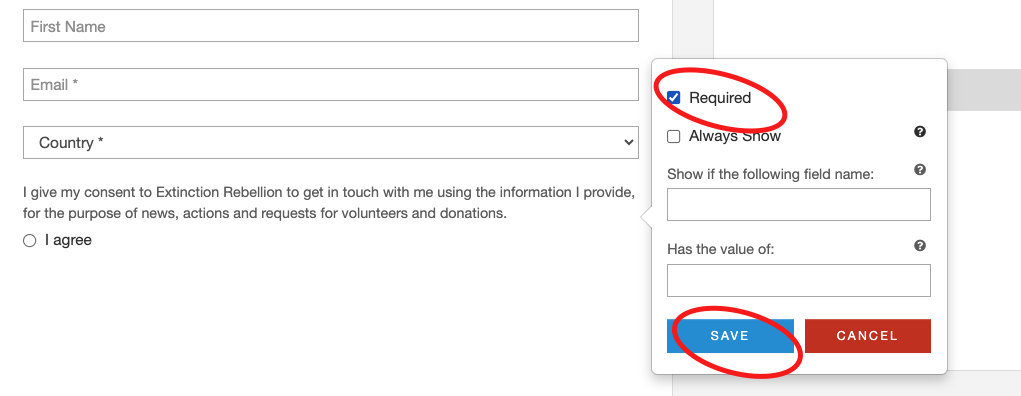
The fields can then be set to 'Required' if they are mandatory.
The GDPR consent field should always be set to 'Required'.
[](https://rebeltoolkit.extinctionrebellion.uk/uploads/images/gallery/2023-08/image-1693403719211.png)
NOTE: Historically all admins could create questions and we've ended up with hundreds of questions with lots of overlap. So we are documenting a [list of some standard XRUK questions](https://rebeltoolkit.extinctionrebellion.uk/link/655#bkmrk-page-title) that you can use.
You could also add your own questions at this stage, but note that the information will only be stored within the form answers, not with their activist record. It might be worth [requesting some training from the Action Network Data Team](https://rebeltoolkit.extinctionrebellion.uk/books/action-network-for-xr/page/training-request) to explain how all this works in more depth.
In the bottom right click 'SAVE AND PREVIEW' and 'SAVE AND GO TO NEXT STEP'.
#### 4. Thank You page
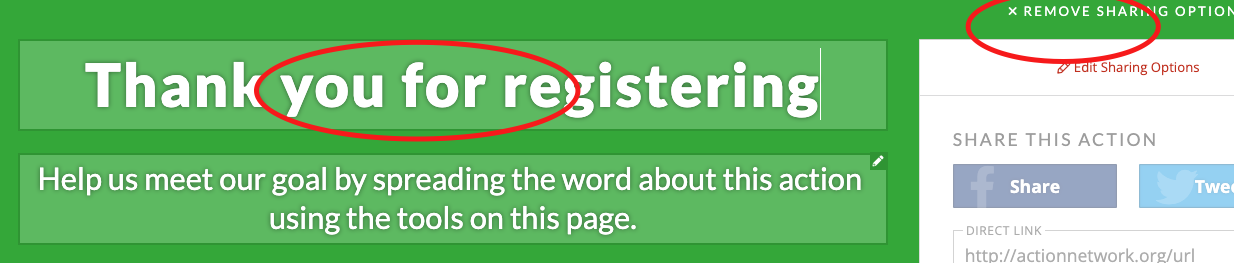
To keep things simple - turn off the sharing options (you can investigate this later), and change the title to something that suits your form.
#### 5. Write a short message
[](https://rebeltoolkit.extinctionrebellion.uk/uploads/images/gallery/2023-12/image-1701612636172.png)
#### 6. Click 'Save and Publish'
You form is now live, some last things to do are:
- add a nice page wrapper
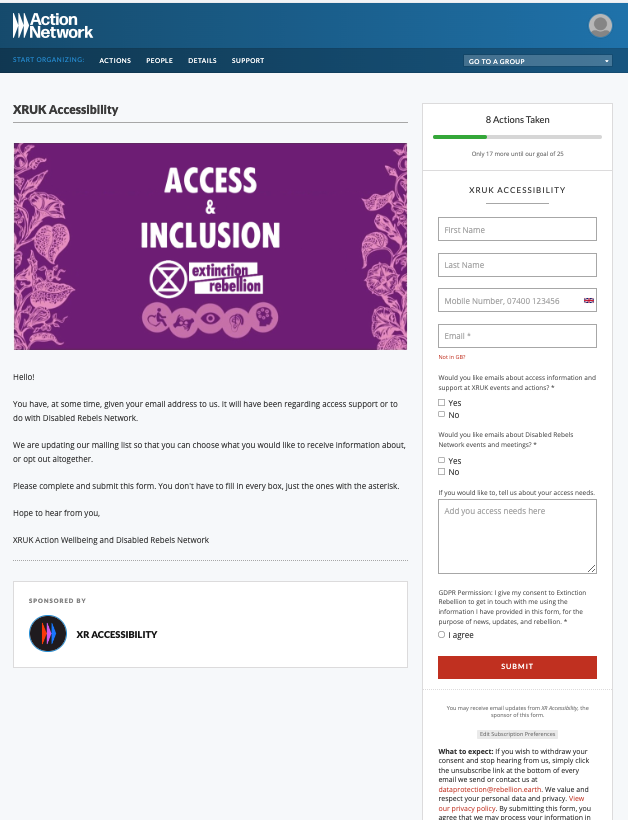
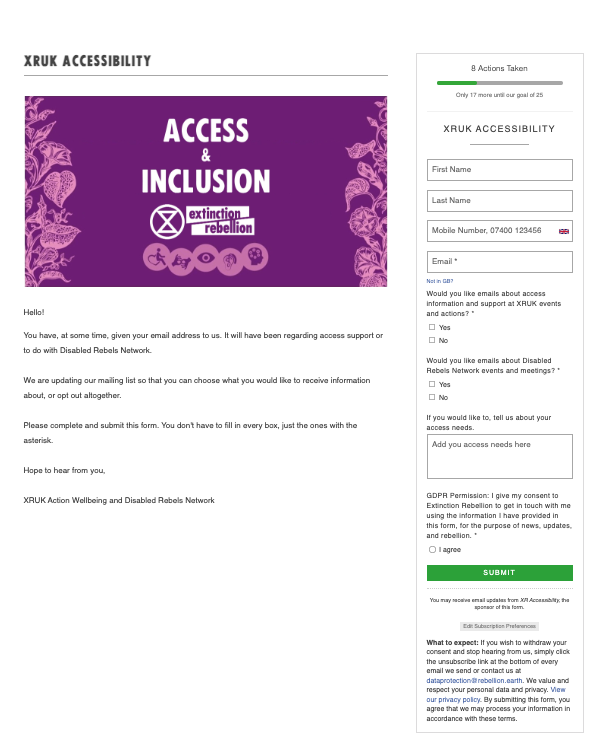
- The page wrapper gives your Event the 'XR Style' of font and colours and also this gets rid of all the Action Network branding at the top and bottom of the page. Swap from the default to the 'no logo' one.
- turn off or set up auto-reply emails (see next page)
- Click on 'Responses'
- As usual for an email - you might pick an appropriate wrapper ([contact data team](https://rebeltoolkit.extinctionrebellion.uk/books/action-network-for-xr/page/contact-the-action-network-data-team) if you don't have the XR Wrappers), set up your subject, from and reply-to email correctly.
- Click SAVE RESPONSES
#### 7. Promote
Lear more about [advertising your event]((https://rebeltoolkit.extinctionrebellion.uk/link/1591#bkmrk-page-title)) in regards to URLs, preview images and tracking where sign ups have come from.
If you need help with setting up a Form, please book a training or coaching session via our [Training Request Form](https://rebeltoolkit.extinctionrebellion.uk/books/action-network-for-xr/page/training-request), or [contact the Action Network Data Team](https://rebeltoolkit.extinctionrebellion.uk/link/634#bkmrk-page-title).
# Online events
#### Guidance below focuses on events that point to a zoom link.
The zoom meeting link should be one that doesn't require the person to register (otherwise they'll end up having to register on the AN event AND again on the zoom link).
There are benefits to using Action Network _events_ instead of sending people direct to a zoom registration. It enables you to easily see who has registered without having to download details from Zoom. Also it makes it easier to set up auto-reply emails, 24hr reminders and follow up emails.
**This page covers how to:**
- Create an Event (see below)
- Duplicate an existing Event - [watch this video](https://tube.rebellion.global/w/fyxX2i1X5X3o72pThcg6YE)
#### 1. Create an Event
[](https://rebeltoolkit.extinctionrebellion.uk/uploads/images/gallery/2023-08/image-1693402635162.png)
#### 2. Add the key details
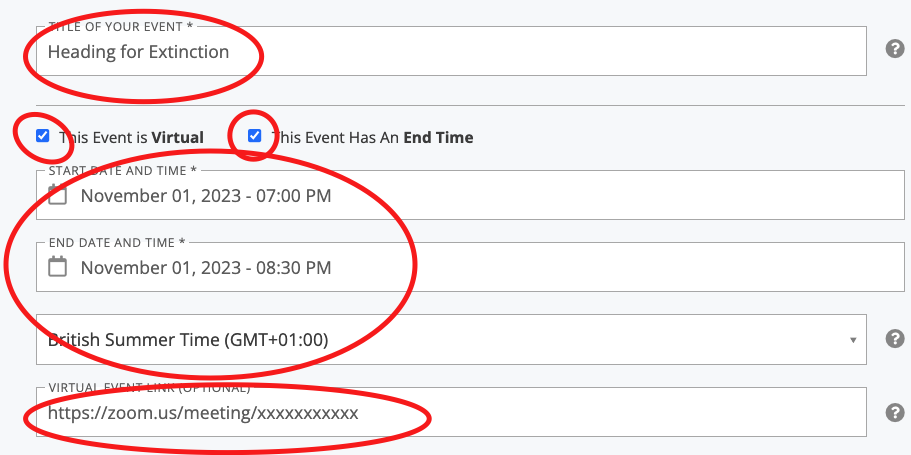
Title, start and end time, zoom link and timezone
- title - keep it short and clear
- zoom link - this should NOT be a registration link (otherwise people will have to register here on the event and then again when they click the zoom)
- timezone - if your event date is within British Summer Time (then pick that time zone - see above) - otherwise choose Greenwich Mean Time.
[](https://rebeltoolkit.extinctionrebellion.uk/uploads/images/gallery/2023-08/image-1693403065925.png)
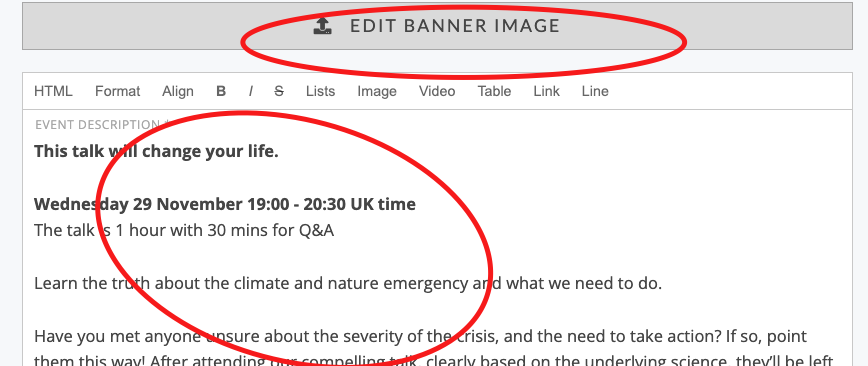
#### 3. Add some short text about the event and upload graphic
Write something a little shorter than you might do on a Facebook event or other advert - because by the time they've reached this registration page - they should already know something about what they are signing up for.
[](https://rebeltoolkit.extinctionrebellion.uk/uploads/images/gallery/2023-09/image-1694515631684.png)
#### 4. Then the graphic
[](https://rebeltoolkit.extinctionrebellion.uk/uploads/images/gallery/2023-08/image-1693403382221.png)
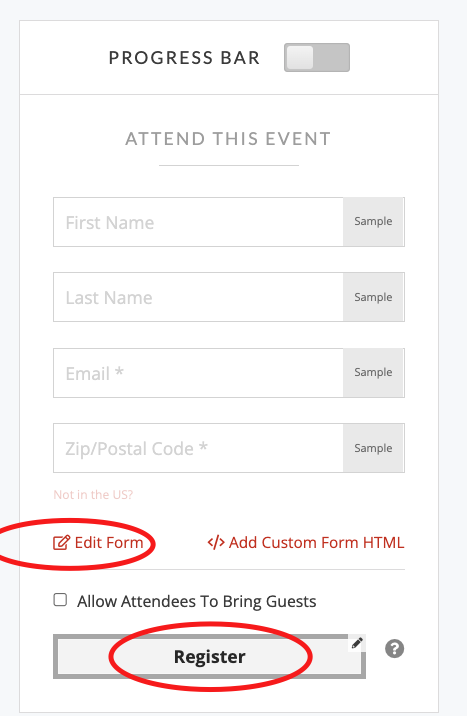
#### 5. Update the form data entry details
Check the button to 'Register' and then click 'Edit Form'
[](https://rebeltoolkit.extinctionrebellion.uk/uploads/images/gallery/2023-08/image-1693403465132.png)
#### 6. Choose data fields
This part is hard to describe in words and images - so you need to just have a go. You can drag and drop any fields you don't want for your event (it's up to you). Just click on them and drag away from the left and let go.
In this example the surname and postcode have been removed and the GDPR field is being picked up and moved in to the form.
[](https://rebeltoolkit.extinctionrebellion.uk/uploads/images/gallery/2023-08/image-1693403673562.png)
The fields can then be set to 'Required' if they are mandatory.
The GDPR consent field should always be set to 'Required'.
[](https://rebeltoolkit.extinctionrebellion.uk/uploads/images/gallery/2023-08/image-1693403719211.png)
NOTE: Historically all admins could create questions and we've ended up with hundreds of questions with lots of overlap. So we are documenting a [list of some standard XRUK questions](https://rebeltoolkit.extinctionrebellion.uk/link/655#bkmrk-page-title) that you can use.
You could also add your own questions at this stage, but note that the information will only be stored within the form answers, not with their activist record. It might be worth [requesting some training from the Action Network Data Team](https://rebeltoolkit.extinctionrebellion.uk/books/action-network-for-xr/page/training-request) to explain how all this works in more depth.
In the bottom right clock 'SAVE AND PREVIEW' and 'SAVE AND GO TO NEXT STEP'.
#### 7. Thank You page
To keep things simple - turn off the sharing options (you can investigate this later), and change the title.
[](https://rebeltoolkit.extinctionrebellion.uk/uploads/images/gallery/2023-09/image-1694515310192.png)
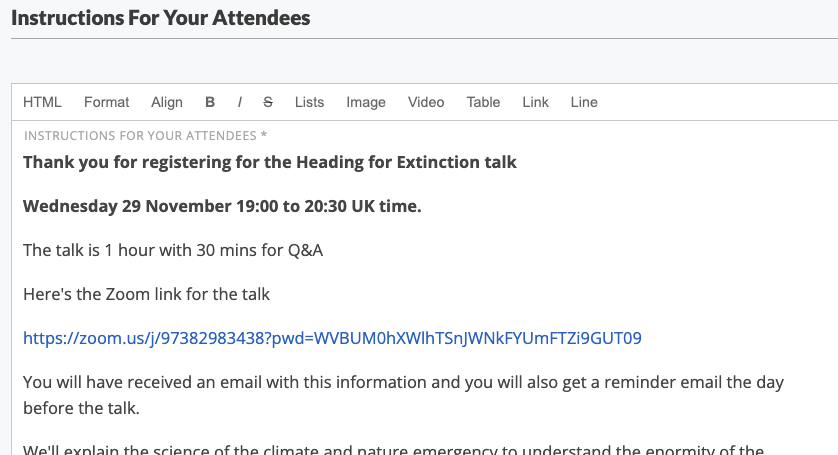
#### 8. Also you can write a message here e.g.
[](https://rebeltoolkit.extinctionrebellion.uk/uploads/images/gallery/2023-09/image-1694515680946.png)
#### 9. Click 'Save and Publish'
You event is now live, some last things to do are:
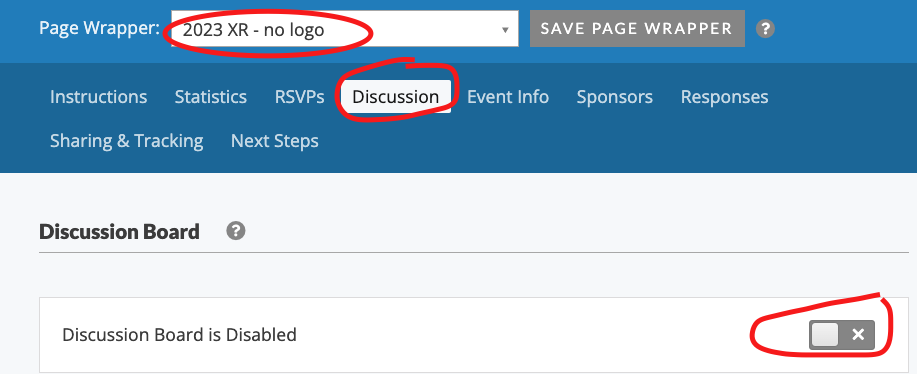
- add a nice page wrapper
The page wrapper gives your Event the 'XR Style' of font and colours and also this gets rid of all the Action Network branding at the top and bottom of the page. Swap from the default to the 'no logo' one.
- turn the discussion board off
Click on Discussion and toggle off.
[](https://rebeltoolkit.extinctionrebellion.uk/uploads/images/gallery/2023-09/image-1694516231328.png)
- set up auto-reply emails (see following page)
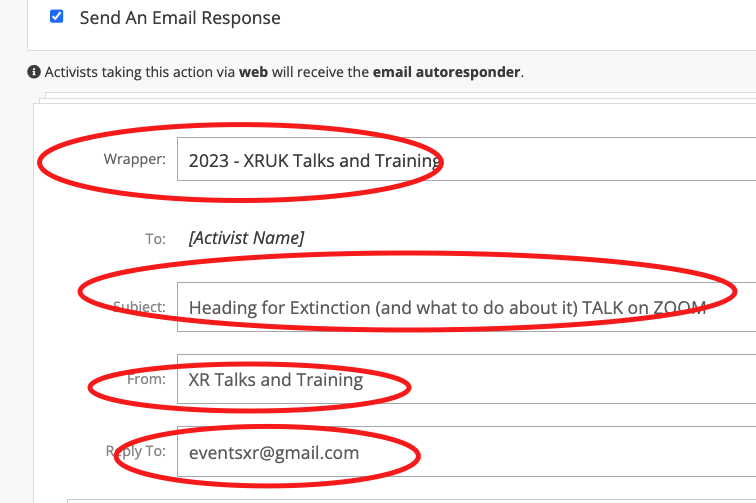
- Click on 'Responses'
- As usual for an email - you might pick an appropriate wrapper ([contact data team](https://rebeltoolkit.extinctionrebellion.uk/books/action-network-for-xr/page/contact-the-action-network-data-team) if you don't have the XR Wrappers), set up your subject, from and reply-to email correctly.
[](https://rebeltoolkit.extinctionrebellion.uk/uploads/images/gallery/2023-09/image-1694516432119.png)
- Then write the content of the email. Some of the default things on offer aren't very clear, so here is an example of a clear email.
[](https://rebeltoolkit.extinctionrebellion.uk/uploads/images/gallery/2023-09/image-1694516538117.png)
- You can copy the same email or something slightly different for the 24hr before reminder email.
- Click SAVE RESPONSES
#### 10. Promote
Lear more about [advertising your event]((https://rebeltoolkit.extinctionrebellion.uk/link/1591#bkmrk-page-title)) in regards to URLs, preview images and tracking where sign ups have come from.
# In-person events
The guidance for creating an in-person event is very similar to [creating an online event](https://rebeltoolkit.extinctionrebellion.uk/link/967#bkmrk-page-title) - but in step 2 you just need to give the physical location of the event.

If you need help on this, please book time on our [Training Request Form](https://rebeltoolkit.extinctionrebellion.uk/books/action-network-for-xr/page/training-request), or [contact the Action Network Data Team](https://rebeltoolkit.extinctionrebellion.uk/link/634#bkmrk-page-title).
# Surveys
Surveys were launched as a new feature from Action Network in 2024, they come under the 'action' menu, just as 'events' and 'forms' do.
Guidance from Action Network on the
survey feature is here.
Unless you are a member of the XRUK Action Network Data Team (or have specifically requested 'custom field' permissions) then all the data you collect in these surveys will be 'action-only' fields.
##### What are action-only fields?
These are perfect for surveys as this mean the data stays within the survey itself and not tied to an activist's record. This is usually preferable, as surveys often take a snapshop in time. e.g. feedback from an action/training or a temperature check on a current issue/decision.
When you give your survey questions field names, e.g. Survey2024_question1 they will be stored with a prefix, so will look like 'can2_action_field_Survey2024_question1'. This is important to know if you need to trigger further pages or questions from the answer in an earlier question.
##### More support
If you want to use surveys to collect more long-term information on an activist, or would like someone to support you making a survey for the first time, then contact the [Action Network Data Team](https://rebeltoolkit.extinctionrebellion.uk/books/action-network-for-xr/page/contact-the-action-network-data-team) and they can set up a question for you.
# Page Wrappers
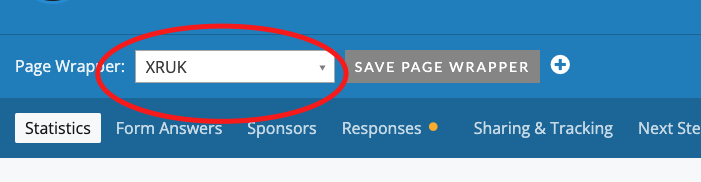
The default for any new event or form is for it to have Action Network branding at the top and the bottom. You can easily remove this by applying a 'page wrapper'. There is an XR wrapper created for you to use (with and you apply it once your event or form is published by going to 'manage' the event/form and you'll see the open to apply the wrapper...
[](https://rebeltoolkit.extinctionrebellion.uk/uploads/images/gallery/2024-09/image-1727201601311-05-56.png)
#### This changes your form from looking like this:
[](https://rebeltoolkit.extinctionrebellion.uk/uploads/images/gallery/2024-09/image-1727201773857-15-27.png)
#### To looking like this:
[](https://rebeltoolkit.extinctionrebellion.uk/uploads/images/gallery/2024-09/image-1727201788071-15-40.png)
#### Viewing on a phone
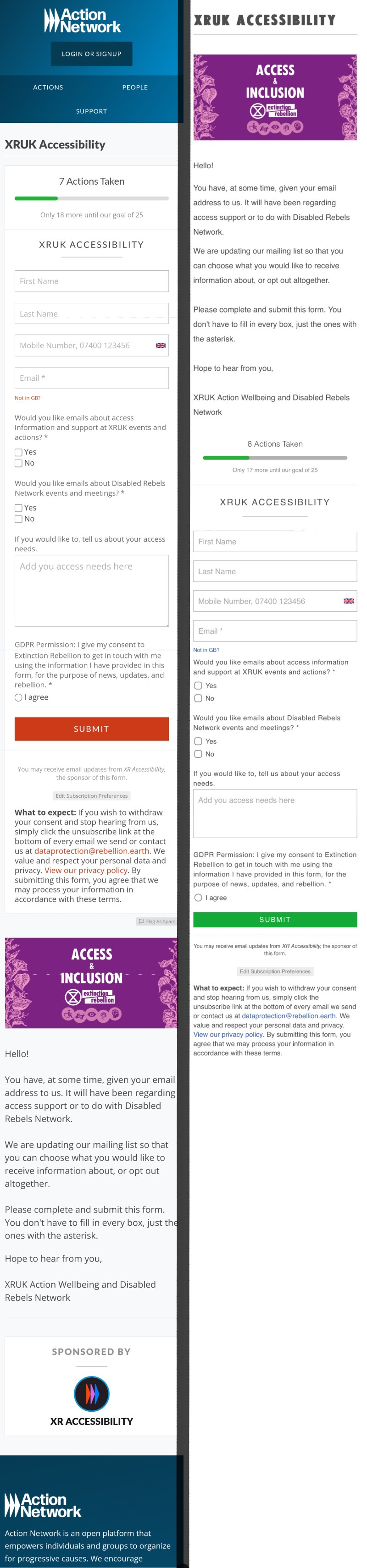
The effect of a page wrapper is even better when viewing on a phone, because it removes very distracting 'login or sign up' at the top. This option is attempting to get someone to sign up for an Action Network account - which is entirely unnecessary and a huge distraction from your own action/form/event sign up.
[](https://rebeltoolkit.extinctionrebellion.uk/uploads/images/gallery/2024-09/image-1727203030773.jpg)
# Useful fields and questions
All these questions are available to all groups using the the XRUK network
When you [use these questions in your forms/events](https://rebeltoolkit.extinctionrebellion.uk/link/1308#bkmrk-page-title) the data you collect will be added to subscribers record.
You can also create your own questions in a form or event, but these will just be held within the 'action' itself (this is more suited to temporary information e.g. to ask people what shifts they could cover when stewarding for an action with options of 12-2pm,2-4pm, 4-6pm)
If you need help on this, please book time on our [Training Request Form](https://rebeltoolkit.extinctionrebellion.uk/books/action-network-for-xr/page/training-request), or [contact the Action Network Data Team](https://rebeltoolkit.extinctionrebellion.uk/link/634#bkmrk-page-title).
#### Commonly used questions
If you have an idea for a question that could be useful system-wide then [get in touch](https://rebeltoolkit.extinctionrebellion.uk/link/634#bkmrk-page-title). If you feel like you need the freedom to create your own questions, [read more here](https://rebeltoolkit.extinctionrebellion.uk/link/514#bkmrk-page-title)
#### QUESTIONS
A shortlist of most useful questions. These are questions that can be added to forms or events.
- **GDPR_UK** - For use on UK forms, it add "GDPR_Policy_V3" to the field 'GDPR_consent'. Essential for every form and should be set as 'required'.
- **Which Region** - Drop down menu of options of every nation or region and an 'other/nomad' category too. This adds the chosen option to a field called 'Region'. _Apologies for this question and field being just called 'Region' and not NationRegion._
- **Mattermost Handle** - This is a free text field of the same name, for someone to enter their mattermost handle.
- **Event Attended** - This is a free text field that you could use on forms you set up for helping you with data entry of paper sign up sheets. Data added to the field 'event_attended'.
- **Local XR Group 2024 dropdown** - Useful for UK, Action Support or other UK-wide lists, to pick up information on the person's local group. Note: nothing happens when they fill this in, there is no coding that automatically subscribes them to that LG email list. It's just for information only.
- **Principles and Values** - This give a link to the P&Vs on the website and asked for use to tick if they agree with them. Then it tags their activist record with 'P&Vs_agreed'.
#### CUSTOM FIELDS
A shortlist of most useful custom fields. You can view the data in custom fields via reports or by looking at an individual activist record.
- **WestminsterConstituency**, **WestminsterMemberOfParliament**, **WestminsterParty** - these contain a person's UK Parliamentary constituency, the name of their MP and their MP's party. These fields are based on the person's postcode, so are only available where people have given us their postcode.
This data is maintained by the Action Network Data Team and updated periodically. It was last updated in February 2025 and contains the results of the 2024 general election. These fields are not available for anyone who signed up after February 2025.
If you would like these fields to be updated, or if you would like data from the Scottish, Welsh or Northern Irish parliaments to be added, please [contact the Action Network Data Team](https://rebeltoolkit.extinctionrebellion.uk/link/634#bkmrk-page-title).
- **Region** - this data is added via a project to the whole user database in relation to what LG a person was signed up to and also collected via user input, in particular on volunteer role forms.
- **Local XR Group** - this data comes from user input via the dropdown question (listed above).
- **dt_subscribed_child_groups** - this field gives you a list of the actual email lists within our XRUK network that the person is subscribed to (this is not 'LIVE' data, but gets updated regularly).
[Contact the Action Network Data Team](https://rebeltoolkit.extinctionrebellion.uk/link/634#bkmrk-page-title) if you are looking for a question to use on your form that you can't find.
# Advertising your event
### URLs, adding preview graphics and tracking sign ups
#### Links to use when advertising your event or form
After you've set up your event (or form) - you can find it's URL which you can see when clicking 'View Event'.
[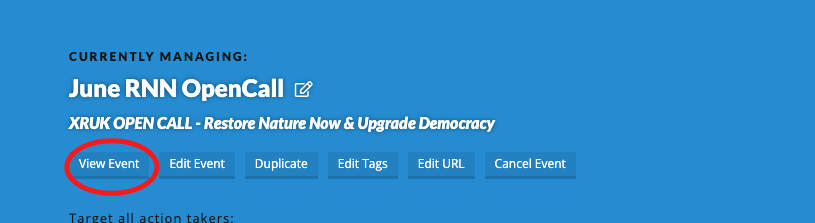](https://rebeltoolkit.extinctionrebellion.uk/uploads/images/gallery/2024-06/image-1718488197181-49-33.png)
You can use this link to adveritise your event.
**For Action Network emails** use the full link:
**https://actionnetwork.org/events/yourevent**
But beware of copying links out of an email you've been sent - some [info on a major issue](https://rebeltoolkit.extinctionrebellion.uk/books/action-network-for-xr/page/action-network-id-attached) if you copy links from one email to another.
**For sharing on social media or Telegram/WhatsApp chats etc**
You can [turn this URL in to a shortlink](https://xrb.link/) - but it is not recommended to use this shortlinks within AN emails, just hyperlink the orginal URL.
#### Preview graphics
This is the image that will automatically show through to channels such at Telegram or WhatsApp as a kind of thumbnail image when you post the URL link.
The image preview for your form comes from the **'Sharing and Tracking'** tab. If you add an image to the Facebook sharing information. It's particularly important to check this if you've duplicated a form, as the previous information/image will still be in this 'Facebook' sharing info.
**Click 'SAVE OPTIONS' after updating.**
Here is some advice for if you've already shared a link on Telegram before fixing this and need to [refresh the graphic preview](https://rebeltoolkit.extinctionrebellion.uk/link/1727#bkmrk-page-title).
#### Tracking
**If you are interested in knowing WHERE your signs up have come from then read on**
You can add a paramater called 'source' to the end of your URL and using the example above, this would look like **https://actionnetwork.org/events/yourevent?source=UKemail**
The source parameter can then be seen when you are 'managing' your event by looking at the 'RSVPs'.
[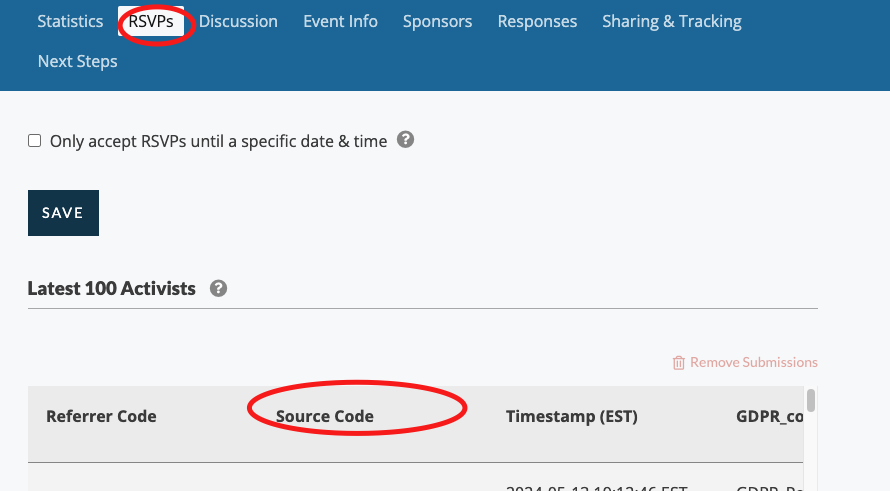](https://rebeltoolkit.extinctionrebellion.uk/uploads/images/gallery/2024-06/image-1718488613332-56-35.png)
If you'd like monitor the effectiveness of advertising between your email list, facebook, website and your group chat you could use different source codes.
?source=email
?source=chat
?source=facebook
?source=website
# Pre-fill data in a form
This will only work with **custom fields** in your form (not core fields or action-only fields)
- If the field name has spaces in it, then you need to use %20 in the URL for each space.
- If the URL is case sensitive, e.g. use Region, not region if you were to pre-fill that particular field
A current example of this is the volunteer form for Upgrade Democracy and here is a URL that allows for the first question to be auto-filled.
The custom field is `ASUD_PrefRole` and the url mechanism is
`source=ASUD_PrefRole=Steward`
Here is the full URL (with an extra source parameter showing the person is signing up from the Rebel Toolkit):
`https://actionnetwork.org/forms/upgrade-democracy-crew-signup?source=RTUDCrew&ASUD_PrefRole=Steward&`
You can see this and various other pre-selected choices on the Upgrade Democracy [volunteering page](https://rebeltoolkit.extinctionrebellion.uk/books/upgrade-democracy/page/volunteer-roles-at-upgrade-democracy)
[More information on custom fields is here](https://rebeltoolkit.extinctionrebellion.uk/link/655#bkmrk-page-title)
# Known Issues and Error Messages with Action Network
# Sending to your full list is not best practice
This new warning message is documented on the [Targeting an email](https://rebeltoolkit.extinctionrebellion.uk/link/1339#bkmrk-page-title) page.
# Email fails domain authentication
Error message seen, sometimes in conjunction with an email going in to junk email.
**'This email has failed its domain's authentication requirements. It may be spoofed or improperly forwarded!'**

##### How you would notice
You've drafted your email and send a test to your own email (protonmail.com is particularly sensitive to this error), and you have this error message shown above. Your test email may have also gone into your Junk/Spam folder
##### Reason
Something wrong with the reply-to email. In particular [proton.me email addresses are not recommended](https://rebeltoolkit.extinctionrebellion.uk/link/968#bkmrk-page-title)
##### Temporary fix
Try sending another test with noreply@extinctionrebellion.uk in the 'Reply-to Email' field. If this works - then that is a sign that the system (or the internet!) doesn't like your reply-to email address.
##### Permanant fix
Use a different reply-to email address. If you are part of an XRUK central team, campaign group or local group you can [apply for an xxxx@extinctionrebellion.uk email address](https://rebeltoolkit.extinctionrebellion.uk/link/1063#bkmrk-page-title) which should work much better for you as we have registered 'extinctionrebellion.uk' with Action Network as a valid 'domain' to stop this kind of problem.
# Action Network ID attached
#### Don't use links that you've copied out of other emails
This is **very important**: links copied from other Action Network emails contain tracking links; people's personal Action Network ID's etc.
The error you get is a pop-up box list this...

#### The cause
Using this example:
https://www.surveymonkey.co.uk/r/CZZX5DN?link_id=2&can_id=071ccc07c7xxxxxxxxxxxxxd003
If you copied the link from an Action Network email that you had previously received - the link will have your personal ID attached (the **&can_id=xxx** part). You don't need any of the information after the question mark.
#### The solution
In this case you would just use https://www.surveymonkey.co.uk/r/CZZX5DN
This goes for other links with user info embedded - eg. some Google links or links to Facebook or a fundraiser. Just cut out the question mark and everything after, make sure the links still works and just use that instead.
# Photos not loading
Note : Protonmail seems to be the most sensitive to errors like this, so sending [test] emails to a protonmail address is a good way to test for errors.
### Filename glitch
Glitch noticed Apr 2022 : If photos look like they've been added to your email, but when you do a test email they appear blank with only the alt-text showing.... then check the file name.
It was found that file names with a + sign were being problematic.
##### Fix:
Change the filename to something simpler. Add the image to the email again and do another test to yourself to check.
### Size glitch
It is good practice to optimise your images within an email. Smaller files load faster and have a smaller carbon footprint! Also it has been noted that some email providers aren't loading large images. You can reduce the size of your graphics and images, preferably to 600px or 700px wide. You can either do this in graphics software before you upload OR you can do this after you've uploaded to your Action Network email. The instructions on this are [on this page here](https://rebeltoolkit.extinctionrebellion.uk/link/706#bkmrk-page-title).
### Alt text glitch
Don't use quotation marks in the alt-text. This makes images fail to load in protonmail (and maybe other emails too)
### Glitch in html style emails
Don't copy and paste images in to emails, this will cause problems for a lot of your email recipients who's email provider won't interpret what you've pasted as an image and instead print 100s of rows of code instead.
[Read the guidance here](https://rebeltoolkit.extinctionrebellion.uk/link/706#bkmrk-html-email-interface) on how to add safetly to an email written in the html mode.
# Telegram, Signal, WhatsApp join links
**The very best thing to do to avoid glitches** like the ones described below is to ALWAYS send yourself test emails before sending to a whole email list.
These errors change over time, so testing is your best friend!
Be sure to read your test emails both **on a computer AND a phone.** Then click on every link in your email to check it's working.
#### Telegram links in emails
It has been noted that Telegram invite links (ones with + signs in them, not the public ones like Rebellion Broadcast, they are fine) don't work when reading an email on a phone.
Current work-around (which goes against advice about shortlinks!) is to turn the Telegram join link in to an short link, before then hyperlinking it in an email.
e.g.
- Rebel Ringers Broadcast : [https://t.me/+S2XAo_FGnVZiYTlk](https://t.me/+S2XAo_FGnVZiYTlk)
- Short link to use in email : [https://xrb.link/z5l9iA](https://xrb.link/z5l9iA)
- Short links can be [created here](https://xrb.link/)
#### Signal links in emails
Fix for signal join links not working is to add the suffix of **?no_rewrite=true** to the end or the URL - which stops the Action Network tracking link and seems to help.
- A signal chat invite link looks like this : https://signal.group/#CjQKI.....xxFRJ
- Adding the suffix : https://signal.group/#CjQKI.....xxFRJ?no_rewrite=true
#### WhatsApp links in emails
No known issues.
# Not receiving emails from XR?
There may be a few reasons why this might happen and the fix is different for different cases.
#### Not receiving ANY emails from XR?
Please check your junk email folder, and if you find emails in there do some or all of the following (email software is different, so here are a few options):
- move email from junk to your inbox
- mark as 'not spam'
- add the senders email address to your contacts. For XRUK emails this is noreply@extinctionrebellion.uk
If this doesn't help, then please [contact the Action Network Data Team](https://rebeltoolkit.extinctionrebellion.uk/link/634#bkmrk-page-title). We can check to see if there is a problem with your subscription and may be able to help.
#### Problems when signing up for events or using other forms
**1 - Check junk email**
The first step is always to check your junk email. If there isn't anything in there, then one reason could be the settings in your Action Network account. You may have created an account years ago and forgotten, so this is how you check...
**2 - Log in to Action Network**
If you know your password, log straight in and jump to step 3.
If you aren't sure if you have an account, try the 'Forgot your password?' link. This will either
- send you an email to reset (do this and jump to step 3)
- gives a message "Oops! You still haven't created an account in Action Network." (if this is the case then this is not the solution to your issue - you should [contact the Action Network Data Team](https://rebeltoolkit.extinctionrebellion.uk/link/634#bkmrk-page-title))
**3 - Then check your settings**
Click on the icon in very the top right of the screen and then click 'Edit Subscriptions'
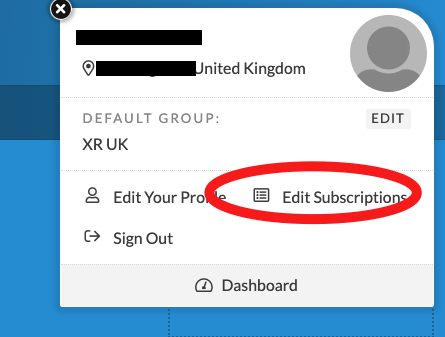
On the right of the screen is some information about 'Transactional Emails' - scroll down and check to see if you are opted-in or out.
If you have deliberately or accidentally opted-out, then click this button to opt-in again. This should fix your issues.
[](https://rebeltoolkit.extinctionrebellion.uk/uploads/images/gallery/2024-02/anoptin.png)
# Advanced
Extra information for people wanting to dig a little deeper in to what Action Network is capable of.
# Giving someone admin access
The following instructions are aimed at people who are already Admins (and have the permission level of 'Group Access'). If you feel like you should have this ability then contact the [Action Network Data Team](https://rebeltoolkit.extinctionrebellion.uk/link/634#bkmrk-page-title).
So if you are still reading - you are probably someone that has been using AN for a while and now would like to give another person Admin access to your AN email list.
##### Step One
Make sure they've signed the [volunteer agreement](https://actionnetwork.org/forms/xr-data-protection-agreement-2).
You can check they have by looking at their activist record* and noting that they have the tag **XR_May2021_Volunteer_Agreement**.
*You can find an activist quickly by using the top menu **People** then choosing **Activists** and entering their email address to find them.
##### Step Two
Give them access by clicking on 'Administrators' (find this menu item along the middle blue bar of options) - click '+ Add'.
[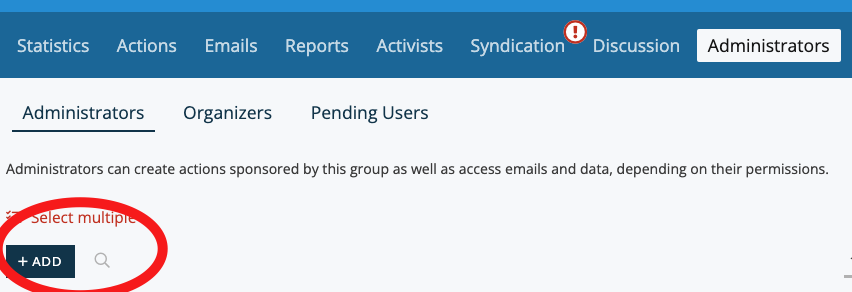](https://rebeltoolkit.extinctionrebellion.uk/uploads/images/gallery/2023-12/image-1701426187863.png)
Then type in their email address, click 'Send Invite'. They will be sent and email and they are immediately added as an 'Organiser'.
##### Step Three
Organiser doesn't allow anyone to do anything useful - so immediately promote them to 'Admin' by clicking 'Make User Admin', then you will be prompted to pick the permission to give to someone.
[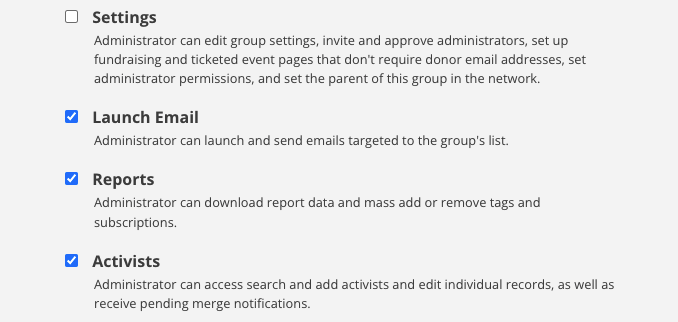](https://rebeltoolkit.extinctionrebellion.uk/uploads/images/gallery/2022-02/permissions.png)
If you just want them to be able to see and report on current activists on the list, then choose 'reports' and 'activists'. If you want them to be able to send out emails to the list, then also add 'Launch Email'.
Only give them the 'settings' permissions if you think they will need to make other people admins on a regular basis. The other permissions lower down the list are not normally required.
##### Step Four
Connect them to this [Rebel Toolkit book](https://rebeltoolkit.extinctionrebellion.uk/books/action-network-for-xr).
Add them to the two mattermost channels for support (see [here](https://rebeltoolkit.extinctionrebellion.uk/books/action-network-for-xr/page/contact-the-action-network-data-team) for those links).
Give them some training yourself, get them to [request training](https://rebeltoolkit.extinctionrebellion.uk/link/650#bkmrk-page-title) or ask the [Action Network Data Team](https://rebeltoolkit.extinctionrebellion.uk/link/634#bkmrk-page-title) for help.
# Using and exporting data
Occasionally, you may wish to use data outside of AN, for example, to make a list of phone numbers available to a trusted team of volunteers to make some calls.
The basic rule for this is that it's always better to keep data within Action Network. Below we explain why that's the case, and suggest some ways to share data with your team without downloading it to your own computers.
#### Why does this matter?
Action Network is designed to keep rebels' data secure. It uses a combination of security measures including data encryption, regular software updates, firewalls and scanning tools which makes it a much safer online space than a domestic computer.
Every time you download Rebels' data to your own computer, there's an increased risk that it can be accessed or leaked. For that reason, we'd strongly encourage you to follow some simple principles in using data outside Action Network:
- Necessity: Is there a way to achieve the same thing whilst keeping data inside Action Network?
- Relevance: Only download the details you actually need. For example, if you're phoning round to encourage people to get involved in a demonstration, it's likely you'll only need their first name and telephone number.
- Duration: If you do need to download data, try to keep it for the minimum time necessary. Keep it in a single location, share it only with trusted people, and when you're finished make sure it's deleted and removed from your recycle bin.
#### Sharing data without downloading
In Action Network, [build a report](https://rebeltoolkit.extinctionrebellion.uk/books/action-network-for-xr/page/create-reports-on-action-network) to identify the data you need. Remember to only include relevant fields.
On the lowest blue toolbar, select 'Report Access' and use the Email Invitation box to invite others to view the data within Action Network.
[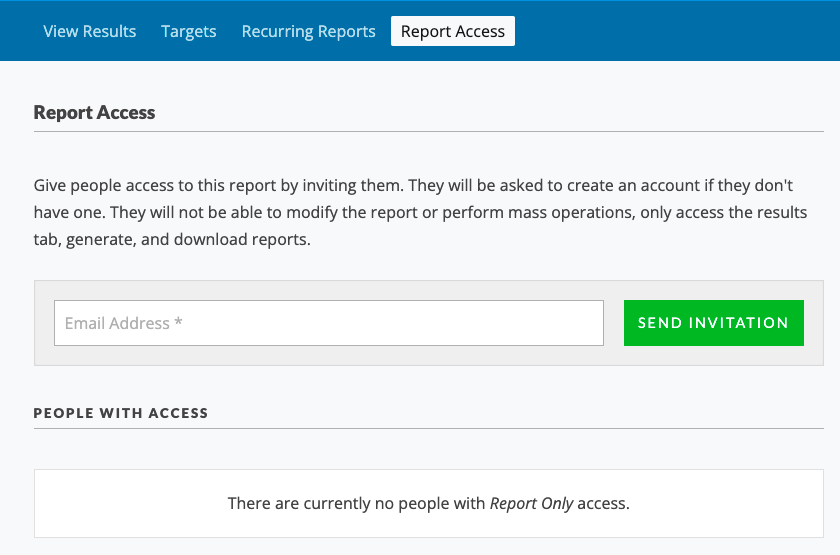](https://rebeltoolkit.extinctionrebellion.uk/uploads/images/gallery/2021-10/ReportShare.png)
Be aware that anyone you invite will be able to download the report. If they're not already familiar with data protection guidance, encourage them to read through this advice or ask them not to download it.
Anyone you share a report with should also have signed the [Volunteer Agreement](https://actionnetwork.org/forms/xr-data-protection-agreement-2).
When the duration of your campaign is over, revoke this report access.
#### If you need to download data
Occasionally you may decide there's no alternative but to download data from Action Network. If that's the case, you can download any report using the toolbar on the right hand side of the results.
Before you begin, make sure:
- Everyone who will have access to the data has signed the [Volunteer Agreement](https://actionnetwork.org/forms/xr-data-protection-agreement-2).
- Everyone has updated their computers to the latest versions of software. This helps to avoid bugs or leaks.
- You've agreed the minimum amount of relevant data you need to download.
- You've agreed the duration of your campaign and when you'll delete the data.
Ideally, keep the data as a cloud-based document, preferable our own [XR Cloud](https://rebeltoolkit.extinctionrebellion.uk/link/1068) on the Comms Hub, or Cryptpad rather than sharing multiple copies of the same Excel file by email. You'll probably need to download one copy to your own computer first, and then upload it to the cloud to share with others.
Avoid storing data on any portable device such as a USB drive, which can be easily mislaid.
When you've finished using the data, make sure it's deleted from:
- Your own computer and recycle bin
- Your cloud drive
- The computers and recycle bins of anyone who's worked with you and may have downloaded it
- Any portable storage devices, if you've had no choice but to use them.
If you have any questions, please contact the [Action Network Support Team](https://rebeltoolkit.extinctionrebellion.uk/link/634#bkmrk-page-title) or the [GDPR and security team.](https://rebeltoolkit.extinctionrebellion.uk/link/606#bkmrk-page-title)
# Merging or deleting a email list
You may wish to merge or delete an email list if:
- An email list was temporary (e.g. project that has finished)
- Local group isn't functioning any more
- You might want to merge two smaller local groups to form a bigger stronger one.
For any requests like this, please [contact the Action Network Data Team](https://rebeltoolkit.extinctionrebellion.uk/link/634#bkmrk-page-title)
Please don't struggle trying to download and re-upload email address. This can be done in a quicker and easier way by the Action Network Data Team. Don't be afraid to ask for help on things like this. We're here to help.
# Installing DKIM, SPF and DMARC records
**You only need to do this if you have your own domain. e.g. xrnottingham.org**
Setting this up helps improve the delivery rates to inboxes (rather than going to junk/spam).
This is highly recommended for lists over 5000 in size.
The extinctionrebellion.uk domain has already been set up. So if you use an email address on this domain as your reply-to email, then you don't need to do anything.
More info on how to get and use [@extinctionrebellion email addresses here](https://rebeltoolkit.extinctionrebellion.uk/link/1063#bkmrk-page-title).
It is not possible to set up DKIM/SPF/DMARC for gmail/hotmail/aol/outlook etc. These should already be recognised domains.
[Link to full instructions here](https://help.actionnetwork.org/hc/en-us/articles/360014433271-Installing-DKIM-and-SPF-records)
# Postcode searches
#### Adding UK list subscribers to Local Group lists
There are many subscribers on the UK list who have entered their postcode, but are not yet connected to a Local Group (LG). If you are from an active LG and want to find out if there are 'floating' rebels in your area, then [contact the Action Network Data Team](https://rebeltoolkit.extinctionrebellion.uk/books/action-network-for-xr/page/contact-the-action-network-data-team) (ANDT) for help in finding them and getting them added to your list.
# Custom field permission
In the XR Action Network system, it is possible to use forms to request information from rebels. Where possible, please use [existing questions](https://rebeltoolkit.extinctionrebellion.uk/link/655#bkmrk-page-title) in your form to match data that is already in the system. If you need to create new questions, please [contact the Data Team.](https://rebeltoolkit.extinctionrebellion.uk/books/action-network-for-xr/page/contact-the-action-network-data-team)
When creating questions please consider [GDPR implications.](https://rebeltoolkit.extinctionrebellion.uk/books/intro-to-technical-and-data-services/page/gdpr-and-personal-data)
The best things you can do to keep both you as the collector and the people participating in direct action safe is to:
- Only collect the data absolutely necessary
- Collect and store as little personally identifying information as possible
- Share the data with as few people as possible using permissions
- Delete the data as soon as it is no longer necessary.
More guidance from the GDPR and Security team can be found in their [page here](https://rebeltoolkit.extinctionrebellion.uk/link/606#bkmrk-page-title).
# Further training resources
#### Action Network help pages
You can browe the [Action Network Knowledge Base](https://help.actionnetwork.org/hc/en-us) for more guidance.
Also there are also [Action Network training sessions](https://actionnetwork.blog/events/) to sign up to.
**Please be aware for both of the above, some features may not be relevant or even available on the XR UK network (in particular 'Action Builder' and 'Mobile Messaging' are not features we currently pay for).**
#### Friends of the Earth
Friends of the Earth (FoE) have produced a good number of training videos and other training documentation to help FoE groups get to grips with using Action Network.
These FoE training materials cover a wider range of Action Network's functions than the emailing functionality currently in general use by XR groups. This includes creating petitions, letter campaigns, events and forms.
**Please be aware that not all this advice will be relevant to XR email lists and also that Action Network upgrade their software regularly, so some of the older videos may a little out-of-date.**
An overview of the FoE Action Network training materials is on their Action Network group page here: [https://actionnetwork.org/groups/friendsoftheearth](https://actionnetwork.org/groups/friendsoftheearth).
# Sending Attachments
You cannot attatch files to an Action Network email but you can store it on in an online drive like Google Drive and link to it. If you don't have your own drive you can store it on Action Network and add a download link to your email.
Click the ACTIONS button on the top navigation tool bar
[](https://rebeltoolkit.extinctionrebellion.uk/uploads/images/gallery/2024-07/screenshot-2022-11-23-at-10-34-04.png)
From the dropdown menu that appears, move your cursor over Files, and click on the plus (+) icon.
[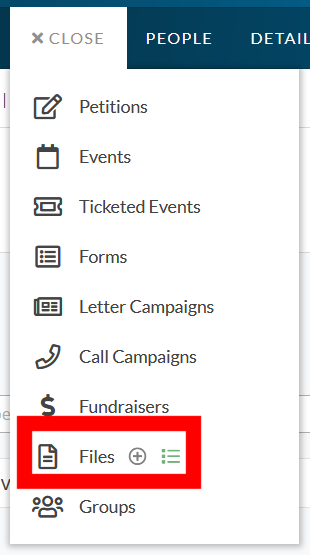](https://rebeltoolkit.extinctionrebellion.uk/uploads/images/gallery/2024-07/screenshot-2024-07-22-162616.png)
You can now upload and add your file.
[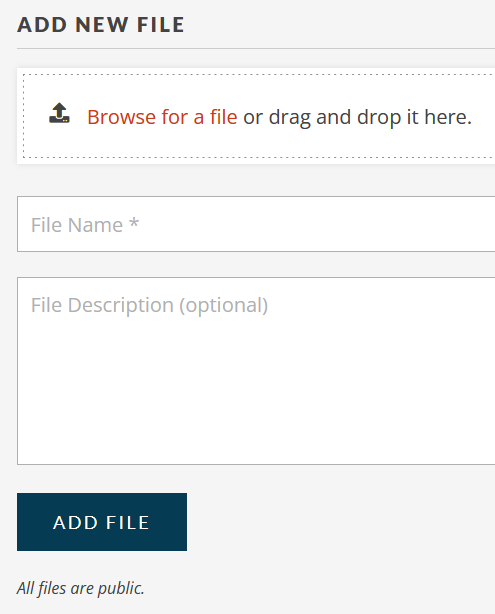](https://rebeltoolkit.extinctionrebellion.uk/uploads/images/gallery/2024-07/screenshot-2024-07-22-163409.png)
Give your file a name, and a description. Descriptions are optional, but are useful in helping others find what they need. Once you have added the file you will be taken to the file list.
[](https://rebeltoolkit.extinctionrebellion.uk/uploads/images/gallery/2024-07/image1.jpg)
Click on the link icon to get the web link for the document which you can then post into your email.
Remember that all files posted this way are publicly accessible.
# Refresh a form or event preview graphic
#### Telegram graphic preview refresh
If a url has been shared previously the preview is cached and will not update automatically. To force a fresh link preview, try one of these methods:
- go to t.me/WebpageBot and submit the url to force a refresh across Telegram
- OR create a new short link