# Advertising your event
### URLs, adding preview graphics and tracking sign ups
#### Links to use when advertising your event or form
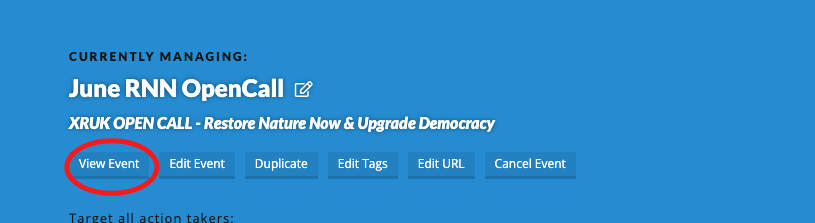
After you've set up your event (or form) - you can find it's URL which you can see when clicking 'View Event'.
[](https://rebeltoolkit.extinctionrebellion.uk/uploads/images/gallery/2024-06/image-1718488197181-49-33.png)
You can use this link to adveritise your event.
**For Action Network emails** use the full link:
**https://actionnetwork.org/events/yourevent**
But beware of copying links out of an email you've been sent - some [info on a major issue](https://rebeltoolkit.extinctionrebellion.uk/books/action-network-for-xr/page/action-network-id-attached) if you copy links from one email to another.
**For sharing on social media or Telegram/WhatsApp chats etc**
You can [turn this URL in to a shortlink](https://xrb.link/) - but it is not recommended to use this shortlinks within AN emails, just hyperlink the orginal URL.
#### Preview graphics
This is the image that will automatically show through to channels such at Telegram or WhatsApp as a kind of thumbnail image when you post the URL link.
The image preview for your form comes from the **'Sharing and Tracking'** tab. If you add an image to the Facebook sharing information. It's particularly important to check this if you've duplicated a form, as the previous information/image will still be in this 'Facebook' sharing info.
**Click 'SAVE OPTIONS' after updating.**
Here is some advice for if you've already shared a link on Telegram before fixing this and need to [refresh the graphic preview](https://rebeltoolkit.extinctionrebellion.uk/link/1727#bkmrk-page-title).
#### Tracking
**If you are interested in knowing WHERE your signs up have come from then read on**
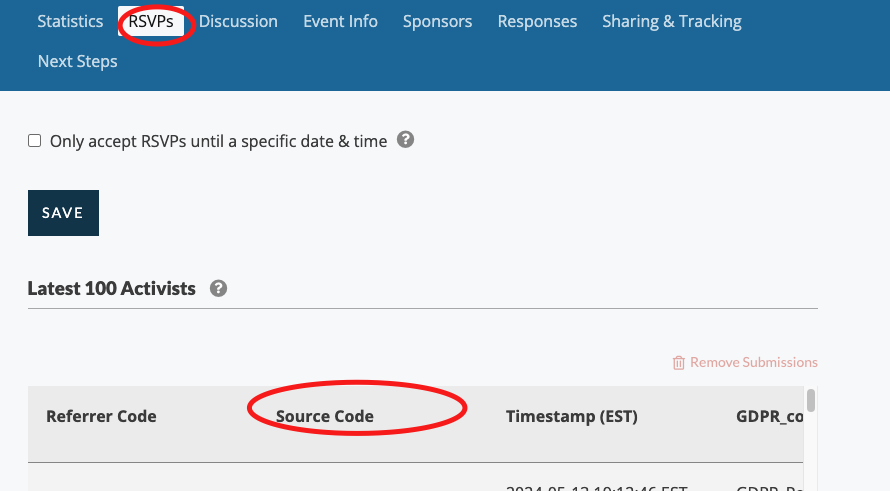
You can add a paramater called 'source' to the end of your URL and using the example above, this would look like **https://actionnetwork.org/events/yourevent?source=UKemail**
The source parameter can then be seen when you are 'managing' your event by looking at the 'RSVPs'.
[](https://rebeltoolkit.extinctionrebellion.uk/uploads/images/gallery/2024-06/image-1718488613332-56-35.png)
If you'd like monitor the effectiveness of advertising between your email list, facebook, website and your group chat you could use different source codes.
?source=email
?source=chat
?source=facebook
?source=website