# Sharing Events, Calendars or Maps
#### Sharing an Event from the Calendar
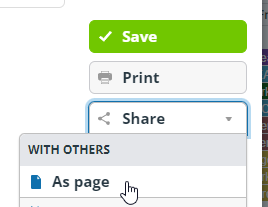
From within an event details window, click 'Share' and then 'As Page'. This will give you a webpage with all the event details on.
[](https://rebeltoolkit.extinctionrebellion.uk/uploads/images/gallery/2023-11/image-1699302752201.png)
#### Sharing More of the Calendar
This is a useful feature if you want to share a pre-filtered version of the calendar with your teams, maybe in your newsletters.
Simply add ?keywords=xxxxx (where xxxxx is the filter you want to apply) to the end of the url you intend to share:
- Basic Calendar url (to add as a hyperlink in your email) `https://teamup.com/kswyi17ixzj7f9i7fu`
- Work out what words or icons in the Filter box frind your team's events eg `Midlands` if you are trying to find events with Midlands in them
- Add `?keywords=Midlands` to the end of the basic Calendar url `https://teamup.com/kswyi17ixzj7f9i7fu`
- So we get a specific url for the Midlands events `https://teamup.com/kswyi17ixzj7f9i7fu?keywords=Midlands`
The London events would be `https://teamup.com/kswyi17ixzj7f9i7fu?keywords=London`
This is one of the reasons it is useful to add your Region as a keyword somewhere in your events.
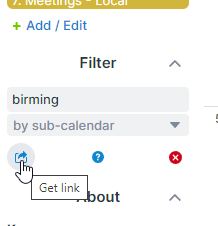
Alternatively, you can generate a link to share a version of the calendar with filters, a view and date ranges etc. To do this click the small button just below the 'Filter' box.
[](https://rebeltoolkit.extinctionrebellion.uk/uploads/images/gallery/2023-11/image-1699895176223.png)
#### Embedding Calendars in your own Webpage
TeamUp provides a easy tool to create the code to [embed a filtered version of the calendar in your own webpage](https://calendar.teamup.com/kb/embed-teamup-calendar/)
#### Sharing a personal map from within Action Network
By adding a hyperlink in an Action Network email you can send rebels a link that will open the map centered on their postcode with a zoom to show at least two events. If they have no postcode a UK map will be displayed.
The specific code to enter in the url box is this `https://eventmap.extinctionrebellion.uk/#{{ZipCode|default:'55.141209,-3.240964'|truncatewords:1,''|upcase}}/6/quarter/action,local,external//?no_rewrite=true` (note code modified to allow insertion in both HTML and drag & drop Action Network email editors)
**Use this code as is.** Action Network will do the work just before sending out the email of taking the rebel's postcode and embedding the start of it in the email that goes out.
#### Sharing a specific Location Map link
If you want to send a link to a map centered on a specific location (useful to add to your local group newsletters) then simply add `/#xxxx` to the end of the basic map url `https://eventmap.extinctionrebellion.uk` where xxxx is the start of your location postcode.
So `https://eventmap.extinctionrebellion.uk/#OX16` would share a map centered on OX16 and zoomed to display at least 2 events
#### Sharing a specific Actions only Map link
If you want to send a link to a map just showing Actions (useful to add to Action Planner group newsletters) then simply use this link.
So `https://eventmap.extinctionrebellion.uk/#53.988395,-1.977539/6/quarter/action//` would share a map centered on UK and showing only Actions in next 3 months.
Technical Information - Map URL structure
The map URL fragment (the bit after the #) consists of the following elements, separated with slashes:
- Latitude,Longitude (of the map centre).
- This may be substituted for a full or partial (Outward) postcode. If you use a full postcode, eg PO381NL then it will work out that it should zoom in on PO38. Zoom level is ignored if a postcode is given.
- This may also be substituted for TWO lat longs separated by a colon. For example: `https://eventmap.extinctionrebellion.uk/#55.141209,-3.240964:56.141209,-1.240964/6/week/action,local,external//`
- This will load the map panned and zoomed to show the highest zoom level possible while both lat/long points are both visible. This is intended for use in iframes on local or regional websites, or other links where someone wants to ensure a whole area loads in view right away.
- Zoom level:
- numeric 3-19
- Time span:
- week
- month
- quarter
- Categories to show:
- action
- local (includes Talks, Training and Workshop events where these have a physical location)
- external (same as the 'Other' filter option)
- Options
- minimal (small control), (this is the default if the map is opened on a mobile device)
- extra (big control),
- nowheel (disable mousewheel, recommended for iframe embedding).
- Search term
- the search term to filter by, if any. Nb. emoji will be encoded as UTF8 bytes.
When the map is moved or settings changed, the URL updates. If you link to the page using a fragment that follows these rules, it will use those settings. This is ideal for embedding in iframes or including in emails etc.