# Using Email Folders
This page shows how to create and use email folders for your @extinctionrebellion.uk account[1](https://rebeltoolkit.extinctionrebellion.uk/link/1329#bkmrk-the-information-on-t) via our 'Roundcube' Webmail interface. However, if you're [accessing your emails via a third party app](https://rebeltoolkit.extinctionrebellion.uk/link/1307#bkmrk-page-title) using IMAP (not POP3), then you'll be able to carry out these operations via that software also, and changes made there will automatically be copied into the Webmail account.
#### Why use folders?
Folders allow you to organise your mails. Our Webmail comes with some folders already created. These are:
- Inbox
- Drafts
- Sent
- Spam
- Deleted items
- Archived
You may want to create extra folders for various reasons such as:
- to group together all mails that relate to a specific campaign/issue
- to group together mails being dealt with by specific activist
- to facilitate the sorting of incoming mail by [using plus-addressing](https://rebeltoolkit.extinctionrebellion.uk/link/1306#bkmrk-page-title)
- to facilitate the sorting of incoming mail by [using filters](https://rebeltoolkit.extinctionrebellion.uk/link/1328#bkmrk-page-title)
#### How to create Folders in Webmail
1. Firstly you'll need to [log into Webmail.](https://rebeltoolkit.extinctionrebellion.uk/link/1305#bkmrk-page-title)
2. From within Roundcube, click on the 3 dots next to your email name, and then on 'Manage Folders'.
[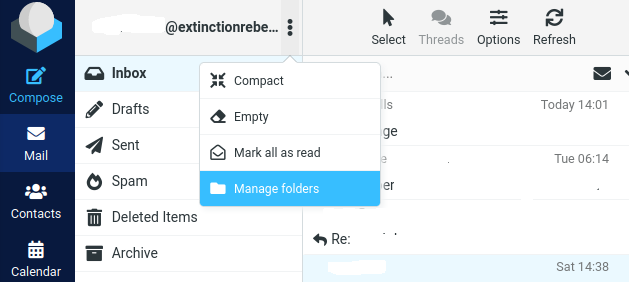](https://rebeltoolkit.extinctionrebellion.uk/uploads/images/gallery/2023-12/managefolders.png)
3. With the 'Folders' tab selected (under 'Settings'), click on 'Create'.
[](https://rebeltoolkit.extinctionrebellion.uk/uploads/images/gallery/2023-12/folders-create.png)
4. Enter the folder name (Eg: Outreach) and click on 'Save'.
#### NOTES:
1. The information on this page also applies to older @rebellion.earth emails. Just read @rebellion.earth wherever @extinctionrebellion.uk is mentioned.
---
This page has been contributed by the [Digital Discussions Applications Team](https://organise.earth/uk/channels/migrreception).