# Recruitment and Onboarding

# Start Here

This is a 'Recruitment and Welcome/Onboarding' Tool for Integrators or Internal Coordinators. In this handbook, you will find the resources you need to welcome new and existing Rebels/Volunteers.

If you and your team would like a tailor-made workshop on Recruitment and Onboarding, please contact us on Mattermost via [Recruitment &amp; Onboarding (Integrator) Support reception channel](https://organise.earth/uk/channels/integrat-integration-receptio) or email us at <volunteer@extinctionrebellion.uk> with the subject line reading: Request for Recruitment and Onboarding Workshop.

If the Rebel/Volunteer is brand new, be sure to direct them to the [Welcome to XR](https://rebeltoolkit.extinctionrebellion.uk/shelves/01-welcome-to-xr) shelf on the Rebel Toolkit. Even if they have some experience and knowledge, you can still signpost them to this introduction. The most important thing to remember is to be welcoming and patient.

This handbook has been put together by the XRUK Pathways and Recruitment Support teams.

If you have any questions or comments, please contact us on Mattermost via the [Recruitment &amp; Onboarding (Integrator) Support reception channel](https://organise.earth/uk/channels/integrat-integration-receptio).

# Preparing for new volunteers


# Why do we need new rebels?

For a movement that aims to mobilise 3.5% of the population, that seems like a daft question! However, it can be useful to think about why we need new people beyond just the obvious.

#### New rebels are the lifeblood of every team

We know we need numbers to win. We may think about it less, but we also need the energy, skills, ideas, community connections, diversity and fresh perspective new rebels bring us. Last but not least, we need our stretched coordinators to be able to occasionally take a break! 

Sometimes it can seem like bringing new rebels into our groups just creates work. Maybe the team is very busy and has experienced inducting a rebel who quickly left again. At times like these, it is tempting to think "oh, we'll just do it all ourselves". 

However, if we close ourselves in this way, it can easily lead to a downward spiral. Without a continual flow of new people, the team ends up consisting of experienced but very stretched people with no time to show others how to do things. Then, when one of those experienced people needs to step back, things can really go wrong. A healthy group has a mix of people of all levels of experience, with a steady flow of newbies learning, moving on to more complex work, showing others how to do things and relieving the more experienced coordinators of work.

#### Setting the tone

Before you even start recruiting or doing outreach, think about how you will look after the people when they arrive. New people will need extra care and attention at the start (typically for around a month).  It is best that coordinating this work falls to someone who is not frazzled from doing a ton of other things and typically this will be the team's integrator. 

This does _not_ mean it is the integrator's job alone to make new people feel welcome! This is a job for _everyone_ in the team.  

Of course, no one can guarantee that your rebels will stick with you, but there are some things you can do to make it more likely. We had a People's Assembly and asked why people stayed. These answers came up the most:

- we felt **appreciated** 
- we felt **part of a community** 
- we thought XR was **effective** 

And we really felt part of XR when:
- we **got to know people** 
- we **worked together** on something 
- we **got to know XR** 
- we **gained a role** in our team

So, drawing from this, the kinds of things which encourage people to keep coming back include:

- A friendly, non-cliquey environment where group members avoid XR jargon, take the time to explain things, check understanding and listen to the views and experiences of the new person.
- A named 'buddy' who will look after the new person, answer questions and help them settle in.
- Asking if the new person has anything they need to take part or feel comfortable and trying to meet their needs wherever possible (see also [Supporting your New Rebel](https://rebeltoolkit.extinctionrebellion.uk/books/integrator-handbook/page/supporting-your-new-rebels) and [How do we genuinely welcome everyone?](https://rebeltoolkit.extinctionrebellion.uk/books/integrator-handbook/page/how-do-we-genuinely-welcome-everyone)).
- A tangible project the whole group can work together on.
- A role, or maybe some simple task to start with, for the new person;
- connections to people, projects or training you know the new person will find interesting.
- Evidence of the impact of the things you are doing (e.g. getting your local council to declare a climate and ecological emergency, getting good press coverage, having a successful event where you bring in more people etc).

If you can provide these things, then you will have gone a long way to making a supportive and welcoming environment for the new rebels who arrive in your group.

# To genuinely welcome everyone...

### We must be inclusive

#### For guidance on Inclusivity in XR, [start here.](https://rebeltoolkit.extinctionrebellion.uk/link/1132#bkmrk-page-title)

More useful resources:
- [Neurodiverse and disabled rebels inclusion](https://rebeltoolkit.extinctionrebellion.uk/books/accessibility) pages of the toolkit.
- [Inclusivity-disability Resources Pack](https://docs.google.com/document/d/1qCVHLVYBDk2BO3C7UjgTYs0pb6iBKcepCUv0jZtJ-nw/edit)

You can contact the Disabled Rebels Network via <a href="https://www.facebook.com/groups/398593814047341" target="_blank" rel="noopener noreferrer">Facebook</a>, their <a href="https://organise.earth/uk/channels/drnreception" target="_blank" rel="noopener noreferrer">Mattermost Reception</a> or you can email them at [wellbeing+drn@exinctionrebellion.uk](mailto:wellbeing+drn@exinctionrebellion.uk)

#### Rare exceptions
There are a few rare cases where you might not be able to include someone, i.e. if their needs are beyond what you can reasonably meet, or if they risk causing harm to other people (see [Supporting your new volunteers](https://rebeltoolkit.extinctionrebellion.uk/link/226)).

# What does an Integrator / Recruiter do?

It can be slightly overwhelming joining XR - so much to learn, so many new faces, all that XR jargon and even a new structure to work around. 

And this is on top of the anger, frustration or desperation we feel because we face the global catastrophe of climate change, a result of systemic injustice and racial inequality, the effects of which are already being felt all over the world. It can be a lot to process. 

And sometimes we forget to welcome new volunteers into XR, simply because we are often so involved in a project which is taking all our time and attention.

For this reason, where possible we should have an Integrator in our groups - to welcome new volunteers and to make sure that existing Rebels are finding their way on their journey through XR.  

Check out the Rebellion Academy Module: [Working Group roles](https://uk.rebellion.academy/wgroles), for some videos about being an Integrator.

#### Standard Integrator / Recruiter mandate
View the template Integrator / Recruiter mandate<a href="https://organism.extinctionrebellion.uk/?id=0&tab=defaultroles&expand=r3736" target="_blank" rel="noopener noreferrer"> on the Organism.</a>

**Purpose:**<br>
Team members are flourishing and productive in all roles, and the team has team members to fill its roles and support its workload.

**Mandate:**

- Inviting new members to join the team in alignment with this policy <a href="https://organism.extinctionrebellion.uk/?id=35&tab=policies&expand=r3736#:~:text=Criteria%20%26%20Conditions%20for%20Membership%20of%20an%20XR%20UK%20Working%20Group" target="_blank" rel="noopener noreferrer"> 'Criteria & Conditions for Membership of an XR UK Working Group'
</a> [scroll to the relevant policy]
- Onboarding, inducting and orienting new members into the team.
- Keeping a list of team members up to date, with the help of a Group Admin.
- Requesting a Group Admin to add new members to the Communications Hub, as required.
- Checking in with team members about their fit with roles, projects and the team generally, and offering feedback.
- Suggesting improvements to who fills roles, to improve the work of the team and its members, or when a role-holder has completed the length of their term (e.g, 6 months). (The suggested changes would still need to be consented to by the rest of the team. A full election process should happen if requested by any team member.)
- If a transformative conflict process does not resolve an issue, asking someone to leave the team if in the team’s best interests.

**In addition**, if you have a group Volunteer Website and/or Reach Volunteering account, managing the group account on the websites, posting roles and dealing with role applications.


Different teams break this down differently (for example, you might have one person handling recruitment and a different one for onboarding) but someone will need to be responsible for each of the tasks listed above.  Work out who will do what ahead of time so that everyone is clear what to expect. 

#### Not got a team Integrator?

Then this is the first role to recruit for! You may think this person would need to know your team inside out in order to welcome others; but really the most important thing is for them to be friendly, empathetic and willing to learn as they go along. Sometimes, it even helps for the integrator to be relatively new so that they can use their own experience to help others. There are lots of resources on this toolkit to help them. 

**NB:** If you haven't got an Integrator then it is the Internal Coordinator's job to do this work!

**Cautionary note:** if you are using the Volunteer website to recruit, it is important you get to know a new Integrator before giving them login details to your group account since this is a position of great trust and involves handling sensitive personal data.

# Recruiting via the XRUK Volunteer Website


# Volunteer Website

[![XR-Header-v4-(with-text)-small.jpg](https://rebeltoolkit.extinctionrebellion.uk/uploads/images/gallery/2020-11/scaled-1680-/XR-Header-v4-(with-text)-small.jpg)](https://volunteer.extinctionrebellion.uk/roles)

##### [volunteer.extinctionrebellion.uk](https://volunteer.extinctionrebellion.uk) 


This website works just like a jobs board and aims to help volunteers find roles and groups to find volunteers. Any XR UK group can apply for an account and recruit this way - you just need an official email address. In practice, the site is mainly used by UK-wide, national and regional groups which are less likely to find their people on the streets or at an in-person meeting.

**On this website we've used the term 'volunteer' throughout rather than 'rebel' as it is better understood by people completely new to XR.**


#### Setting up a team account
To get started, you will need to get a group account.
 
1. Go to [volunteer.extinctionrebellion.uk/integrator](https://volunteer.extinctionrebellion.uk/integrator)
2. Watch the short (7 min) video which explains how the site works.
3. Scroll down and click 'create group account'.
4. Use your **XR group's email** to set up an account - this needs to be an email that is checked regularly _(please note we can't take personal email addresses)_.
5. The application comes to the Pathways team for approval.
6. Once the application is approved, you will receive an email with a link to click on to complete the registration.
7. You are up and running and ready to post roles!

#### Writing an appealing role
1. **De-jargon!**
Try to look through the eyes of someone who knows nothing about XR. You can explain the ‘correct’ terms for things later if needed but for now communication is key e.g.:

>☹ Internal coordinator, external coordinator, integrator, regen, rebel

>😊 Team guide, team representative, team builder, wellbeing, volunteer

2. **Make it accessible**
Volunteers rarely have both good skills and lots of time. Asking for lots of time excludes certain groups of people and makes us less diverse as a movement. Can you break down the role? e.g. Internal Coordinators often get asked to do everything!

>☹ Internal coordinator (hours: full-time)

>😊 Team guide (hours: 10-15/week).
Recruiter (hours: 2-4/week).
Newbie support person (hours: 5-9/week).
Wellbeing champion (hours: 2-4/week).
Secretary (hours: 2-4/week).
Admin helper (hours: 2/week).
Facilitator (hours: 2/week).
Team tech support (hours: 2-4/week). 

3. **Be clear** what you want someone to do, especially in the job title. The more specific you are, the more likely you are to get what you are looking for. However, if you just need more team members and plan to find out what they want to do later that's fine too! If you do this, try to have a few tasks your newbie can help with right away. 
 <p>
   
4. **Include key words** in your description. Ask yourself which search words people are most likely to use if they want a role like yours.
 <p>
   
5. **Consider the type of role**: do you need a permanent member of the team or could the work be done as a time-limited project? The second of these is likely to attract more people, especially those who are skill-rich but time-poor.
 <p>

6. **[Create an eye-catching role ad using HTML](https://rebeltoolkit.extinctionrebellion.uk/books/integrator-handbook/page/create-an-eye-catching-ad-using-html)**
 <p>

7. **Consider trying out several different titles for your role.** You can even experiment by posting the role more than once and see which gets the best engagement.
   
#### Managing your applications
Keeping up with your account shouldn't be too much of a chore! The website is easy to use and you just need to remember a couple of key things to make things run smoothly and bring new people into your team:
   
1. Make sure you regularly check the email address you used to set up the account. If you get any applications, a notification will be sent to this email address.
<p>
  
2. Use the 'action' column to let volunteers know what is going on after they apply. Clicking here sends an automatic email. Try to at least use the first 'thumbs up' when you get their application to tell people you've received it and know they are waiting  
<p>
  
3. **Contact your applicants as soon as possible, ideally within 24 hours!** This is super important; no one wants to offer their time for free and then hear nothing. This might be the first contact they have had with XR and can determine whether they become an enthusiastic contributor to the movement or someone who goes away and complains about us to their friends!
 <p>
   
4. Don't be scared to say 'no'. Not everyone is suitable for every role; it has to work out for both the volunteer and the team. Of course you can still say 'no' nicely! If after chatting to your 'applicant' you don't think they are suitable for your role maybe you can suggest some other ways they can get involved in XR. You may not get a new team member but you can still help to grow the movement and leave the person feeling valued. _(see 'Calling applicants' on [this page](https://rebeltoolkit.extinctionrebellion.uk/books/integrator-handbook/page/new-applicants-a-warm-contact))_
 <p>
         
5. Make sure you delete or hide any roles you've filled or don't need anymore. This stops the site clogging up with unavailable roles and saves you time contacting people who might apply for them. 
   
**(NB roles time-out after two months and then are hidden automatically. If you want to re-advertise the role you can un-hide it and it will reappear on the site but it will carry its orginal posting date so if you want it to appear near the top you will need to set up a new role)**
  <p>
         
6. **Urgent roles**: if your role is genuinely urgent, please email admin support at [volunteer@extinctionrebellion.uk](mailto:volunteer@extinctionrebellion.uk) - we have the ability to bring these roles to the top of the list and give them a yellow highlight so more people see them.

#### Searching for volunteers on the database

**NB** This option is currently only open to UK-wide teams due to data protection. Also, you will get a more enthusiastic and committed volunteer from letting people apply for your roles. However, if you are struggling to find people and need a search, please email user support at [volunteer@extinctionrebellion.uk](mailto:volunteer@extinctionrebellion.uk).
   
If you are in a UK-wide team and are not getting suitable applications for your role, the first step is to do a quick sense-check: is it obvious what your role is and who it is for? If yes, then maybe you want to try a search of the database. Log in to your account and go to 'Volunteer Database' in the lefthand menu. You can search for volunteers by hours offered, preferred type of work, preferred location of work and by any search term you enter (this searches the volunteer's whole profile.)


#### Data Protection
   
It is of course very important to be aware that you are handling people's personal data and to treat it with the greatest respect. The data on the site is protected by website security and should not be copied elsewhere unless absolutely necessary, in which case it should be deleted as soon as possible. All integrators must read, understand and sign our [Volunteer Agreement](https://actionnetwork.org/forms/xr-data-protection-agreement-2?source=direct_link&) which contains our Data Protection Policy. (We ask new volunteers to sign this, after all!)
   
    
***
   
Site support is available by emailing [volunteer@extinctionrebellion.uk](mailto:volunteer@extinctionrebellion.uk)

**The website has been set up by the UK Pathway team and is maintained by the UK Pathway and UK Digital teams.**

# Templates for Volunteer Website Role Adverts

To format your role ads on the Volunteer Website, you need to use something called HTML. Without HTML, your role description will appear as one long block of text, which is hard to read and digest. To help with this, you can copy and paste one of the templates below into your ads. Then, you just have insert links specific to your team and add any extra text you need to make your ad look marvellous!

You will need to replace everthing in caps with your group info and links. Remember to delete the square brackets. You can view how the ad will appear above each of the HTML templates.

#### To insert links specific to your team:
1. Find your group on the <a href="https://organism.extinctionrebellion.uk/?id=0" target="_blank" rel="noopener noreferrer">Organism</a>
2. Select the option 'Mandate' top right
3. Select and copy the URL [address at the top of the web page]
4. Paste over the word LINK in the template
4. Find your parent circle on the Organism and repeat steps 2, 3 & 4

We've created role advertisment (ad) templates for the following roles:- 
- Internal Coordinator (IC)
- External Coordinator (EC)
- Facilitator
- Budget Holder
- Secretary (Minute Taker)
- Integrator/Recruiter

  
There are standard mandates for these roles on the Organism and so we've included links to these in the templates. If you are advertising a different role, discuss the tasks the role holder will need to do with your group and add these to the task list under 'Some of the [ROLE NAME] tasks include:'

#### More Info
For basic instructions on how to use HTML, you can copy and paste from the <a href="https://www.markdownguide.org/basic-syntax/" target="_blank" rel="noopener noreferrer">Basic Syntax</a> list</p>


##### How the Internal Coordinator ad will look using the template below:
---
<p><strong>The role can be shared between two people, reducing the time commitment necessary.</strong></p>

<p><b><font color="green">Recruitment Support is a friendly and dynamic team.</font></b></p>
<p>The key role of the Internal Coordinator (IC) is to ensure the team is healthy and achieving its mandate.</p>
Some of the IC tasks include:

<p>
<ul>
<li> Proposing roles and projects the team needs to fulfil its purpose and accountabilities.</li>
<li> Supporting the work of role-holders and sub-circles, and reviewing their work at regular intervals.</li>
<li> Inviting people with relevant skills and abilities to join the team as required.</li>
<li> Maintaining an awareness of what is happening in the wider organism, and communicating regularly with the team’s External Coordinator.</li>
</ul>
</p>

<p>For more information on the mandates for Recruitment Support, Pathways and the Internal Coordinator, please select the links below:</p>

<p><a href="https://organism.extinctionrebellion.uk/?id=1310" target="_blank" rel="noopener noreferrer">Recruitment Support mandate</a></p>
<p><a href="https://organism.extinctionrebellion.uk/?id=1292&tab=overview" target="_blank" rel="noopener noreferrer">Pathways mandate</a></p>
<p><a href="https://organism.extinctionrebellion.uk/?id=1310&tab=defaultroles&expand=r2" target="_blank" rel="noopener noreferrer">Internal Coordinator mandate</a></p>
<p><strong>We look forward to hearing from you.</strong></p>

---

#### Internal Coordinator - Template<br>
```
<strong>The role can be shared between two people, reducing the time commitment necessary.</strong></p>

<p><b><font color="green">The [YOUR TEAM NAME] is a [FRIENDLY/ORGANISED/DYNAMIC ETC] team.</font></b></p>

<p>The key role of the Internal Coordinator (IC) is to ensure the team is healthy and achieving its mandate.</p>

Some of the IC tasks include:

<p>
<ul>
<li> Proposing roles and projects the team needs to fulfil its purpose and accountabilities.</li>
<li> Supporting the work of role-holders and sub-circles, and reviewing their work at regular intervals.</li>
<li> Inviting people with relevant skills and abilities to join the team as required.</li>
<li> Maintaining an awareness of what is happening in the wider organism, and communicating regularly with the team’s External Coordinator.</li>
</ul>
</p>

<p>For more information on the mandates for [YOUR TEAM NAME], our parent circle [YOUR WIDER CIRCLE NAME] and the Internal Coordinator, please select the links below:<br></p>

<p><a href="LINK" target="_blank" rel="noopener noreferrer">YOUR TEAM NAME mandate</a></p>                                                                                          
<p><a href="LINK" target="_blank" rel="noopener noreferrer">YOUR WIDER CIRCLE NAME mandate</a></p>

<p><a href="https://organism.extinctionrebellion.uk/?id=1310&tab=defaultroles&expand=r2" target="_blank" rel="noopener noreferrer">Internal Coordinator mandate</a></p>

<p><strong>We look forward to hearing from you.</strong></p>
```


##### How the External Coordinator ad will look using the template below:
---
<p><strong>The role can be shared between two people, reducing the time commitment necessary.</strong></p>

<p><b><font color="green">Recruitment Support is a friendly and dynamic team.</font></b></p>
<p>The key role of the External Coordinator (EC) is to ensure the team is represented in the broader circle, and aware of that circle’s work and priorities.</p>
Some of the EC tasks include:

<p>
<ul>
<li> Representing the mandate of the team within meetings of the broader circle, and asking another member of the team to attend when not available.</li>
<li> Taking issues that can’t be resolved in the team to the broader circle.</li>
<li> Exchanging information with other teams.</li>
</ul>
</p>

<p>For more information on the mandates for Recruitment Support, Pathways and the External Coordinator, please select the links below:</p>

<p><a href="https://organism.extinctionrebellion.uk/?id=1310" target="_blank" rel="noopener noreferrer">Recruitment Support mandate</a></p>
<p><a href="https://organism.extinctionrebellion.uk/?id=1292&tab=overview" target="_blank" rel="noopener noreferrer">Pathways mandate</a></p>
<p><a href="https://organism.extinctionrebellion.uk/?id=1310&tab=defaultroles&expand=r1" target="_blank" rel="noopener noreferrer">External Coordinator mandate</a>.

<p><strong>We look forward to hearing from you.</strong></p>

#### External Coordinator - Template<br>
```
<strong>The role can be shared between two people, reducing the time commitment necessary.</strong></p>

<p><b><font color="green">The [YOUR TEAM NAME] is a [FRIENDLY/ORGANISED/DYNAMIC ETC] team.</font></b></p>

<p>The key role of the External Coordinator (EC) is to ensure the team is represented in the broader circle, and aware of that circle’s work and priorities.</p>

Some of the EC tasks include:

<p>
<ul>
<li> Representing the mandate of the team within meetings of the broader circle, and asking another member of the team to attend when not available.</li>
<li> Taking issues that can’t be resolved in the team to the broader circle.</li>
<li> Exchanging information with other teams.</li>
</ul>
</p>

<p>For more information on the mandates for [YOUR TEAM NAME], our parent circle [YOUR WIDER CIRCLE NAME] and the External Coordinator, please select the links below:<br></p>

<p><a href="LINK" target="_blank" rel="noopener noreferrer">YOUR TEAM NAME mandate</a></p>                                                                                          
<p><a href="LINK" target="_blank" rel="noopener noreferrer">YOUR WIDER CIRCLE NAME mandate</a></p>

<p><a href="https://organism.extinctionrebellion.uk/?id=1310&tab=defaultroles&expand=r1" target="_blank" rel="noopener noreferrer">External Coordinator mandate</a>.

<p><strong>We look forward to hearing from you.</strong></p>
```
##### How the Facilitator role ad will look using the template below:
---
<p><b><font color="green">Recruitment Support is a friendly and dynamic team.</font></b></p>

<b>About the Facilitator role</b>


<b>The Facilitator role is to ensure that meetings stay on track with the agenda and decision-making processes are appropriately structured. </b>


<ul>
<li>Facilitating meetings of this team.</li>
<li>Inviting facilitators from inside or outside of this circle to facilitate a given meeting, if not personally facilitating.</li>
<li>Ensuring that applicable processes for elections and decision-making (e.g. group agreements, constitutional rules, Ways of Working) are followed.</li>
</ul>


<p>For more information on the mandates, please select the links below:<br></p>


<p><a href="https://organism.extinctionrebellion.uk/?id=1310" target="_blank" rel="noopener noreferrer">Recruitment Support mandate</a></p>
<p><a href="https://organism.extinctionrebellion.uk/?id=1292&tab=overview" target="_blank" rel="noopener noreferrer">Pathways mandate</a></p>

<p><a href="https://organism.extinctionrebellion.uk/?id=1310&tab=defaultroles&expand=r4667" target="_blank" rel="noopener noreferrer">Facilitator mandate</a> 

<p><strong>We look forward to hearing from you.</strong></p>

#### Facilitator - Template<br>
```
<p><b><font color="green">The [YOUR TEAM NAME] is a [FRIENDLY/ORGANISED/DYNAMIC ETC] team.</font></b></p>

<b>About the Facilitator role</b>


<b>The Facilitator role is to ensure that meetings stay on track with the agenda and decision-making processes are appropriately structured. </b>


<ul>
<li>Facilitating meetings of this team.</li>
<li>Inviting facilitators from inside or outside of this circle to facilitate a given meeting, if not personally facilitating.</li>
<li>Ensuring that applicable processes for elections and decision-making (e.g. group agreements, constitutional rules, Ways of Working) are followed.</li>
</ul>


<p>For more information on the mandates, please select the links below:<br></p>


<p><a href="LINK" target="_blank" rel="noopener noreferrer">YOUR TEAM NAME mandate</a></p>                                                                                          
<p><a href="LINK" target="_blank" rel="noopener noreferrer">YOUR WIDER CIRCLE NAME mandate</a></p>


<p><a href="https://organism.extinctionrebellion.uk/?id=1310&tab=defaultroles&expand=r4667" target="_blank" rel="noopener noreferrer">Facilitator mandate</a> 

<p><strong>We look forward to hearing from you.</strong></p>
```
##### How the Budget Holder role ad will look using the template below:
---


<p><b><font color="green">Recruitment Support is a friendly and dynamic team.</font></b></p>

<b>About the Budget Holder role</b>


<b>The Budget Holder ensures that the team has money spent and distributed, and volunteers have expenses re-reimbursed when requested and where required for its operation. The Budget Holder ensures that the team’s budget is managed well and transparently. </b>


<ul>
<li>Handling any requests for volunteer living expenses transparently with the team.</li>
<li>Approving, declining, recording, and tracking team members’ requests for payment.</li>
<li>Advising the Integrated Budget Group of new and existing funding requests outside of the allocated budget.</li>
<li>Assisting the Integrated Budget Group and broader circle budget holders during regular budget reviews.</li>
<li>Monitoring the budget holder chats for any information that might be relevant to their role.</li>
<li>Maintaining and sharing transparent records of the expenditure and money of the team, upon request of other members of this team, or budget holders of super circles if relevant.</li>
<li>Keeping a record of expenditure to ensure it is within the team's budget and highlighting when there may be a serious overspend or underspend.</li>
</ul>


<p>For more information on the mandates, please select the links below:<br></p>


<p><a href="https://organism.extinctionrebellion.uk/?id=1310" target="_blank" rel="noopener noreferrer">Recruitment Support mandate</a></p>
<p><a href="https://organism.extinctionrebellion.uk/?id=1292&tab=overview" target="_blank" rel="noopener noreferrer">Pathways mandate</a></p>


<p><a href="https://organism.extinctionrebellion.uk/?id=1310&tab=defaultroles&expand=r6" target="_blank" rel="noopener noreferrer">Budget Holder mandate</a> 

<p><strong>We look forward to hearing from you.</strong></p>


#### Budget Holder - Template<br>
```
<p><b><font color="green">The [YOUR TEAM NAME] is a [FRIENDLY/ORGANISED/DYNAMIC ETC] team.</font></b></p>

<b>About the Budget Holder role</b>


<b>The Budget Holder ensures that the team has money spent and distributed, and volunteers have expenses re-reimbursed when requested and where required for its operation. The Budget Holder ensures that the team’s budget is managed well and transparently. </b>


<ul>
<li>Handling any requests for volunteer living expenses transparently with the team.</li>
<li>Approving, declining, recording, and tracking team members’ requests for payment.</li>
<li>Advising the Integrated Budget Group of new and existing funding requests outside of the allocated budget.</li>
<li>Assisting the Integrated Budget Group and broader circle budget holders during regular budget reviews.</li>
<li>Monitoring the budget holder chats for any information that might be relevant to their role.</li>
<li>Maintaining and sharing transparent records of the expenditure and money of the team, upon request of other members of this team, or budget holders of super circles if relevant.</li>
<li>Keeping a record of expenditure to ensure it is within the team's budget and highlighting when there may be a serious overspend or underspend.</li>
</ul>


<p>For more information on the mandates, please select the links below:<br></p>


<p><a href="LINK" target="_blank" rel="noopener noreferrer">YOUR TEAM NAME mandate</a></p>                                                                                          
<p><a href="LINK" target="_blank" rel="noopener noreferrer">YOUR WIDER CIRCLE NAME mandate</a></p>


<p><a href="https://organism.extinctionrebellion.uk/?id=1310&tab=defaultroles&expand=r6" target="_blank" rel="noopener noreferrer">Budget Holder mandate</a> 

<p><strong>We look forward to hearing from you.</strong></p>
```
##### How the Secretary role ad will look using the template below:
---


<p><b><font color="green">Recruitment Support is a friendly and dynamic team.</font></b></p>

<b>About the Secretary role</b>


<p><b>The key role of the Secretary </b> is to ensure that formal, up-to-date records are accessible to all team members and that the team’s organisation is transparent. The tasks break down as follows:-
</p>

<ul>
<li>Scheduling the team’s meetings, and sharing the meeting details with all team members, giving plenty of notice.</li>
<li>Capturing and sharing the outputs of the team’s meetings as appropriate, i.e. decisions, project/role updates, and action points.</li>
<li>Updating the Communications Hub with agreed changes to teams, roles, and policies - coordinating with the Group Admin core role where present.</li>
</ul>

<p>For more information on the mandates, please select the links below:<br></p>


<p><a href="https://organism.extinctionrebellion.uk/?id=1310" target="_blank" rel="noopener noreferrer">Recruitment Support mandate</a></p>

<p><a href="https://organism.extinctionrebellion.uk/?id=1292&tab=overview" target="_blank" rel="noopener noreferrer">Pathways mandate</a></p>

<p><a href="https://organism.extinctionrebellion.uk/?id=0&tab=defaultroles&expand=r4666" target="_blank" rel="noopener noreferrer">Secretary mandate</a> 


<p><strong>We look forward to hearing from you.</strong></p>


#### Secretary - Template<br>
```
<p><b><font color="green">The [YOUR TEAM NAME] is a [FRIENDLY/ORGANISED/DYNAMIC ETC] team.</font></b></p>

<b>About the Secretary role</b>

<p><b>The key role of the Secretary </b> is to ensure that formal, up-to-date records are accessible to all team members and that the team’s organisation is transparent. The tasks break down as follows:-
</p>

<ul>
<li>Scheduling the team’s meetings, and sharing the meeting details with all team members, giving plenty of notice.</li>
<li>Capturing and sharing the outputs of the team’s meetings as appropriate, i.e. decisions, project/role updates, and action points.</li>
<li>Updating the Communications Hub with agreed changes to teams, roles, and policies - coordinating with the Group Admin core role where present.</li>
</ul>


<p>For more information on the mandates, please select the links below:<br></p>


<p><a href="LINK" target="_blank" rel="noopener noreferrer">YOUR TEAM NAME mandate</a></p>                                                                                          
<p><a href="LINK" target="_blank" rel="noopener noreferrer">YOUR WIDER CIRCLE NAME mandate</a></p>

<p><a href="https://organism.extinctionrebellion.uk/?id=0&tab=defaultroles&expand=r4666" target="_blank" rel="noopener noreferrer">Secretary mandate</a>

<p><strong>We look forward to hearing from you.</strong></p>
```
##### How the Integrator/Recruiter role ad will look using the template below:
---


<p><b><font color="green">Recruitment Support is a friendly and dynamic team.</font></b></p>

<b>About the Integrator/Recruiter role</b>


<p><b>The key role of the Integrator </b> is to ensure that team members are flourishing and productive in all roles, and that the team has members to fill its roles and support its workload. The main tasks are:-
</p>

<ul>
<li>Advertising your team's roles on the XRUK Volunteer Website and other recruitment websites.</li>
<li>Reviewing applications and inviting new members to join the team.</li>
<li>Onboarding, inducting and orienting new members into the team.</li>
<li>Checking in with team members about their fit with roles, projects and the team generally, and offering feedback.</li>
<li>Training and tools are available from the Recruitment Support team to help you with all these tasks.</li>
</ul>

<p>For more information on the mandates, please select the links below:<br></p>


<p><a href="https://organism.extinctionrebellion.uk/?id=1310" target="_blank" rel="noopener noreferrer">Recruitment Support mandate</a></p>

<p><a href="https://organism.extinctionrebellion.uk/?id=1292&tab=overview" target="_blank" rel="noopener noreferrer">Pathways mandate</a></p>

<p><a href="https://organism.extinctionrebellion.uk/?id=0&tab=defaultroles&expand=r3736" target="_blank" rel="noopener noreferrer">Integrator/Recruiter mandate</a> 


<p><strong>We look forward to hearing from you.</strong></p>


#### Integrator/Recruiter - Template<br>
```
<p><b><font color="green">Recruitment Support is a friendly and dynamic team.</font></b></p>

<b>About the Integrator/Recruiter role</b>


<p><b>The key role of the Integrator </b> is to ensure that team members are flourishing and productive in all roles, and the team has members to fill its roles and support its workload. The main tasks are:-
</p>

<ul>
<li>Advertising your team's roles on the XRUK Volunteer Website and other recruitment websites.</li>
<li>Reviewing applications and inviting new members to join the team.</li>
<li>Onboarding, inducting and orienting new members into the team.</li>
<li>Checking in with team members about their fit with roles, projects and the team generally, and offering feedback.</li>
<li>Training and tools are available from the Recruitment Support team to help you with all these tasks.</li>
</ul>

<p>For more information on the mandates, please select the links below:<br></p>


<p><a href="https://organism.extinctionrebellion.uk/?id=1310" target="_blank" rel="noopener noreferrer">Recruitment Support mandate</a></p>

<p><a href="https://organism.extinctionrebellion.uk/?id=1292&tab=overview" target="_blank" rel="noopener noreferrer">Pathways mandate</a></p>

<p><a href="https://organism.extinctionrebellion.uk/?id=0&tab=defaultroles&expand=r3736" target="_blank" rel="noopener noreferrer">Integrator/Recruiter mandate</a> 


<p><strong>We look forward to hearing from you.</strong></p>
```
```

# Manage your Applications

#### Managing your applications
Keeping up with your account shouldn't be too much of a chore! The website is easy to use and you just need to remember a couple of key things to make things run smoothly and bring new people into your team:
   
1. Make sure you regularly check the email address you used to set up the account. If you get any applications, a notification will be sent to this email address.
<p>
  
2. Volunteers will receive an automatic email from the system after they apply: 

 ##### Your volunteer role application with XR UK
Hello [first name] / friend,<br>
This is to confirm that you have applied for the role XXXXXX @ XXXXX team 	
with Extinction Rebellion UK. Thank you so much! <br>
We have notified the organiser who posted the role and they should contact you soon. We are all volunteers here though, juggling work, family and other life stuff so please bear with us. It is always worth checking your spam folder if you don't hear back after a few days.<br>
If you haven't heard back after ten days please reply to this email and we will try to get you connected with them or find another role to suit you.<br>
People like you make XR function - thank you for volunteering!

Love and courage <br>
The Volunteer Website Team <br>
volunteer@extinctionrebellion.uk

<p>
  
3. **Contact your applicants as soon as possible!** This is super important; no one wants to offer their time for free and then hear nothing. This might be the first contact they have had with XR and can determine whether they become an enthusiastic contributor to the movement or someone who goes away and complains about us to their friends. After 24 hours they’ll start to ‘cool’ which makes onboarding harder. **A warm human voice is always better than written communication, so calling them is always the best option.** 
You can find some key tips for this conversation below.

If you do email, here's a handy template email with the relevant links for copy/pasting to use as a reply message to the applicant:

---
```

Hi [NAME]

Thanks so much for applying for the role of [ROLE NAME] with Extinction Rebellion (XR) UK's [GROUP NAME] team.

Your application looks great! We really appreciate you offering to donate your energy and skills, and we're really looking forward to meeting you.

If you'd like to know more about XR and to also read our 10 Principles and Values (P&Vs), please could you have a look at the two links below. When you're ready, please get in touch and we will arrange a time to meet for a chat about next steps.

- https://extinctionrebellion.uk/about/
- https://rebeltoolkit.extinctionrebellion.uk/books/xr-uk-ways-of-working-and-constitution/page/principles-and-values

Thank you again for stepping up to help. Time is XR's most valuable resource and we're very grateful to you for offering yours.

Look forward to hearing from you soon and, if you decide to join us (which I very much hope you do), working with you in the future. But please let us know if you decide to withdraw your application, so we don't worry about your wellbeing.

Love and courage

[YOUR NAME]

XRUK [YOUR TEAM] team

Team Recruiter Role
```

 <p>
   
4. Don't be scared to say 'no'. Not everyone is suitable for every role; it has to work out for both the volunteer and the team. Of course you can still say 'no' kindly! If after chatting to your applicant you don't think they are suitable for your role maybe you can suggest some other ways they can get involved in XR (see our [Get Involved](https://extinctionrebellion.uk/join-us/) page on the UK website for ideas). You may not get a new team member but you can still help to grow the movement and leave the person feeling valued. 
 <p>
         
5. Make sure you delete or hide any roles you've filled or don't need anymore. This stops the site clogging up with unavailable roles and saves you time contacting people who might apply for them. <br>  
**(NB role ads time-out after two months and then are hidden automatically. If you want to re-advertise the role you can un-hide it and it will reappear on the site.)**
  <p>
         
6. **Urgent roles**: if your role is genuinely urgent, please email admin support at [volunteer@extinctionrebellion.uk](mailto:volunteer@extinctionrebellion.uk) - we have the ability to bring these roles to the top of the list and give them a yellow highlight so more people see them.

    
#### Calling applicants
So someone has applied, now you need to get in touch. This should always be by phone rather than email - not only do emails often get missed or go to junk but a friendly first call can go a long way to making someone feel welcome and valued.

**It's important to recognise** that this might be the first time they have an opportunity to express how they feel about the climate and nature emergency. Allow time for them to unpack their feelings if they need to.
    
It can be a little nerve-wracking at first: how do you work out if this person is right for your role in just a short call? But don't worry - really it's just talking to good people with integrity. You can’t mess it up if you're open, enthusiastic and honest. Remember, “I don’t know” is a perfectly good answer - just determine if you think they’re a good person and a good fit to the best of your knowledge. 

If the person isn’t right for your role or another role in your group, signpost them to other options. The Get Involved talk and Get Involved page on the XRUK website or if needed, ask them to email volunteer@extinctionrebellion.uk and the Recruitment Team will pick them up. It's fine to also ask "Is it OK to get in touch again when something in our team that suits better comes up?". If they're interested in local activities, advise them to investigate roles with their Local Group, or if they're really keen and don't have an LG near them, sign-post them to the info on the Rebel Toolkit for setting up a LG. Be gentle and end the call positively - not everyone can do every role.
   
##### Here is a suggested roadmap to help when you start making calls:
   
1. Read your volunteer's profile and application message (if applicable). 
Get a little excited about speaking to an amazing person who may be able to help.
  <br><br> 
2. Dial.<br><br> 

3. If no answer, either leave a voicemail or send a text/Telegram/WhatsApp message. <br><br> 
   
4. If they answer, give a clear enthusiastic intro: 
   
> “Hi XXX, it’s XXX here with Extinction Rebellion, XXX team. I’m calling because you [put your hand up for volunteering with us/applied for our XXX role]. Is now a good time to chat?” Let them answer.

5. If 'no', arrange a time to call them back.<br><br> 
6. If they can chat, ask a few basic questions and arrange another time to speak to them for a longer chat - preferably on Zoom:
  - How much time can they volunteer?
  - Do they have any access requirements we need to be aware of?
  - Do they have any questions?
  - Can they Zoom so you can have a longer chat about the role (as well as get to know them better)? <br><br>
**NB:** Always arrange the next time to speak/meet during each call so they have the date in their calendar. Saves time and makes them feel 'held'.

7. When you have your longer (Zoom) call with them, ask some open questions to get them talking. You want to gain their full attention and start collecting clues about them and if they’d be good for your role/s. Let them talk and hope they don’t ramble on too much or start telling you exactly where XR are going wrong and asking to meet the management. (Listen carefully to behaviour / vocabulary.)
   
**Example questions**  
 
   
> “What led you to getting in touch with XR?”
   
> “What do you know about organising with XR?”
   
8. Once they are right there with you in the conversation  build some **rapport** - maybe share a similar anecdote and relate to their experiences. Ask questions you can relate to but keep it heading in the right direction.

**Example questions** 
   
> “So are you in a Local Group?” Listening. “Wow yeah mine too; they’re amazing and the Council has now declared a Climate Emergency”
   
> “Do you have mates (volunteering) in XR too?” Listening. “Great - how's their experience, are they finding it rewarding?” Listening.

> “Did you see that the EU have now declared a Climate Emergency?”
   
> THEN ASK “So have you joined a Rebellion or Action yet?” Listening. “Wow yeah I was at XXXX action and met the most incredible people” OR “Well don’t worry we have plenty of roles that don’t require you to [Go to London for 2 weeks / Get in trouble with the Law] - like the one I’m calling about”.
   
9. Now find out about their background and skills. Use open or closed (yes/no) questions depending on how keen they are and how long you have to chat to them etc.

**Example questions**
> CLOSED: “So I saw you had Accounting skills, which we’d love to bring to our XXXX team. Is that true?”<br> OPEN: “So I saw you had Accounting skills, which we’d love to bring to our XXXX team; can you tell me about that?”
   
> CLOSED: “So have you ever managed social media accounts?”<br> OPEN: “So what’s your experience with Twitter, Facebook, Insta and such?”
   
> CLOSED: “Have you done much copywriting?”<br> OPEN: “Are you someone who’s good with words and writing?”

10. You can use alternative questioning if you have a few roles that you want to narrow down, e.g. “Would you say you’re more of a tech person or an arts person?”<br><br> 
10. Once you get a rough idea of what they are about and their strengths and specific skills, ALWAYS ASK:
“How confident are you with using apps & technology to communicate?”<br>
THEN ask
“And how much time do you expect to have to commit to tackling the climate emergency most weeks?”<br><br> 
11. If all has gone well and you think they are a match for your role, then you can give an overview of the team and what sort of thing they would be doing in the role.    
"You’d be doing XXXX and working with a great team on XXXX project/action/topic. How does that sound?” Let them think.<br><br> 

12. DISCUSS TIME COMMITMENT. It is important that the volunteer understands the time required for the role, plus any training eg in technical aspects. If they drop out quickly because they find the time commitment is too much this is clearly not the best use of our time or theirs. While sounding upbeat and interested (and not like you are trying to get rid of them!) clearly state the estimate of hours needed and ask if this is something they feel confident they can offer. That said, it can be hard to gauge and we have to go with our gut here often. 
<br><br> 
13. If they need specific technical skills, DIG DEEPER on those now. If you have reservations about their availability, fit with your team or anything else, follow your instincts.<br><br> 
14. If you're happy then lay out what will happen next (but minimise barriers to entry).<br><br> 
15. Handle any last questions they have but feel free to say they're best off speaking to the person you're passing them on to.<br><br> 
16. Wrap up. “Great that's fantastic and I can't wait to introduce you to the team.” Thank them for stepping up to volunteer. 

AND THAT'S THE CALL!


##### Getting in touch if they haven't left a phone number

If they haven't left a phone number or you've had your initial call, then send an email. 

- Some suggested content:
  - Thanks for signing up
  - [Intro to XR link](https://rebeltoolkit.extinctionrebellion.uk/shelves/01-welcome-to-xr) - if brand new to XR.
  - How best to keep in touch 
  - What will happen next or what you need back from them (e.g. a phone number and a good time to call if you've not already spoken.)
<p>
  
- After each contact, until the volunteer is part of your team, complete the 'Contact history' section (at the bottom of the volunteer's application). It takes seconds to do and means you will have a note of who contacted them, when and what was said. This is particularly invaluable if anyone else from the team needs to take over and see what has been done.
- If you haven't spoken to them and you hear nothing back from your initial email, after a week send a second email. If still nothing, let it lie.

# Recruiting via Reach Volunteering


# What is Reach Volunteering?

Reach Volunteering is a leading skills-based volunteering charity and the UK’s single biggest source of trustees for the voluntary sector.

Their vision is to create a world where people come together to create a thriving, fair and sustainable society.

They inspire, support and connect civil society organisations and volunteers to work together, sharing skills and expertise to create a better society.

Find our more about <a href="https://reachvolunteering.org.uk/about-reach" target="_blank" rel="noopener noreferrer">Reach Volunteering</a>

# How to Create Your Reach Account

#### Pre-reading
You need to have a Volunteer Website account before you can create a Reach Volunteering account. If you don't have a Volunteer Website account, please go to [this page](https://rebeltoolkit.extinctionrebellion.uk/books/recruitment-and-onboarding/page/advertise-your-roles-on-the-volunteer-website) for help on how to create one.

Please post your roles on the Volunteer Website first before also posting them on Reach. The Volunteer Website is XR UK's dedicated platorm and you're more likely to find volunteers who are familiar with XR.

For help on how to create a role advert on the Volunteer Website, go to [this page](https://rebeltoolkit.extinctionrebellion.uk/link/238#bkmrk-writing-an-appealing). You can also find role templates [here](https://rebeltoolkit.extinctionrebellion.uk/books/recruitment-and-onboarding/page/templates-for-volunteer-website-role-adverts).

#### Creating a Reach account

All XR UK team accounts on Reach sit under the Extinction Rebellion UK 'umbrella' account. There is a process to connect your team account to the umbrella. Therefore, to create your team's Reach account, you will need to follow the steps in <a href="https://cloud.extinctionrebellion.uk/s/9abb5JmcyKWQoxD" target="_blank" rel="noopener noreferrer">our presentation</a> which are shown via a set of screenshots.

#### How to keep track of new volunteers
In order to keep track of your applicants and for Recruitment Support to support you, we really recommend using our Mattermost board. If you would like to be added to it and also request help with using the Mattermost board, please contact us on Mattermost via <a href="https://organise.earth/uk/channels/integrat-integration-receptio" target="_blank" rel="noopener noreferrer">Recruitment & Onboarding (Integrator) Support Reception channel</a> or email us at [volunteer@extinctionrebellion.uk](mailto:volunteer@extinctionrebellion.uk) with the subject line: Help with Recruitment Support Application board on MM.

# How to Create Role Ads on Reach

#### Posting Opportunities (roles) on Reach

New volunteers who apply for a role via Reach are more unlikely to know much, if anything, about XR.

To avoid confusion, it's best to use non-XR language and abbreviations. You can use the full name and then add abbreviations in the text.

XR's terminology is specific to us, e.g. SOS, NVDA, role names etc.

There are agreed alternatives which you can use and then clarify what we use in XR:

- Team Connector (known as External Coordinator in XR)
- Team Guide (known as Internal Coordinator in XR)

# Handy Templates

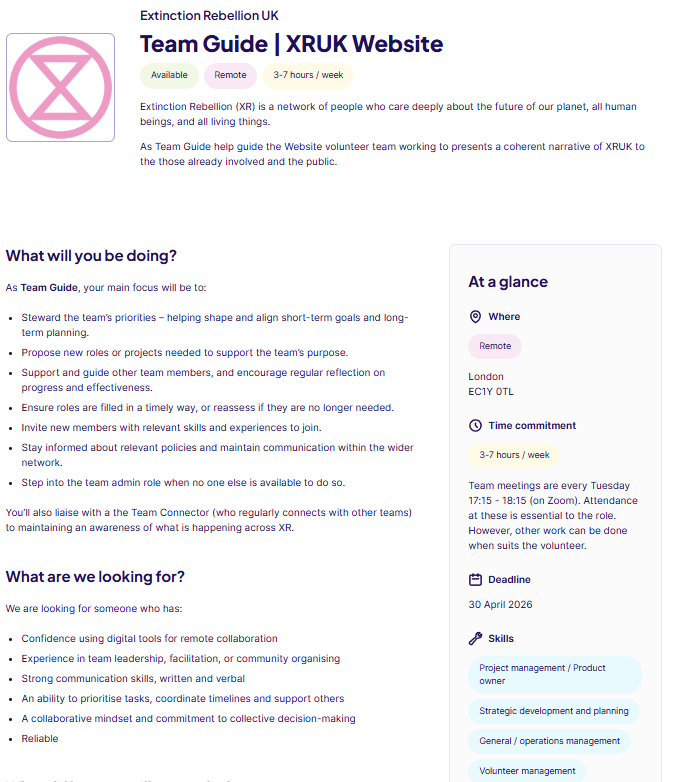
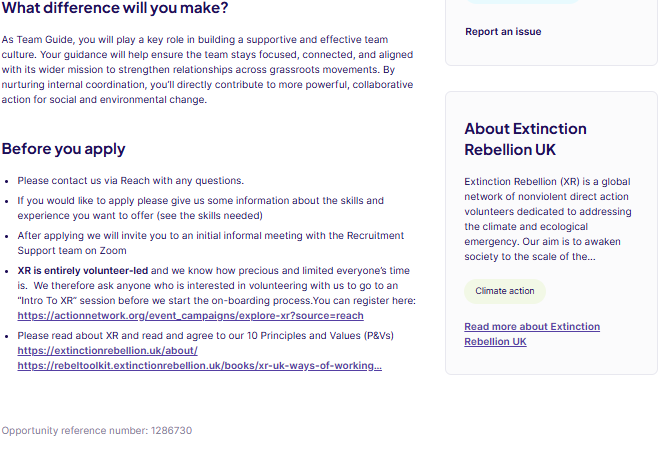
#### Example of a Team Guide (Internal Coordinator) Role ad for XRUK Website team

Use this example for wording and to see what can be added to each section of your role ad.

[![Template Role Ad Reach part 1.png](https://rebeltoolkit.extinctionrebellion.uk/uploads/images/gallery/2026-03/scaled-1680-/NJjtemplate-role-ad-reach-part-1.png)](https://rebeltoolkit.extinctionrebellion.uk/uploads/images/gallery/2026-03/NJjtemplate-role-ad-reach-part-1.png)
[![Template Role Ad Reach part 2.png](https://rebeltoolkit.extinctionrebellion.uk/uploads/images/gallery/2026-03/scaled-1680-/template-role-ad-reach-part-2.png)](https://rebeltoolkit.extinctionrebellion.uk/uploads/images/gallery/2026-03/template-role-ad-reach-part-2.png)

#### Email Template

Here's a handy template email with the relevant links for copy/pasting to use as a reply message to the applicant. Please send this both via Reach messaging and from your team's email address directly to the applicant's email if they have included it on their CV.

---
```

Hi [NAME]

Thanks so much for applying for the role of [ROLE NAME] with Extinction Rebellion (XR) UK's [GROUP NAME] team.

Your CV and application look great! We really appreciate you offering to donate your energy and skills, and we're really looking forward to meeting you.

Do you know much about the work of Extinction Rebellion? 

If not, then the next step before we start the volunteer onboarding process is to go along to "An Intro to XR" session to allow you to find out more about our work and see if this is a good fit for you. XR is entirely volunteer-led and we know how precious and limited everyone’s time is.  This is why we ask anyone who is interested in volunteering with us to go to an “Intro To XR” session before we start the onboarding process.  We hope this will give you a chance to see if XR is a cause you want to give your valuable time to. 

There is “An Intro to XR” session on [INSERT DATES] on Zoom. You can sign up for either of these and see other upcoming dates here: https://actionnetwork.org/event_campaigns/explore-xr?source=rebeltoolkit

(please make sure you look out for “Intro to XR” sessions, not the “Get Involved” ones)

Are you able to go to any of the upcoming sessions?

Please let me know if you have any questions or need any further information.

You can also read more about XR and our 10 Principles and Values (P&Vs) by visiting the link below:

- https://extinctionrebellion.uk/about/
- https://rebeltoolkit.extinctionrebellion.uk/books/xr-uk-ways-of-working-and-constitution/page/principles-and-values


I look forward to hearing from you soon and, if you decide to join us (which I very much hope you do), working with you in the future. But please let us know if you decide to withdraw your application, so we don't worry about your wellbeing.

Love and courage

[YOUR NAME]

XRUK [YOUR TEAM] team

Team Recruiter Role
```
#### Signposting Template

When an applicant isn't right for the role, here's a template email with the relevant links for copy/pasting to use. From the three possible situations, please select the suitable option and send this both via Reach messaging and from your team's email address directly to the applicant's email if they have included it on their CV.

---
```
Dear [NAME],
Thanks so much for applying for the role of [ROLE NAME] with Extinction Rebellion (XR) UK's [GROUP NAME] team.
We really appreciate you offering to donate your energy and skills.  

OPTIONS:

1. YOU KNOW THE ROLE / TEAM TO SIGNPOST THEM TO

After reading your application message and / or CV [DELETE AS APPROPRIATE], we feel that your experience would really fit well with [INSERT TEAM OR ROLE AS APPROPRIATE]. It’s not that we don’t want you in our team, but we want to find the best place for you in XR.
Here’s a link [INSERT LINK] to the role for you to look at. If you would like more information about the role, click ‘Apply Now’ and send a brief message.

Or, if this role doesn’t interest you, please come to one of our Get Involved sessions or get in touch with volunteer@extinctionrebellion.uk and our Recruitment Support team will do their best to help you find your happy place within XR.

Register for Get Involved:
https://actionnetwork.org/event_campaigns/explore-xr?source=signposting_email


2. SOMEONE ELSE HAS TAKEN THE ROLE

We really appreciate you offering to donate your energy and skills. Someone has recently taken on this role. However, we feel that your skills and experience would be really valuable within XR.

If you haven’t yet attended, please come to one of our Get Involved sessions or get in touch with volunteer@extinctionrebellion.uk and our Recruitment Support team will do their best to help you find your happy place within XR.

Register for Get Involved:
https://actionnetwork.org/event_campaigns/explore-xr?source=signposting_email


3. NOT SUITABLE FOR THE ROLE

We really appreciate you offering to donate your energy and skills. It’s not that we don’t want you in our team, but we want to find the best place for you in XR. 
If you haven’t yet attended, please come to one of our Get Involved sessions or get in touch with volunteer@extinctionrebellion.uk and our Recruitment Support team will do their best to help you find your happy place within XR.

Register for Get Involved:
https://actionnetwork.org/event_campaigns/explore-xr?source=signposting_email


Love and courage
```

# How to Respond to Reach Applicants

#### Responding to Applicants
When replying to your Reach applicants, it's a good idea to reply first via the Reach platform (rather than your team's email) and to send them 2 links, one to the XRUK Website, asking them to read through the Learn More/About page, and the second to detailed explanations of our 10 Principles & Values.

This will help in identifying if the applicant is in agreement with what XR does and if they feel XR is for them. It will also speed up your onboarding process!

# Dump

<p><a href="https://extinctionrebellion.uk/about/">About Extinction Rebellion</a></p>
   
<p><a href="https://rebeltoolkit.extinctionrebellion.uk/books/intro-to-xr/page/our-principles-and-values">XR's 10 Principles & Values</a></p>

---

##### Some further resources on posting positions on Reach:

<a href="https://youtu.be/DCmZW0_B5so?si=2-j2eO9SnljhB-hj" target="_blank" rel="noopener noreferrer">How to post a great volunteer opportunity on Reach</a> (2mins 20secs YouTube)

How to <a href="https://reachvolunteering.org.uk/help/adding-colleagues-your-organisation" target="_blank" rel="noopener noreferrer">connect your Reach Integrator account </a> - known as a colleague on Reach - to Extinction Rebellion UK.

# Managing New Volunteers

#### Using a Mattermost board to track your applicants

It can quickly become confusing when you have a number of applications for your role ads. Storing their contacts details securely and within GDPR regulations can be a challenge.

To help, we have a system on Mattermost using the built-in 'kanban-style' boards. Kanban boards are a way of seeing information linearly and laterally to minimise overwhelm.

Mattermost boards can be tailored to any repetitive task - like managing new volunteers! Read the basic info on [How to use Mattermost Boards](https://rebeltoolkit.extinctionrebellion.uk/books/the-hub-mattermost-cloud-and-forums/page/mattermost-boards). Once you've read the basic information on How to use Mattermost Boards and watched the video \[link coming\], let us know you're ready and we will then add you to the board.

To request access to the Recruitment Support: Applications board, contact Recruitment Support either via our [Mattermost Reception](https://organise.earth/uk/channels/movpathreception) or email <volunteer@extinctionrebellion.uk>.

##### Benefits of using the board

By completing the steps below, you keep track of progress and if you need support, others who use the board can see this progress. If the applicant isn't suitable for your team and you want to pass them to another team, they can easily pick up where you left off.

##### How to manage new volunteers

Recruitment Support have a process to help you. Once familiar with the process, it's easy to use and keeps all the information in one place, which means we can support each other with recruitment and onboarding. Recruitment Support can offer guidance and give ongoing support until you feel happy using this process. It involves using Mattermost and if you're not yet a Mattermost user, we can also support you with how to use it.

#### Create a card for your applicant

**1.** Use the [Recruitment Support: Applications](https://organise.earth/boards/team/ihy9i8ethpgtdci9beon9o6phc/bjchnafan1jniinroctaoyuhqdr/v4e8oixeohtdmurs9z7owwdd54o) Mattermost board to manage your new applications and keep a record of progress.

If you decide not to use Mattermost, you can use a spreadsheet. However, this means Recruitment Support won't be able to support you in the same way as we won't have access to your spreadsheet.

**2.** Acknowledge the new applicant either by email, text or call. Then fill in the Contact history on the Volunteer Website or if on Reach, reply to the applicant's message to let Reach know you've acknowledged the application.

**3.** Have all the info at hand. If using Reach, have the applicant's CV open. Or if using the Volunteer Website have the volunteer's application open.

**4.** Create a card on the Applications board using New \[top right blue option\]. You name will be added into the Created by field and the date you created the card, automatically.

**5.** Copy the applicant's name and paste into Untitled then click into Empty next to Status and choose Application Received.

**6.** Add the Integrator's handle. The Integrator is responsible for contacting the applicant and creating and maintaining the card. Anyone may start this process and make themself the Integrator. They may then find an Integrator for a hand over and only then change the Integrator's name. Otherwise there is no clear responsibility and applicants get forgotten.

**7.** Download the applicant's CV and upload to the [Applicants CVs](https://cloud.extinctionrebellion.uk/apps/files/files/1605502?dir=/Recruitment%20Support%20%5Bwg%5D/Applicants%20CVs) Cloud folder. **To request access to this folder**, use the Recruitment Support contact details above. Once uploaded to the Cloud folder, create a Public view-only share link, and paste the link into the CV property on the card.

**8.** Delete the CV from your own device. Don't store people's personal details on your own devices!

**9.** If using the Volunteer Website, copy and paste the applicant's profile and message text or, if using Reach, copy the applicant's message and paste into the Comments section on the card.

**10.** Fill in all the remaining relevant details on the card. These include: [![Screenshot 2026-05-04 133438.png](https://rebeltoolkit.extinctionrebellion.uk/uploads/images/gallery/2026-05/scaled-1680-/screenshot-2026-05-04-133438.png)](https://rebeltoolkit.extinctionrebellion.uk/uploads/images/gallery/2026-05/screenshot-2026-05-04-133438.png)

##### Handy Hints

- **Record** any progress, e.g. email, phone or text conversations, meetings arranged, outcomes of meetings, onboarding progress etc. into the Comments section on the card. It is easy to forgot what you said to whom and when!
- There are searches available to find a specific applicant - **use the search box** with the magnifiying glass top right.
- Once you have messaged the new applicant, **change the status** from Application Received to In Progress.
- Use **consistent names** for your team and roles to make it easier to search and produce stats
- **Don't add more than 1 integrator** or you risk neither integrator keeping in touch
- **Buddy** - this is someone in your team the new volunteer can maintain contact with for further support.
- Attended **Intro to XR** - it's good advice for all volunteers new to XR to register for this talk as this will save you time. The talk covers the P&amp;Vs, Three Demands, how we organise and many other topics, you might have to explain otherwise. It also gives the new applicant the opportunity to decide if XR is for them.
- If they have one, add their **LinkedIn profile**.

We are here to help, please use us! If you need further support with Mattermost Boards, contact the Recruitment Support team.

# Onboarding new Volunteers


# Building Onboarding into your Team

We know that one of the main reasons that volunteers stay with XR is that they find a community with us. So how can we ensure that we are as welcoming to as many people, and as many different people, as possible?

### The Job of Welcoming
 It is an integrator's job to find, contact and induct new volunteers into the team. It is the whole team's job to welcome them.

**Make Sure:**
1. a team member steps up to have a 1-1 chat with the new volunteer in their first week!
2. a team member steps up to be the new Volunteer's "Point Person" or "Buddy" for their first few weeks, that single port-of-call if the new volunteer has any questions*; and
3. the team invites the new voluntees to any social gatherings coming up or any activities they may wish to join. 
	- (**This is especially important if you organise in multiple chats, ensuring they know what's happening**)

##### A buddy is vital for helping new members to feel welcome and find their feet!

**The buddy's role/responsibility is:**

- To make initial contact in the form of a friendly email, introducing
yourself, possibly offering to meet for coffee or have a call

- To properly welcome them into XR by answering their questions, and
allaying any fears they might have about getting more involved
- To generally be a friendly voice on the end of a phone and support
them in finding their own place in XR

**Some ideas for how a buddy can support a new XR volunteer:**

- General meetups in a café to chat about their interests in XR, ask how
they would like to be involved

- Inviting your buddy to a meeting that you are going to; you’ll be the
friendly person already there, so they won’t have to go into a room of
strangers

- Introducing your buddy to other XR people who are in areas that your
buddy is interested in (art, media, outreach, performance actions)

- If they are ready to become involved, invite your buddy onto your
local telegram group

**As the Integrator, do think about how the local group will keep track of who is
buddying whom.**

### New Volunteer in the Chat!
When a new volunteer is added to your chat (Mattermost, Signal, Telegram...) make sure to say Hi and welcome them. Make sure they know the purpose of various chats and where they can ask for help.

### A Volunteer's First Meeting
**Do**  
1. ensure that the team has included their roles and pronouns in their screen names **or** start off with a round of names and role descriptions; and
2. have a least one person offer to stay behind to check in with the new Volunteer, see how they found their first meeting and if they have any questions.


**Don't**  
1. use lots of acronyms and XR jargon! Try to have someone there to call people out on their jargon and ask them to define things.

# Moving on or Exiting Process

#### Rebel Pathway - Exit Process

##### We are all volunteers in XR. This comes with some benefits and also some drawbacks. The benefits are clear and include the ability for us to step up when we have time and step back when our circumstances change, we are able to tailor the time we give to suit our lives, give the things we want to give and hold back as much as we want for ourselves. There are a lot of aspects to our volunteer structure that are inherently regenerative in nature, after all we are all crew, we are a family.

On the flip side this does mean that sometimes we will offer to do things that it turns out we don’t have the time for, or we step up to be a part of a project but our other responsibilities require us to step back. There are often conflicting responsibilities when it comes to volunteering our time and this can mean that the teams we build may suffer from a lot of churn or some months where the team simply doesn't have the capacity to meet its goals.

We never want to blame our individual volunteers for this. It is not our fault when our situations change. However, we want to make sure that when we do have to change our commitment to XR that we can do so in a way that limits the impact on our teams.

Below are two suggested processes to guide Rebels in stepping back smoothly:

Change of Focus
Often we step into a team or role in XR to work on a specific project or for a fixed term and as this comes to a close we may want to change what we are working on or move to another project, we don’t want to leave the role suddenly but we do want to transition our attentions to elsewhere.

Let your Coordinators know you plan to change focus. It is useful to give as much warning as possible if you plan to move from your team, this allows them to redistribute tasks in your absence. But also make a date for yourself, it is all too common for there to be that one last thing to clear up and it could take months for a clean separation! Don’t be afraid to leave some things unfinished.
Find your new home! If you don’t already know what you are interested in diving into next then check out the Volunteer Website. You may have used this as you were joining XR but it is also a great way to see where help is needed in different parts of the movement. 
Find your Replacement if necessary. If your team or project is continuing without you you may need to find someone to replace you. This may mean holding an election for your role or onboarding a new Rebel. Don’t be daunted by finding someone new - we can help!
5 Steps to finding a New Rebel:
Write up a short role/project description
Ask your integrator or IC to post it on the Volunteer Website
Once you get a hit reach out to them for a chat, send them the Rebel Starter Pack and give them a run down of the project.
Introduce the new Rebel to your team, let them shadow you for a week or two slowly picking up more of the role.
Make sure you step back at the date you had planned, stay in contact with your replacement if they need help but make sure they know that the role is now theirs and they should fly!
Compile your Loose Ends. Take an hour or so to track down the loose ends that you will leave to your team (or if it is several teams, for each team). This will not only help your team in picking up where you left off but it will also give you a sense of rounding off so that you don’t have to worry while your mind is needed elsewhere.
Consider:
Making note of conversations you were having
Linking to any documents you were working on 
Copying over your to do list and any unfinished APs
Adding a couple of sentences on what your goal for the next few weeks was going to be
Template Loose Ends Doc
Say goodbye to your team. Plan a small social or activity for your team to round off your time with them. We recommend Kumospace to bring larger teams together in a natural mingling way, or an intimate Zoom drinks party. Or you can host an activity, maybe play a game or a gratitude sharing space.
Stay in contact. XR works due to our interconnectivity. In your new role you won’t only bring yourself but you’ll also bring your experience and knowledge of your previous teams. Use it! Make connections, start collaborations and most of all have fun!

A Swift Retreat
Sometimes the need to step back comes quickly and unexpectedly due to family responsibilities, mental health, job applications or many other things. Here is a roadmap for a swift exit which doesn’t leave your team in the lurch. 

Let your Coordinators know that you need to step back. Ideally give them a date (end of the week, after the next meeting etc…) but if you need to go instantly that is also okay. The important thing is that your team knows to not expect you to continue holding the things you had.
Compile your loose ends. Take an hour or so to track down the loose ends that you will leave to your team (or if it is several teams, for each team). This will not only help your team in picking up where you left off but it will also give you a sense of rounding off so that you don’t have to worry while your mind is needed elsewhere.
Consider:
Making note of conversations you were having
Linking to any documents you were working on 
Copying over your to do list and any unfinished APs
Adding a couple of sentences on what your goal for the next few weeks was going to be
Template Loose Ends Doc
Set up auto replies. On your Mattermost or your XR email address set up an auto reply saying that you have stepped back and who to contact instead. This will allow any contacts to connect with your team once you’ve gone. Consider writing a short message in a document that you can copy into your texts or emails if someone contacts you from XR but you cannot set up a generic auto reply for that account.
For Example:
“Hi Rebel, I’m sorry but I have had to step back from my XR work for the time being. If your question is about X please forward it to rebel1@example.com and if it is about Y then connect to rebel2@example.com. Love & Rage, Rebellina”
Take a breath. You have now done everything to help your team continue the work without you, thank you! Take a moment to yourself to reflect on the amazing things you have done with XR and don’t be surprised if a few Rebels reach out in the coming days to say thank you! Come back when you are ready or good luck in the next adventure!

# Supporting your new Volunteers

#### Helping Volunteers stick!
The National Council for Voluntary Organisations produced a national survey on the volunteer experience- <a href="https://www.ncvo.org.uk/news-and-insights/news-index/time-well-spent-2023/volunteer-retention/" target="_blank" rel="noopener noreferrer">Time Well Spent 2023, Rei Kanemura</a>. It is interesting to see why volunteers stay and why they step back.

#### Access needs
Find out about your new volunteer's access needs and any other ways they may need to be kept safe. These may include any disclosed disability that might affect their participation in our community (such as the use of assistive technologies to read emails and the web) as well as participation in events (such as physical access needs, mental-health issues and dietary or other invisible needs).

Gathering this information must always take account of someone's right not to disclose anything, as well as their need for proper support if they do disclose something.

You can find advice on ensuring that you support volunteers with access needs [in the Access and Inclusion section of the toolkit](https://rebeltoolkit.extinctionrebellion.uk/shelves/09-access-and-inclusion).

#### Keeping each other safe 
Any organisation needs to keep its members safe, and we need to make sure that we know if anyone in our community might be classed as vulnerable. If you find any concerns related to a volunteer (whether about their needs or about their potential impact on other volunteers), you may need to draw up a support plan so that volunteers can be protected from anyone who might harm them, either deliberately or accidentally. You should draw up a support plan in consultation with the volunteer who is its focus, and assure them that we want them to take part and are aiming to provide them with the support they need to do this safely.

#### Where else can volunteers get support?

Please signpost your New volunteers to the pages **[Care and Respect](https://rebeltoolkit.extinctionrebellion.uk/books/our-culture/page/care-and-respect)** and **[Inclusivity](https://rebeltoolkit.extinctionrebellion.uk/books/our-culture/page/inclusivity)** in the **Intro to XR**.


Please check your New volunteers have read these and understand the behaviour they are expected to follow.

# Welcome and Onboarding steps

### You have an applicant! What next?

<hr>

You can **<a href="https://cloud.extinctionrebellion.uk/s/jiEyBsRHzFYtSgr" target="_blank" rel="noopener noreferrer">download the flowchart</a>**  as a pdf with 'clickable links'.<br>
Or skip to below the Visual Flowchart to **[view an accessible text version](https://rebeltoolkit.extinctionrebellion.uk/link/1771#bkmrk-text-version-of-flow)** of the flowchart.

You can also **<a href="https://actionnetwork.org/event_campaigns/welcome-and-onboarding-workshops" target="_blank" rel="noopener noreferrer">register to attend a workshop</a>**, which provides complimentary guidance and support on how to follow all the steps in this flowchart.

#### Visual Flowchart

<br>

[![Welcome & Onboarding Your New Volunteer ~ Flowchart [no links].jpg](https://rebeltoolkit.extinctionrebellion.uk/uploads/images/gallery/2025-01/scaled-1680-/flowchart-for-integrators-new-applicant.jpg)](https://rebeltoolkit.extinctionrebellion.uk/uploads/images/gallery/2025-01/flowchart-for-integrators-new-applicant.jpg)


#### Text version of the flowchart

##### 1. Acknowledge
- Send a message ASAP - preferably within 24hrs
- Tell the applicant when and how you will be in touch
##### 2. Security check (for sensitive roles)
- Are they vouched for by someone known?
##### 3. Call
- A friendly phone call is best - you get a better idea of the person
- Ask them about themselves - start to build trust
- Explain the role
- Can they make your meetings?
- What are their skills?
- Do they have access needs and can they be accommodated?
- For sensitive roles, request social media names for background checks
##### 4. Decide
- Are they a good fit for your role? (or another role with your team?)
- Update contact history on <a href="https://volunteer.extinctionrebellion.uk/login-wg" target="_blank" rel="noopener noreferrer">Volunteer Website</a> and <a href="https://reachvolunteering.org.uk/user" target="_blank" rel="noopener noreferrer">Reach Volunteering</a>
- Skip to **[YES](https://rebeltoolkit.extinctionrebellion.uk/link/1771#bkmrk-yes) OR [NO](https://rebeltoolkit.extinctionrebellion.uk/link/1771#bkmrk-no)**

#### **YES**
##### 5. Let them know and send some simple info
- Confirm they agree with the [Principles and Values](https://rebeltoolkit.extinctionrebellion.uk/books/intro-to-xr/page/our-principles-and-values) of XR
- <a href="https://actionnetwork.org/event_campaigns/explore-xr" target="_blank" rel="noopener noreferrer">Intro to XR</a> talk and / or [Intro to XR](https://rebeltoolkit.extinctionrebellion.uk/books/intro-to-xr) on the Rebel Toolkit 
- Invite them to join the <a href="https://extinctionrebellion.uk/join-us/" target="_blank" rel="noopener noreferrer">XRUK mailing list</a> if they haven't already
- Invite them to meet the team (day, time, Zoom link)
##### 6. Meet
- [Welcome them warmly](https://rebeltoolkit.extinctionrebellion.uk/link/1767#bkmrk-the-job-of-welcoming) and thank them as they join the meeting
- Deep check-ins: explain who you all are, your roles and some info about your life outside of XR
- Invite them to introduce themselves
- Explain [hand signals](https://rebeltoolkit.extinctionrebellion.uk/link/1521#bkmrk-hand-signals)
- [Avoid jargon / acronyms](https://rebeltoolkit.extinctionrebellion.uk/books/intro-to-xr/page/glossary). Encourage them to ask for clarifications
##### 7. Debrief
- Stay on to  answer questions (or arrange a later time) 
- Reassure them that it will take time but that there’s plenty of support
- Do they still want to join the team? If **Yes** continue with the steps, or go to [**No**](https://rebeltoolkit.extinctionrebellion.uk/link/1771#bkmrk-no)
##### 8. Data security
- If they’ll have access to personal data, talk about keeping it safe and
ask them to ask them to watch the [6 minute video](https://rebeltoolkit.extinctionrebellion.uk/books/intro-to-technical-and-data-services/page/gdpr-and-personal-data#bkmrk-what-is-gdpr%3F) and then <a href="https://cloud.extinctionrebellion.uk/s/teaTsgTAgtXLGGT" target="_blank" rel="noopener noreferrer">test for understanding</a> and then sign the <a href="https://actionnetwork.org/forms/xr-data-protection-agreement-2?source=wel&onboardstepsRT" target="_blank" rel="noopener noreferrer">Volunteer Agreement</a><br>

#####  9. Welcome pack
- Send them your team’s <a href="https://cloud.extinctionrebellion.uk/s/ekAWK5jBoyNzs2k" target="_blank" rel="noopener noreferrer">Welcome Pack</a> and arrange to go through it 
- Can a team member be a [buddy / point of contact](https://rebeltoolkit.extinctionrebellion.uk/link/1767#bkmrk-%2Aa-buddy-is-vital-fo)?
#####  10. Add to team comms channels
- Check they know how to use them
- If not, sign-post them to the [Tech Support sessions](https://rebeltoolkit.extinctionrebellion.uk/books/directory-of-talks-and-training/page/tech-support-sessions-and-training)
- [Welcome them](https://rebeltoolkit.extinctionrebellion.uk/link/1767#bkmrk-new-volunteer-in-the) into the chat
##### 11. Starter task
- Something simple to complete before you next meet
- If taking on an EC / IC role, begin shadowing
##### 12. Ongoing care
- Create a debrief schedule based on their needs
- If interested, invite them to a parent circle meeting

##### Congratulations - you have a new team member!
---
#### **NO**

##### Let them know
- Arrange a time to phone; inform them gently 
- Reassure them that they’re valued and there’s a place for them in XR
- Ask if they’d like feedback and if they say yes, be kind and honest<br>

##### Signpost to other options to find another role
- A <a href="https://actionnetwork.org/event_campaigns/explore-xr" target="_blank" rel="noopener noreferrer">Get Involved</a> session
- The <a href="https://extinctionrebellion.uk/join-us/" target="_blank" rel="noopener noreferrer">Get Involved page</a> on the website or, if needed,
- Email Recruitment Support [volunteer@extinctionrebellion.uk](mailto:volunteer@extinctionrebellion.uk)

# New Volunteer's Training

How to create a drop-down:

[here](https://rebeltoolkit.extinctionrebellion.uk/link/1598#bkmrk-drop-down-expanding-)

<a href="LINK" target="_blank" rel="noopener noreferrer">TEXT</a>


### GETTING STARTED

##### Intro to XR online talk

Join this talk if you're new and want to find out about Extinction Rebellion (XR).

 <a href="https://actionnetwork.org/event_campaigns/explore-xr?source=rebeltoolkit" target="_blank" rel="noopener noreferrer">Click here to register</a>

Duration - 90 minutes + 30 minutes optional Q&A

[Intro to XR book on the Rebel Toolkit](https://rebeltoolkit.extinctionrebellion.uk/books/intro-to-xr)


#### Get Involved online session
A warm welcome and all your questions answered.

 <a href="https://actionnetwork.org/event_campaigns/explore-xr?source=rebeltoolkit" target="_blank" rel="noopener noreferrer">Click here to register</a>

Duration - 60 minutes + 30 minutes for questions


Approximate duration - 30 minutes +

##### Heading for Extinction video - 50 minutes (can be watched later)

##### Tech Support and Training

Open Zoom link (no need to register - just turn up!)

Every Thursday 18:30 - 19:30

Useful videos about XR's Communication Tools on this playlist

Join the Hub and Say Hello on Mattermost

First, message us at volunteer@extinctionrebellion.uk asking for your invite to join the Hub then follow the instructions in the email you get back.

Then post your first message in the Explorers chat

Explorers

Accepting your Invite to the Hub - video (7 minutes)

What is Mattermost - video (5 minutes)

Mattermost - Download and sign in to the app- video (4 minutes)

Mattermost explanation - Rebel Toolkit

### HOSTED TRAININGS
Zoom meetings with trainers can be done at your own pace,
dependent on the dates that trainers are available.

##### How XR Works & Who Makes the Decisions ?

Learn about the Self-Organising System (SOS), which empowers by distributing

decision-making power to everyone, through roles and teams.

This basic training is particularly helpful for people interested in joining

XRUK working groups but very interesting if you are new to XR.

Zoom meeting with the SOS team

Duration - 75 minutes

For the next Basic SOS training please Click here to register

The SOS team also has a pre-registration signup for their future training:

Click here to register your interest

##### Prepare for Action (NVDA) workshops

Email the team to request training:
[pfa@extinctionrebellion.uk](mailto:pfa@extinctionrebellion.uk)

Duration - 1.5 hours.

### INDEPENDENT LEARNING
These modules can be done at your own pace and in any order.

Confused about the Rebel Toolkit and the Rebellion Academy?
To understand the differences, please Click here
Please note: You don't need to be on the Hub to access the Rebellion Academy.

You can create an account directly on the Rebellion Academy to access the courses.

##### Regenerative Culture

The theory behind XR's regenerative culture

2022: Regenerative Culture - Rebellion Academy

Approximate duration - 60 minutes

##### Introduction to XR

Introduction to XR - Rebellion Academy

Approximate duration - 60 minutes

##### Our Strategy

Our Strategy - Rebel Toolkit

Approximate duration - 40 minutes

##### Our Structure

Our Structure - Rebellion Academy

Approximate duration - 30 minutes

Similar content to the Interactive 'How XR Works & Who Makes the Decisions' session

##### Group Roles

Working Group Roles - Rebellion Academy

Approximate duration - 60 minutes


##### Internal Coordinator Role

(optional, highly recommended if you want to be involved in stewarding a team)

Coordinating a Team - Rebellion Academy

Approximate duration - 60 minutes

##### Heading for Extinction

Heading for Extinction - video

Approximate duration - 60 minutes

##### Know Your Rights

Know Your Rights (KYR) - Rebellion Academy

##### Citizens' Assemblies

Citizens' Assemblies 2024 - Rebellion Academy

Approximate duration - two sections of 60 minutes each

##### How We Work Together

XRUK Ways of Working - Rebel Toolkit

Approximate duration - 60 minutes

##### Get Involved Now with a Digital Action!
You can make a difference from wherever you are.
Check out the Digital Rebellion website

##### Find a Local Group, Region or Nation

Local Group map

Sign up for news

##### And Finally
A big thanks from the Explore team for getting involved.
These resources reflect XR's devotion to ecological and climate justice

and it's been our pleasure to help you get a good grounding in XR.

XR runs on the generosity of donations, so please consider supporting our work further

by donating today or becoming a regular donor.

Any contribution will be greatly appreciated.

CLICK HERE to donate to XRUK

# Integrator Resources

#### Recruitment &amp; Onboarding workshop:

- Here's the link to the slides used in the **[Recruitment &amp; Onboarding Workshop](https://cloud.extinctionrebellion.uk/apps/onlyoffice/1689487?filePath=%2FRecruitment%20_%20Onboarding%20Training%20%5Brs%5D%2FTraining%20Resources%2FR%26O%20Training%20Slides.pptx)**

#### Resources for new rebels:

- **[Intro to XR](https://rebeltoolkit.extinctionrebellion.uk/shelves/01-welcome-to-xr)**
- **[Get Involved workshops](https://extinctionrebellion.uk/join-us/)**
- For volunteers to send questions **[Volunteer Email](mailto:volunteer@extinctionrebellion.uk)**
- For new rebels who cannot or don't want to join actions in person: **[Digital Rebellion](https://digitalrebellion.uk/)**

#### Resources for Integrators:

- Link to the **[Integrator Handbook](https://rebeltoolkit.extinctionrebellion.uk/books/recruitment-and-onboarding)** of which this page is a part
- Link to the **[UK Organism](https://organism.extinctionrebellion.uk/?id=0)** (see how we're organised as a Self-Organising System)
- GDPR (General Data Protection Regulation): **[page on the Rebel Toolkit](https://rebeltoolkit.extinctionrebellion.uk/link/606#bkmrk-page-title)**
- For Integrators of regional or national working groups, watch this **[7-minute video](https://volunteer.extinctionrebellion.uk/integrator)** on how to use the Volunteer Website.

#### Integrator Support:

- We run regular live training on Zoom. Check the **[Welcome/Onboarding (Integrator) Support Channel](https://organise.earth/uk/channels/integrat-integration-receptio)** on Mattermost or email us at **<volunteer@extinctionrebellion.uk>** for dates or check the **[Events page](https://extinctionrebellion.uk/act-now/events-calendar/)** on the XRUK website
- Integrator (onboarder) training on the **[Rebellion Academy](https://academy.extinctionrebellion.uk/mod/lesson/view.php?id=625)**

#### Peer support:

- Join the **[Integrator Support Channel on Mattermost](https://organise.earth/uk/channels/integrat-integration-receptio)** for integrators (onboarders) to share resources and support.

#### Contact the Recruitment Support team:

- Message us directly on Mattermost: **[Recruitment Support Reception](https://organise.earth/uk/channels/movpathreception)**
- For support on using the Volunteer Website, please email us at: **<volunteer@extinctionrebellion.uk>**