
Jitsi Meet
We now have two different Zoom alternatives which are free for XRUK rebels:
- Jitsi Meet: meet.extinctionrebellion.uk (XRUK version)
- Big Blue Button: see the Rebel Toolkit page
Jitsi Meet is an open-source video conferencing platform that allows users to host secure online meetings through a web browser or mobile app. It supports features like screen sharing, chat, and meeting recording. We started working on Jitsi Meet mainly because of problems with subtitles/closed captions in Big Blue Button, especially on mobiles. It solves that problem, but documentation is still a work in progress.
How to use Jitsi Meet
This video explains most of what you need to know. We will update it with a more polished version soon.
The simplest way to create a meeting is to go to meet.extinctionrebellion.uk to create a meeting, log in with your Hub account, and then share the link to the meeting with other participants.
The controls should be reasonably familiar, but please have a look at the video if you are not sure, or come to one of our regular tech support drop-ins.
Accessing the XR UK Jitsi Instance
Method 1 – Using a Meeting Link
- Click the meeting link shared by the moderator.
- Allow camera and microphone access when prompted.
- Enter your display name, team and pronouns, as appropriate.
- Click Join Meeting.
Method 2 – Manual Join
- Go to the XR UK Jitsi homepage meet.extinctionrebellion.uk.
- Enter the meeting name.
- Click Join.
The screen images shown here were captured in Chrome on Windows 11; you may see differences in appearance (and possibly behaviour) on other platforms.
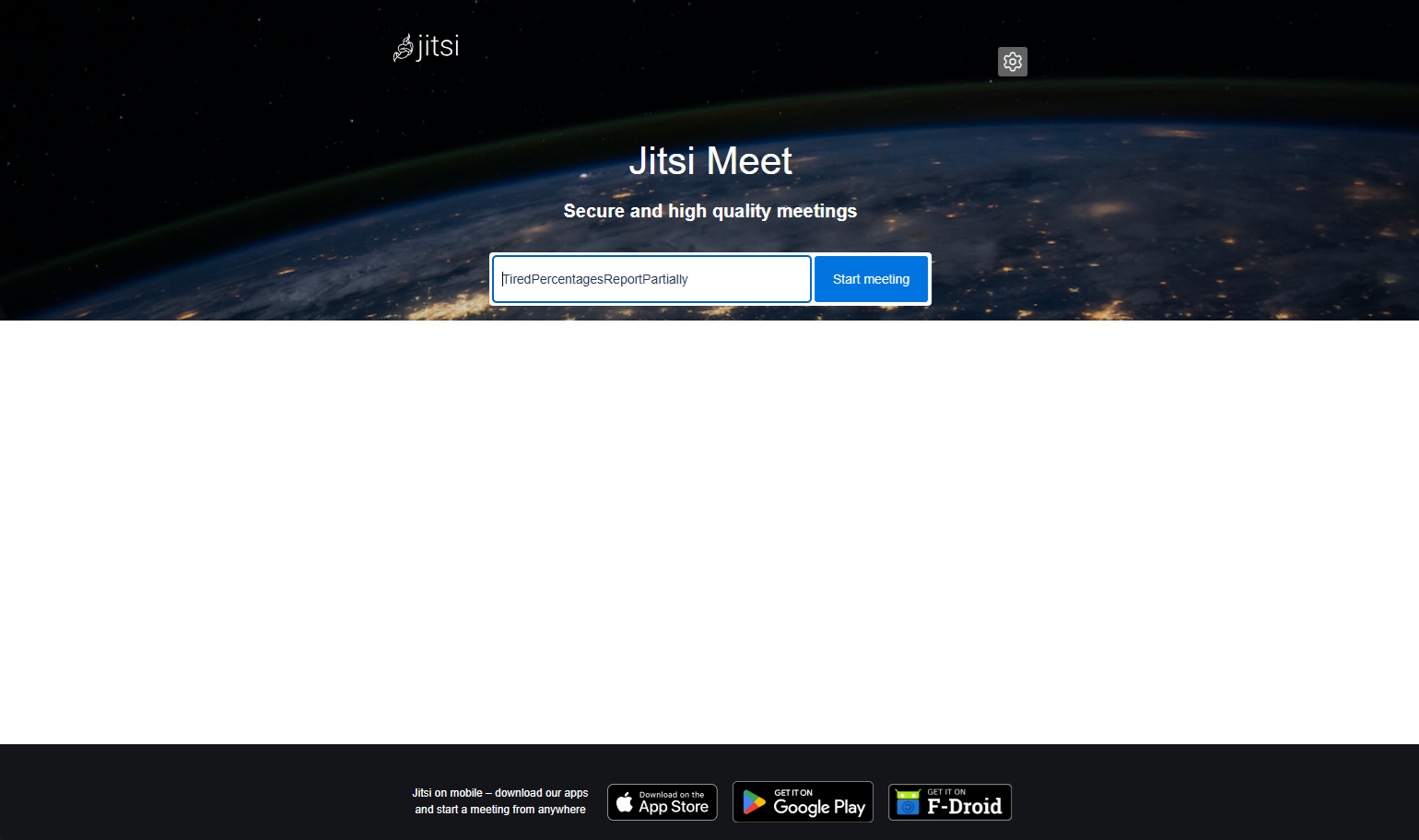
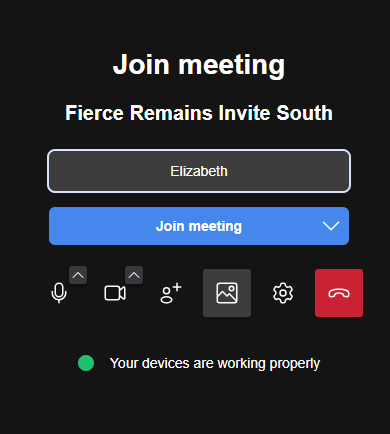
Each Jitsi meeting is identified by four words, which also make up the URL. These persist, so the same link can be used for regular meetings. The Join meeting screen shows these words, along with configuration tools and a device status message:
If you should arrive in a meeting before the moderator has started it, you will see the message below:
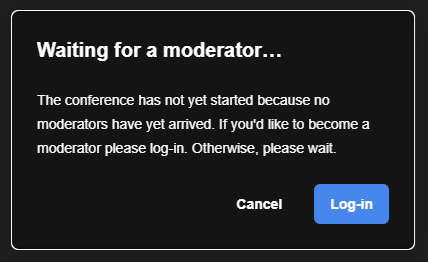
Simply wait, and you will be automatically joined to the meeting once it begins.
If you are the moderator starting the meeting, click Log-in, and enter your Hub credentials. Next you will be asked to choose which Circle the meeting is for, see example below:
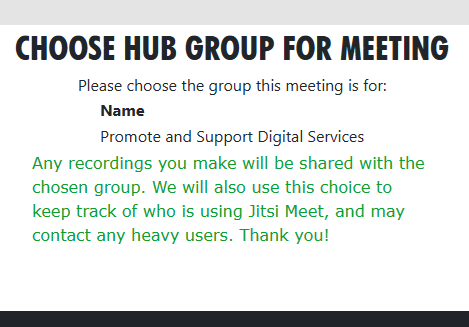
Note the message about recordings, then click on your choice of Circle (here only Promote and Support Digital Services is shown) and you will be returned to the Join meeting screen (but this time as a moderator). Click Join meeting again to start the meeting - if participants are waiting they will be added to the meeting too.
Note that a meeting can have more than one moderator; you can take on this role by opening Settings (on the More actions menu - three horizontal dots), choosing the Profile section, and logging in.
Typical controls in a meeting
Once in the meeting, the screen should look similar to the image below. Here the Chat window has been opened, showing the standard message that there is a 180 minute limit on all meetings (this is configurable, should it be necessary).
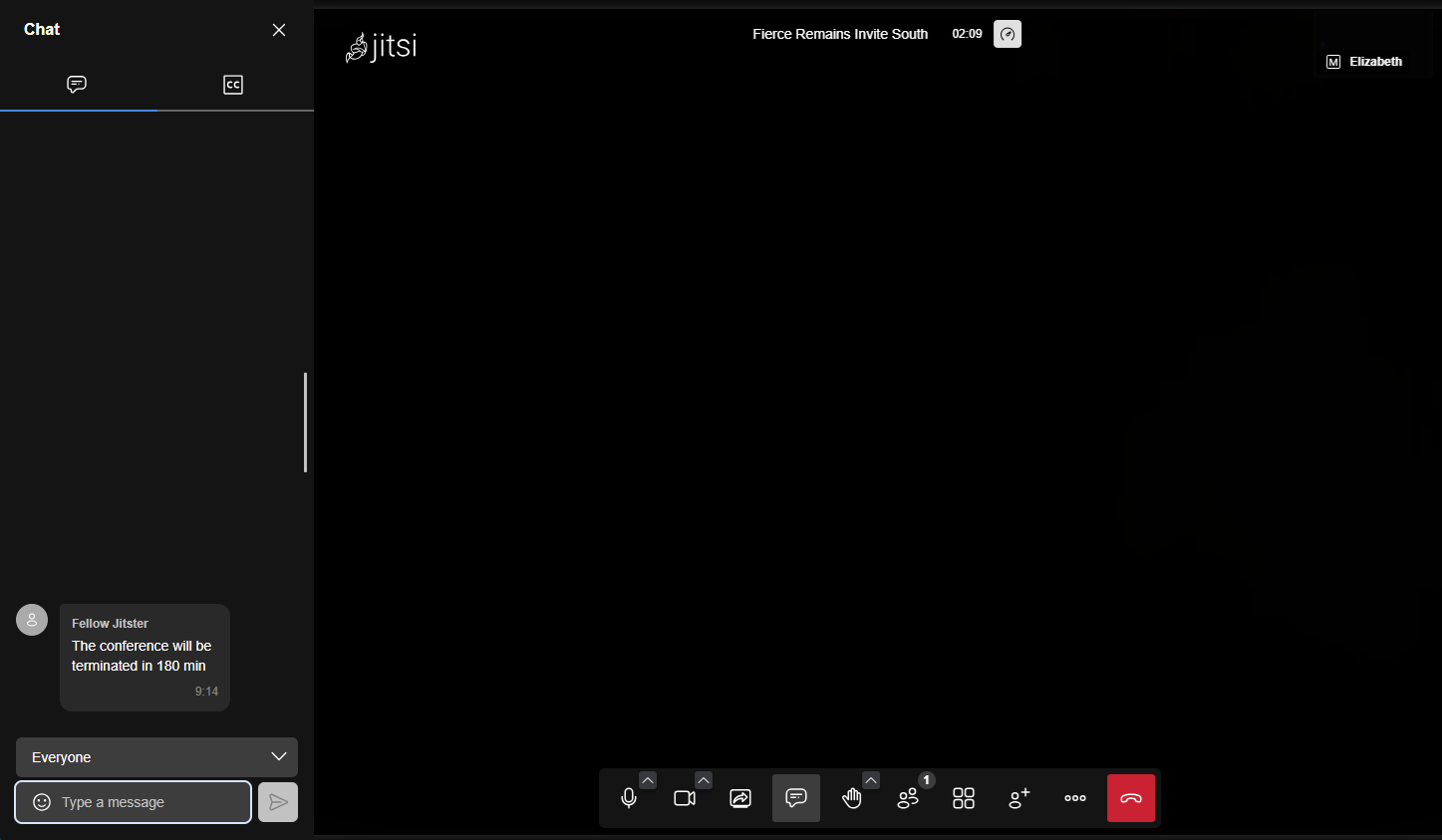
To turn on Closed Captions (subtitles), note the 'CC' symbol at the top right of the Chat window. Click on this to see the option to start subtitles, shown below.
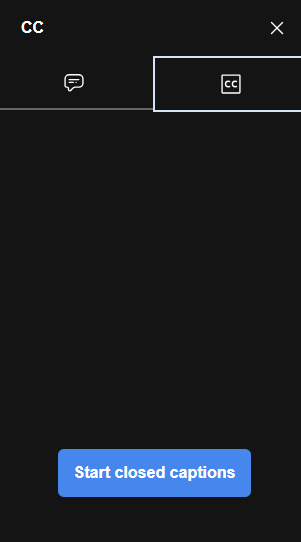
Click Start closed captions, but note that sometimes it may take a couple of minutes from the start of the meeting for the functionality to be ready. Usually you will see a message in the chat to this effect, and another message when subtitles are ready. Once you see the second message, a moderator will need to click the "Start closed captions" button, and then words spoken by any speaker from then on should appear as subtitles in the CC tab of the Chat window, as shown below.
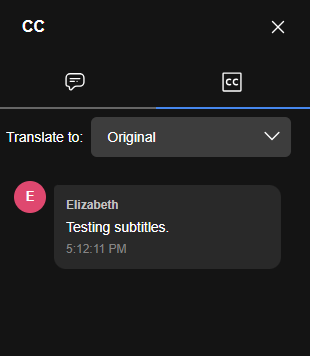
You can switch between the Chat tab (speech bubble icon) and the subtitle tab (CC icon) as required, during the meeting. You may notice the subtitle text correcting itself as people speak, this is expected functionality.
Control Functions
In the image above, from the left, you can see the following controls:
- Microphone - mute/unmute audio
- Camera - enable/disable video
- Share Screen - present your screen or window
- Chat - send messages to participants
- Raise Hand - notify the host you wish to speak
- Participants - view attendees
- Grid view - change the way participants are arranged on your screen
- Add participants - invite others to the meeting
- ⋯ More Actions - (see below)
- End meeting - leave or end the meeting
The image below gives you an idea of the options available on the More Actions (three horizontal dots) menu.
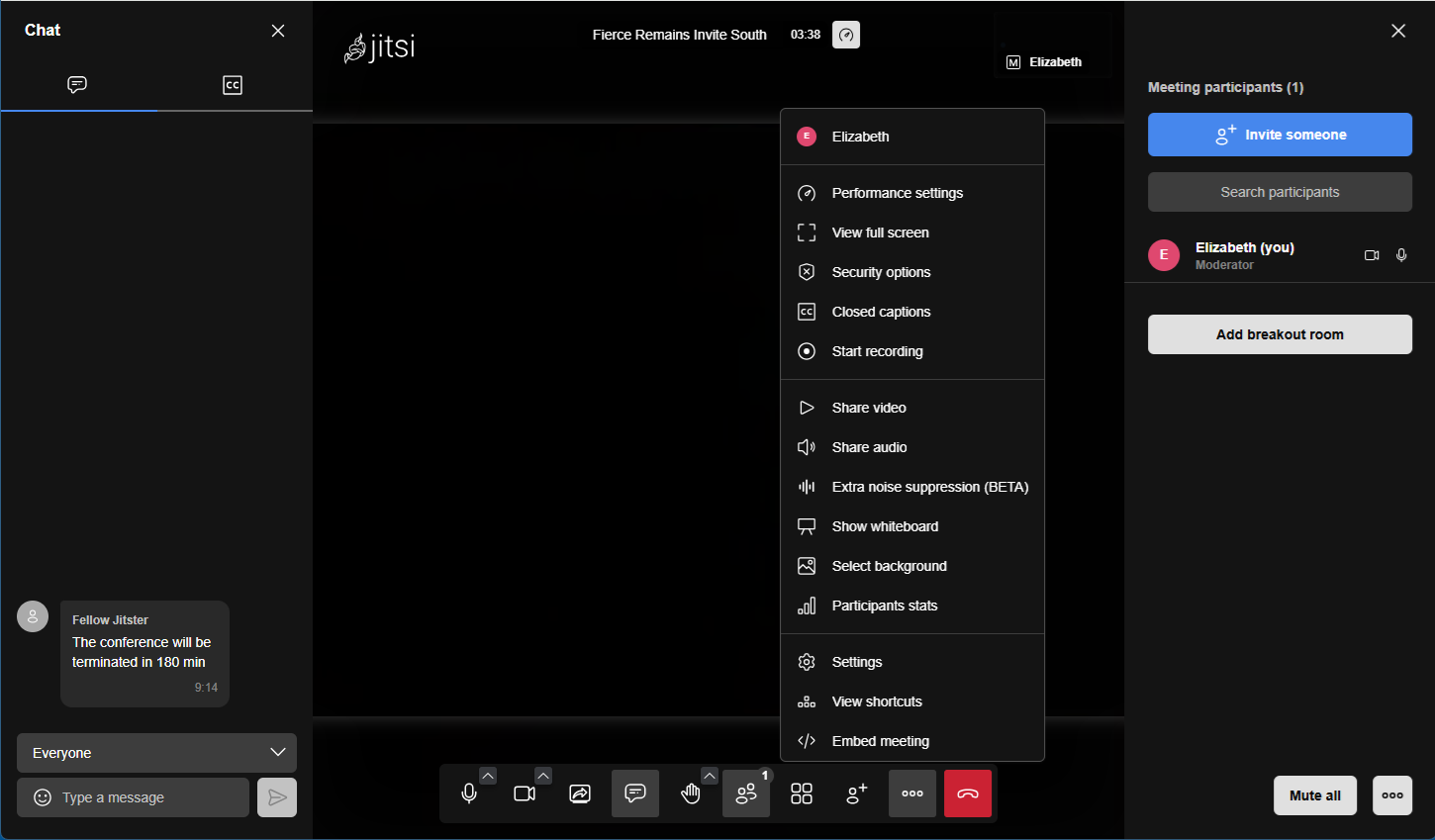
Jitsi automatically highlights the active speaker and shows participants in a grid or tile view.
Please use the mute button!
We strongly recommend that all participants mute themselves when not speaking - not doing this can cause problems with audio, and may take you out of the stack if you use the raise hand button.
Mobile phones
On a mobile phone you will need to rotate the screen (into landscape mode) to see the subtitles (or chat) at the same time as the people.
Also, if you don't need subtitles, consider using the app. You'll need to paste the whole meeting link (starting with https://meet.extinctionrebellion.uk/) into the app, not just the four words that make up the meeting ID.
The app allows you to screen share from mobile, and is a bit faster and therefore more stable. However, at the moment, subtitles don't work, so if you need subtitles you will need to use a browser as usual.
Inviting Participants
- Click Invite People or the information icon ().
- Copy the meeting link.
- Send the link through email, chat, or calendar invite.
Participants only need the link to join. The link to set up Breakout rooms is visible in the Participants view.
Chat During Meetings
Steps:
- Click the Chat icon.
- Type your message.
- Press Enter to send. Messages are visible to all participants in the meeting.
Screen Sharing
Both hosts and participants can share screens depending on instance settings.
Participant Management (Moderators)
Moderators can:
- Enable subtitles (see above)
- Mute participants
- Remove users
- Lock the room with a password
- Enable waiting room
- Start recording or streaming
These controls appear in the Participants panel or More Actions menu.
Basic Settings
Access via More Actions → Settings.
Available settings usually include:
- Display name
- Audio device selection
- Camera selection
- Language
- Background blur/virtual background
Ending the Meeting
To leave:
- Click the red hang-up button
- Close the browser tab
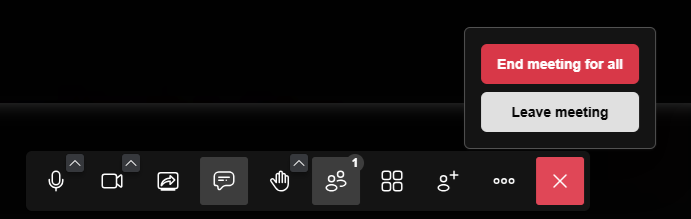
Moderators may optionally end the meeting for everyone:
Common problems
Sound
If your sound is not working (especially if nobody can hear you), there are several things you can try.
Please make sure that:
- The browser is allowed to use the microphone.
- The web page is allowed to use the microphone (usually in the address bar).
- You are using the right audio input (try each possible input, either with the up arrow next to the microphone icon, or using the Settings page).
- Audio is not muted at the system level (e.g. on Windows, look for a crossed-out microphone in Control Panel sound settings).
- If necessary, restart the browser and/or reboot :(
Also, as above, please mute yourself when not speaking.
If this does not make sense, or you still can't get it working, please contact us!
Other problems
There is a list of common problems with Jitsi Meet and how to fix some of them on the known issues page.
Otherwise please contact tech support! Please use this checklist if possible when reporting issues with Jitsi Meet, which explains what we will need to know to be able to help you, and also explains some common problems.
Jitsi Meet vs Big Blue Button
Advantages of Jitsi Meet over Big Blue Button:
- Subtitles work, even if somebody is on a mobile phone.
- Subtitles are more secure and easier to set up than on Big Blue Button (with BBB you should use local captions if possible).
- Screen sharing works on mobile if you use the app.
- Does not require emailing XR Global to get an account, you can use your Hub account.
- Calendar on the Hub (see below).
Disadvantages:
- You need a Hub account to start a meeting in Jitsi Meet.
- Big Blue Button has better background blur/background replacement.
- XRUK's Jitsi Meet is a work in progress, especially the documentation, but we consider it stable enough to use for regular meetings.
- 2 minute delay from the first person joining until subtitles start working.
- Recording works, but you'll need to contact us within two weeks to get the recording file, or use the record to local file option (lower quality). We are working on this.
- Polls are turned off due to issues with mobiles.
- Subtitles work on a browser on mobile but not on the app on mobile; this is being worked on.
- It seems to be less stable than BBB with slow connections.
- We have had some stability issues more generally (mostly people's video freezing, occasionally people getting kicked out), we are working on it but it is significantly improved already.
In general, Jitsi Meet provides both security and accessibility at the same time, unlike Big Blue Button (which is secure as long as you don't use subtitles, and isn't accessible if anyone is on a phone) or Zoom (which isn't secure for XR purposes). So we hope most circles will eventually move their regular meetings to it. But there are some minor drawbacks, so some circles may wish to continue using Big Blue Button. Either is preferable to Zoom!
Note that meet.extinctionrebellion.uk is hosted by XRUK. There is also a separate XR Global Jitsi Meet which does not have working subtitles, and even a public site (which does not have subtitles either). We suggest you use ours!
Security basics for Jitsi Meet
You need a Hub account to start a meeting in Jitsi Meet.
Once a meeting has started, anyone can join: they do not need a Hub account. However you can control who joins the meeting by enabling the lobby, as in Zoom. You can also login after joining the meeting from Profile under Settings (on the menu), which will make you a moderator. You need to be a moderator to enable the lobby, to mute other people or remove people, to enable closed captions, etc.
While you can technically pick any meeting name, please use a randomly generated name by e.g. clicking on meet.extinctionrebellion.uk, starting a meeting, and sharing the link. Otherwise if you use a guessable meeting name you will need to enable the lobby and/or put a password on the meeting, every time you start the meeting. Thanks!
Note that a meeting ID (room name or unique meeting link) belongs to an XRUK circle. Once a meeting ID has been assigned to a circle, only people in that circle can start the meeting. However once it has been started, anyone can join (unless you set a password or enable the lobby).
Scheduling on the Hub
You can see current and scheduled meetings that belong to your circle on the Hub, on the Meetings page for your circle. If you join the meeting through the Hub, rather than just clicking on the meeting link, you are automatically logged in and made a moderator.
Group Admins can create or schedule meetings (e.g. to recur weekly). The Hub can also provide reminders on your Mattermost channel if you use Mattermost.
In the near future, we will use this information to try to ensure that the subtitles backend is available by the time a scheduled meeting starts, so that subtitles work immediately if the first person to join needs them, rather than having to wait the usual 2 minutes for the backend to boot up. However if a meeting starts on the hour we will not start subtitles up until the start of that hour, for cost reasons.
Your data and how to help us
Digital's servers (and sysadmins) know who is using Jitsi Meet, both which Hub account created the meeting, which circle they said the meeting is for, who joined etc. We will keep this information private, and delete it regularly, but we may reach out to you if you use Jitsi Meet regularly, especially if your circle is a heavy user.
We do not routinely keep transcripts, and any recordings you make will be shared with your circle on the Cloud, either manually on request (within 2 weeks!), or in future, through an automatic process. We will update this section soon.
If you need tech support, or have any feedback on what works and what could be better, please contact Digital.